
Vandaag of morgen in huis

Kwaliteit gegarandeerd

Welkomstaanbiedingen ontgrendelen: GRATIS bezorging | Tot 80% korting | Gratis 30 dagen JoyPlus-proefperiode
Download de app
Buying a gaming mouse might seem straightforward – until you have to choose between wireless connectivity, DPI, weight, buttons and comfort. A high DPI value doesn’t automatically mean a mouse will suit your play style. What’s more, RGB lighting and a large number of buttons can distract from the things that matter more day to day, such as shape, battery life and compatibility.
The following pitfalls are common:
An optical mouse uses a sensor to track movement across a surface. DPI indicates how sensitively the cursor responds to movement. A model with adjustable DPI is practical when you switch between a low sensitivity for FPS games and a higher setting for desktop use.
Alongside DPI, pay attention to the polling rate. This value tells you how often the mouse reports its position to the computer. In the product information of selected models, this ranges from 1,000 Hz to 8,000 Hz, for example. A higher value can be appealing for fast-paced games, but it also requires support from the mouse, software and computer.
A high sensor resolution is therefore not a standalone sign of quality. Look at the combination of:
A wireless gaming mouse with a 2.4 GHz receiver is designed for a direct connection to a PC or laptop. Bluetooth is particularly useful when you want to work without a USB dongle or use multiple devices. A model with three connection modes – 2.4 GHz, Bluetooth and USB-C – offers more flexibility for gaming and productivity.
Also check how the mouse is charged. A built-in rechargeable battery avoids loose batteries, but you do need to remember to charge it in time. Some models can be used wired while charging. Others work with an AA battery, which can be handy if you want to quickly pop in a spare.
When it comes to battery claims, pay attention to the wording. “Up to” a certain number of hours is a maximum from the brand’s product information; actual usage time can vary depending on lighting, connection mode and settings.
An ultra-light gaming mouse weighing around 54 to 70 grams can be suitable for fast movements. A heavier model with more buttons may make more sense for MMO, MOBA or productivity tasks. Always check whether the mouse is left- or right-handed and whether the dimensions suit your hand.
For office work, an ergonomic mouse with a vertical shape or a generous palm rest can feel more comfortable. That doesn’t mean an ergonomic design will prevent discomfort. Take breaks during long periods of use and pay attention to your posture.

Why this fits the profile: This wireless mouse combines a 2.4 GHz connection, adjustable DPI and RGB lighting in a straightforward model for PC and laptop use.
The product information states an optical sensor with DPI settings from 800 to 4800, rather than just a standalone maximum DPI claim.
73 grams, up to 80 hours of battery life according to the product information, six programmable buttons and USB-C charging.

Why this fits the profile: Designed for players who want a lightweight, right-handed mouse with a fast wireless connection and high customisability.
The weight of 54 grams and the right-handed shape are clearly specified, so you don’t have to select based solely on DPI or marketing lighting.
Optical Focus Pro sensor with up to 35,000 DPI according to the product specifications, 8,000 Hz polling rate and up to 95 hours of use according to Razer.

Why this fits the profile: Ideal for users who want one wireless mouse for gaming, laptop work and multiple devices.
The three modes are clearly stated: 2.4 GHz, Bluetooth and wired via USB-C. According to the product information, the software for button settings only works in wired Windows mode.
Up to three devices, eight programmable buttons, RGB lighting and six DPI levels up to 10,000 DPI according to the product description.
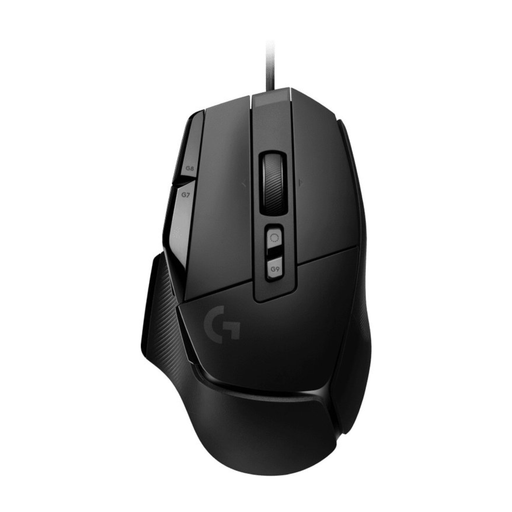
Why this fits the profile: A wired gaming mouse with plenty of buttons for players who value macros, shortcuts and a fixed connection.
Because this model is wired, you don’t need to factor in battery life or wireless compatibility. Do check whether your desk setup allows for a cable.
Optical sensor up to 25,600 DPI, ergonomic right-handed shape and, according to the product information, 13 control options.
A programmable gaming mouse often requires software to adjust buttons, DPI profiles or lighting. Check beforehand whether the programme is available for Windows, macOS or your other system. On some models, not all functions are available via Bluetooth.
For a mouse for PC and laptop, it’s also important to look at available ports. A USB receiver may need a USB-A port, while modern laptops sometimes mainly use USB-C. A Bluetooth mouse avoids a dongle, but your computer does need to support Bluetooth.
We’ve put together a full, up-to-date list of products that fully meet these strict selection criteria and comply with current European safety regulations.
That depends on the connection. A 2.4 GHz receiver is generally designed for a direct wireless connection, while Bluetooth mainly offers convenience and lower power consumption. Check the polling rate, receiver and software support before you choose.
There is no fixed DPI value for every player. A model with multiple adjustable levels is usually more practical than a mouse that only emphasises a high maximum value. You can then tailor the sensitivity to your screen, game and playing space.
The lifespan depends on the switches, cable or battery, how intensively it’s used and how well it’s maintained. Keep the sensor and glide pads clean, don’t pull on the cable, and charge a wireless model according to the instructions. With a mouse that uses replaceable batteries, swapping them out can be easier than with a built-in rechargeable battery.
