
Vandaag of morgen in huis

Kwaliteit gegarandeerd

Welkomstaanbiedingen ontgrendelen: GRATIS bezorging | Tot 80% korting | Gratis 30 dagen JoyPlus-proefperiode
Download de app
Choosing a new gaming mouse can feel like a daunting task. The market is flooded with models, all touting terms like DPI, polling rate, and ergonomic designs. It's tough to determine which specifications truly make a difference for your playstyle.
As a Joybuy Product Recommendation Officer, my job is to guide you through this maze of options. In this article, we'll provide practical guidance and highlight some compelling choices, helping you make an informed decision without getting distracted by marketing hype.
Before we dive into the products, it's helpful to understand a few core concepts. This will help you determine what's important for you.
The choice between a wireless gaming mouse and a wired model is one of the first decisions you'll need to make.
These two specifications determine how accurate and responsive your mouse is.
Comfort is essential for long gaming sessions. An ergonomic gaming mouse is designed to support your hand naturally and reduce fatigue. Pay attention to the mouse's shape and size, and whether it suits your hand and grip style (palm, claw, or fingertip).
Programmable buttons offer a tactical advantage. You can assign complex actions or macros to extra buttons, which is especially useful in MOBA and MMO games.
Below is a selection of gaming mice that stand out for their specifications and functionality.
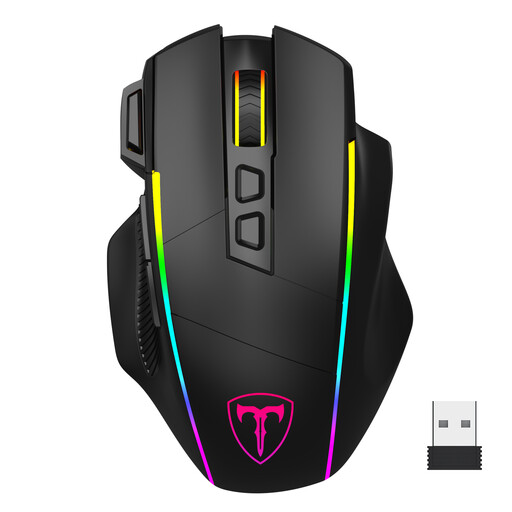
Why It Stands Out This mouse from ET (Eastern Times) stands out for its versatile connectivity. With support for 2.4G wireless, Bluetooth, and a wired USB-C connection, it adapts effortlessly to any situation. You can connect up to three devices simultaneously and switch between them easily.
Key Features
Who Is It For? For the gamer who seeks flexibility. Whether you work and game on multiple devices or simply want a reliable wireless experience with a wired option for when the battery runs low, this mouse delivers it all.
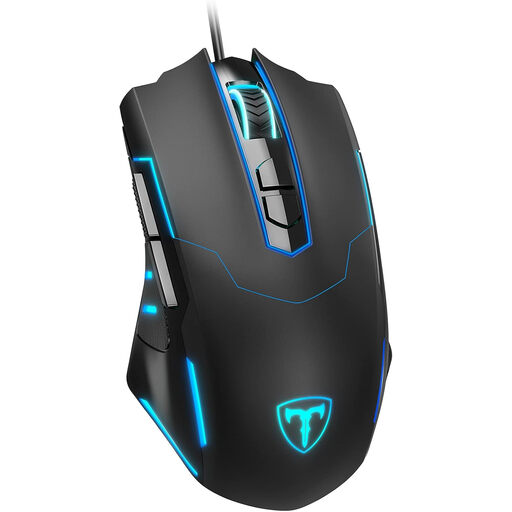
Why It Stands Out Sometimes, simplicity is key. This wired gaming mouse from ET is a plug-and-play solution that delivers instant performance. No fuss with batteries or connection issues; just plug in and game.
Key Features
Who Is It For? For gamers who prefer the uninterrupted reliability of a wired connection. It's a solid, budget-friendly choice for both novice and experienced players who want a no-nonsense PC gaming mouse.
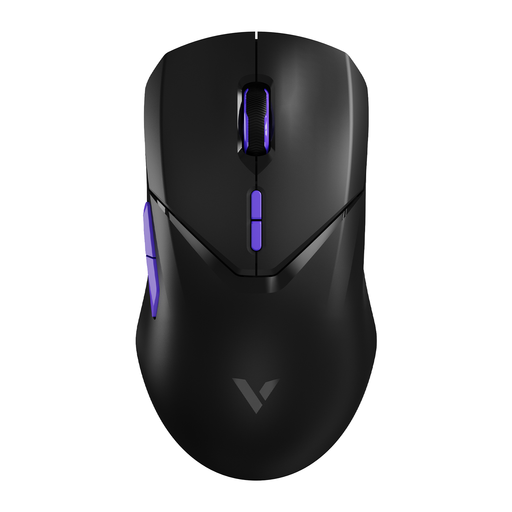
Why It Stands Out The RAPOO VT9Pro is engineered for pure performance. With a wireless polling rate of 4000 Hz (4K), the manufacturer claims a response time that pushes the boundaries of wireless technology. Its super-lightweight 68-gram design minimises resistance for faster movements.
Key Features
Who Is It For? For the serious and competitive gamer seeking top-tier performance. If every millisecond counts and you want a high-DPI mouse with minimal latency and an ultra-lightweight design, the VT9Pro is a strong contender.
A gaming mouse is a key part of your setup, but it's just one piece of the puzzle. If you feel your entire system could use an upgrade, take a look at our broader selection.
? Check out our selection of gaming PCs and laptops here.
1. What is a good DPI for a gaming mouse? This largely depends on your personal preference and the games you play. For FPS games, many players use a lower DPI (400-1600) for precision. For other genres, a higher DPI (1600-3200+) can be useful. The most important thing is to get a mouse with adjustable DPI so you can experiment and find the setting that works best for you.
2. Is a wireless gaming mouse as good as a wired one? Modern wireless mice with 2.4G technology have very low latency that is indistinguishable from a wired mouse for most people. For professional esports athletes, a wired connection might still be preferred for absolute certainty, but for the vast majority of gamers, a good wireless mouse offers comparable performance with more freedom of movement.
3. How important are programmable buttons on a gaming mouse? For games like World of Warcraft, League of Legends, or Final Fantasy XIV, programmable buttons can make a huge difference. You can assign skills, items, or macros to these buttons for faster reactions. For FPS games, they are less crucial, but one or two extra buttons for actions like melee or grenades can still be very handy.
