
Vandaag of morgen in huis

Kwaliteit gegarandeerd

Welkomstaanbiedingen ontgrendelen: GRATIS bezorging | Tot 80% korting | Gratis 30 dagen JoyPlus-proefperiode
Download de app
A lagging mouse, an uncomfortable posture at work, or that single millisecond of delay that costs you the win in a game. Finding the right computer mouse can be a challenge. Whether you're a competitive gamer seeking maximum performance or a professional needing comfort for long workdays, the options are vast. This article will help you understand the specifications and find a model that fits your needs, without the unnecessary marketing jargon.
Before we dive into our recommendations, it's helpful to understand a few key features. This will enable you to make an informed decision that aligns with your needs.
You'll often encounter these two terms with a gaming mouse.
The choice between a wired and a wireless gaming mouse depends on your preference for freedom and reliability.
Comfort is crucial for both gaming and work. An ergonomic mouse is designed to keep your hand, wrist, and arm in a natural position, which can help reduce strain.
Based on specifications and functionality, we have selected several interesting options for different types of users.
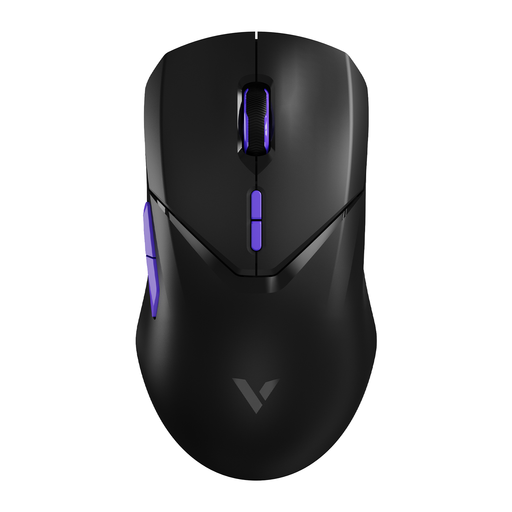
Why it stands out: This model focuses on pure speed. With a wireless polling rate of 4000 Hz, the manufacturer claims a response time four times faster than a standard gaming mouse. The Pixart PAW 3398 is a high-end sensor known for its accuracy.
Pros:
Who is it for? For the serious and competitive gamer looking for the fastest wireless technology available and a lightweight design to stay ahead of the competition. Note: The manufacturer states that the 4K mode demands more from your computer's processor.
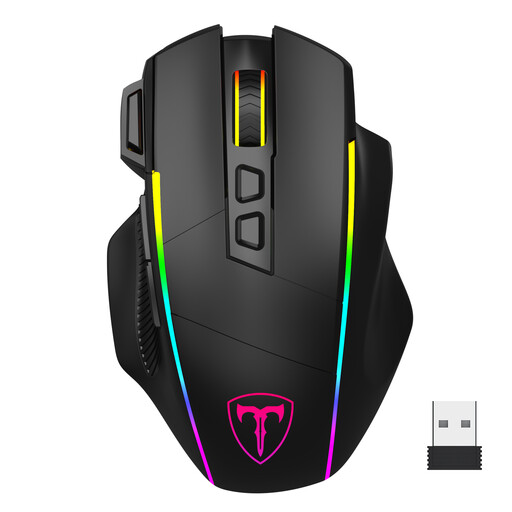
Why it stands out: This mouse is a versatile all-rounder. Its tri-mode connectivity (2.4G, Bluetooth, and wired via USB-C) makes it suitable for almost any situation, from gaming on your PC to working on your laptop. The customisable RGB mouse lighting adds a personal touch.
Pros:
Who is it for? For the all-round user looking for a single mouse for both gaming and productivity across multiple devices. Its flexibility in connectivity and programmable buttons make it a practical choice.
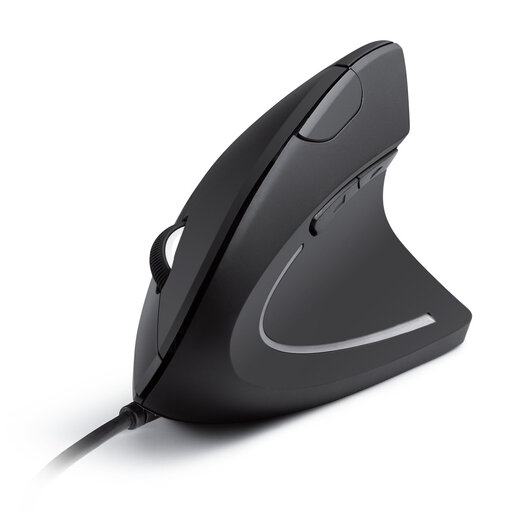
Why it stands out: This mouse from Anker focuses entirely on comfort. The vertical mouse is designed to keep the arm and wrist in a natural "handshake" posture. According to Anker, this reduces muscle strain and promotes smoother movement.
Pros:
Who is it for? For office workers, students, and anyone who spends many hours at the computer and is looking for a more comfortable working posture. It's not a gaming mouse, but a functional, ergonomic mouse for daily use.
While a good mouse is essential, a complete and organised workspace or study area is just as important. For taking notes during work or tracking your game strategies, check out our selection of black pens for note-taking.
What is a good DPI for a gaming mouse? This is highly dependent on personal preference and the type of game. Many professional FPS players use a relatively low DPI (between 400 and 1600) for precise control, compensating with larger arm movements. A higher DPI is not necessarily better. The advantage of a gaming mouse is that you can often adjust the DPI on the fly to suit the situation.
Is a wireless gaming mouse as fast as a wired one? Modern wireless mice using a 2.4 GHz connection have a latency that is imperceptible to humans and comparable to wired models. Technologies like the 4000 Hz polling rate in some models can even make the response faster. Bluetooth generally has slightly higher latency and is therefore less recommended for fast-paced, competitive games.
Does an ergonomic mouse really help with wrist pain? An ergonomic mouse or vertical mouse is designed to place the hand and wrist in a more neutral, natural posture. Manufacturers claim this can reduce strain on muscles and tendons. While this is not a medical solution, many users experience greater comfort and less fatigue during prolonged computer use.
