
Strategy gamer looking to set up shortcuts
You want to assign frequently used actions supported by your game to your thumb. Check that the mouse software and the game allow the assignments you want.


Start by choosing a mouse that feels comfortable in your hand, then decide whether extra buttons or different scroll modes will genuinely help with the commands you use in your game. In a shared room, click noise and desk space may matter more; a quiet standard mouse is an alternative, provided its controls meet your gaming needs. A wired mouse means you don’t have to manage a battery, while a wireless one can free up space around your laptop.
You want to assign frequently used actions supported by your game to your thumb. Check that the mouse software and the game allow the assignments you want.
You use the same mouse for gaming and other computer work. Consider the fit and reach of the buttons; Arboportaal highlights repetitive hand movements and static strain during prolonged screen work.
You want to take audible clicks and limited desk space into account. Weigh quiet operation and the space needed for a cable against the battery or rechargeable battery required by a wireless model.
| What to consider | What should you check? | Who is this important to? |
|---|---|---|
| In-game commands | Check the number and position of programmable buttons, the software required and which keys your game lets you assign. | I want to access frequently used actions directly without having to reach for the keyboard every time. Around 25% of consumers prioritise setting up in-game commands above all else. |
| Comfort for gaming and studying | Consider how it sits in your hand, the grip, how far you can reach the thumb buttons and how much room you have to move the mouse. | When using a mouse for long periods for both studying and relaxing, I want a shape that feels comfortable in my hand. Around 25% of consumers put hand comfort first. |
| Audible clicks | Look for an explicit, model-specific mention of quiet buttons; don’t assume a gaming mouse will be quiet. | If I share a room, I want to avoid disturbing others with clicks. Around 19% of consumers prioritise quieter clicks over extra in-game controls. |
| Desk space and portability | Check the available USB port, connection type, whether a receiver is needed and how the model is powered. | At a small laptop desk, I don’t want an inconvenient cable and I want to be able to take the mouse with me easily. Around 19% of consumers choose with space and portability in mind above all else. |
| Cost and ease of use | Check which features you’ll actually use, what’s included with the model and the current total price before ordering. | I want enough basic features without paying for controls I don’t need. Around 12% of consumers prioritise simplicity and manageable costs. |
DPI affects how quickly the pointer moves in response to a hand movement. On its own, it doesn’t tell you whether the shape, grip or controls suit your game.
First assess the grip, buttons and adjustability for your needs; compare sensor specifications afterwards.
Trust describes the main buttons on its standard Mydo as quiet, but that doesn’t automatically apply to another model, such as the GXT 121 gaming mouse.
Look for an explicit mention for the exact model, and check at the same time whether its controls offer enough gaming buttons.
Wireless use removes the cable while you play, but power options and whether a receiver is needed vary by model.
Before buying, check the connection, whether a receiver is required and whether the mouse uses a battery or rechargeable battery.
Remember that charging or replacing batteries takes attention while you’re using the mouse.
A manufacturer’s warranty doesn’t determine how long you’re entitled to a product that works properly. The Dutch government states that the Netherlands has no fixed statutory warranty period.
Keep your proof of purchase and contact the seller if a product is faulty. Any manufacturer’s warranty is separate from this.
The range spans simple wired controls, wireless models and scroll wheels with different modes.
The Basilisk models focus on assignable controls and scroll-wheel modes; the Naga V2 HyperSpeed has a grid of thumb buttons.
The wired Rival 5 and wireless Aerox 5 Wireless each offer nine programmable buttons.
The wired Scimitar RGB Elite is designed to keep a large number of commands within thumb’s reach.
The GXT 121 Felox+ is a straightforward wired gaming mouse; the Mydo is a separate mouse that Trust has designed for quiet operation.
These mice suit different preferences around programmable buttons, connectivity, scroll controls and use in a small room. Check which features you actually need on each model.
 No image available
Suited to anyone looking for programmable buttons and the option of using the mouse wirelessly or with a cable.
8 programmable buttons; 2.4 GHz wireless and wired USB connectivity; rechargeable battery.
 No image available
An option if you’re looking for macro buttons and different connectivity options; the product description says the buttons are quiet.
7 programmable macro buttons; wired, 2.4 GHz wireless and Bluetooth; 12.800 DPI.
 No image available
Suited to anyone looking to combine programmable controls with an adjustable-resistance scroll wheel, and who has room for a cable on their desk.
13 programmable buttons; wired USB Type-A connection; scroll wheel with different modes.
 No image available
A wireless option for anyone looking for extra programmable buttons and who doesn’t want a cable on their desk.
10 programmable buttons; built-in battery; 4,000 Hz polling rate; 26,000 DPI.
 No image available
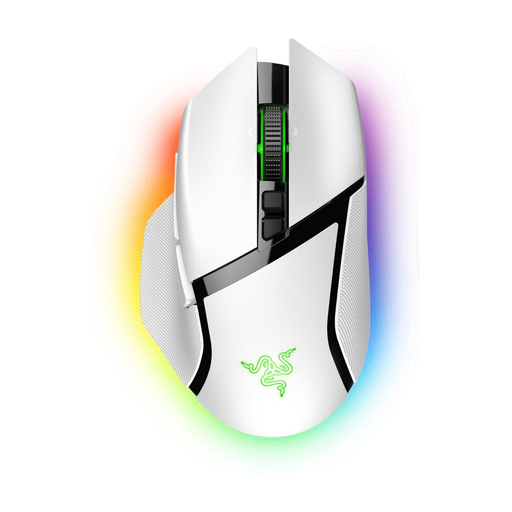
Suited to anyone looking to combine wireless controls, extra buttons and a scroll wheel with multiple modes.
11 programmable buttons; wireless and Bluetooth connectivity; HyperScroll wheel with multiple modes.
No, not if you don’t know which commands you want to assign to them. Check that the buttons are easy to reach and that your game and the required mouse software support the layout you want.
Start with a cursor sensitivity you can control comfortably and assign only commands supported by your game. Follow the instructions for the exact model; advanced settings may require the manufacturer’s software.
A mouse that fits comfortably may help you choose the right one, but it doesn’t replace taking breaks or setting up your workspace appropriately. Arboportaal describes repetitive hand movements and static strain during prolonged screen work; this is general guidance, not a diagnosis for an individual player.
Check whether the exact mouse uses a replaceable battery or a rechargeable battery, and what’s included. Logitech lists one AA battery for the G305 and a stated battery life of up to 250 hours; your battery life may vary.
For a standard online consumer purchase, you generally have a statutory 14-day cooling-off period after delivery; ACM ConsuWijzer lists some exceptions. You’re also entitled to a product that works properly: according to the Dutch government, the Netherlands has no fixed statutory warranty period, and you should contact the seller if a product is faulty. This is separate from any manufacturer’s warranty.