A gaming mouse is only a worthwhile purchase if your football game supports the mouse controls you want to use on your platform. Don’t buy one expecting it to replace a controller. EA confirms mouse and keyboard controls for EA SPORTS FC 27 on PC, but that doesn’t tell you anything about other games or platforms. Then consider how much room you have to move the mouse, your grip and whether you’d prefer a cable or battery power.
Who is this option for?
PC football gamer who wants mouse controls
If you play a football game on PC, first check which actions the mouse actually controls. EA Help confirms mouse and keyboard controls for EA SPORTS FC 27 on PC; this doesn’t automatically apply to other games or platforms.
Player with limited room for a mouse
If your desk is narrow or cluttered, compare how much room you have to move the mouse, whether there’s a cable to route and whether you can adjust the sensitivity. Coolblue’s buying guide explains how sensitivity and cables can affect use.
Player weighing up grip and maintenance
When choosing a mouse for its shape and grip, also check whether it uses batteries or needs recharging. Logitech G and HyperX describe different power and charging options for their models.
What should you look for when buying?
First check the game and platform, then measure the room you have for the mouse. After that, compare the shape and power options.
| Consideration |
What should you check? |
Who is this important for? |
| In-game controls |
Check the exact game title, version, platform and input settings. EA confirms mouse and keyboard controls for FC 27 on PC. |
If I’m buying a mouse for a specific football game, I want to know for sure that it’ll work with that game. Around 36% of consumers prioritise game controls. |
| Room to move the mouse |
Measure the space next to your keyboard and check whether a cable will get in the way. Try a sensitivity setting that suits the way you move. |
If I have limited desk space, I want to be able to move the mouse without bumping into the keyboard or a cable. Around 29% of consumers give desk space top priority. |
| Grip and shape |
Compare the shape and dimensions of the exact model; check that you can reach the buttons comfortably. |
If I play for long periods, I want a shape that suits my hand and grip. Around 21% of consumers put ease of handling first. |
| Battery or charging |
Check whether the model uses a replaceable battery or a rechargeable one, and whether you can use it while it’s charging. |
I want to know in advance whether wireless play will mean replacing batteries or stopping to recharge. Around 14% of consumers prioritise power and maintenance. |
Common buying mistakes
-
Buying a mouse without checking the game’s controls
Mouse controls being confirmed for EA SPORTS FC 27 on PC doesn’t mean every football game or console supports the same inputs.
Check the exact game, platform and control settings before buying a mouse specifically for football games.
-
Looking only at the mouse’s dimensions
The room you need to move it and, for a wired model, the cable can also get in the way on a small desk.
Measure the available space and check how the cable will run around your desk before choosing a model.
-
Assuming a high DPI guarantees better gaming
DPI controls sensitivity, but the setting that feels right also depends on how you move, your screen and the game.
Consider sensitivity, shape and controls separately, and choose a setting that works well for you.
-
Confusing wired and wireless models in the same range
Models in the same range can differ in their connection and weight. SteelSeries, for example, lists separate specifications for the Aerox 3 (2022 Edition) and Aerox 3 Wireless.
Check the full model name and connection type of the exact version.
Brands to compare
Logitech G
The G305 LIGHTSPEED is a wireless option powered by an AA battery; the wired G203 LIGHTSYNC has six buttons.
- Logitech says the G305 runs on a single AA battery.
- The G305 will need a battery replacement; with the G203, check that the cable can run neatly around your desk. These differences don’t prove that one model performs better in a football game.
SteelSeries
The Aerox 3 (2022 Edition) is a wired model; the Aerox range also includes wireless models with different specifications.
- SteelSeries lists the wired Aerox 3 (2022 Edition) as weighing 59 g.
- Don’t confuse this model with the Aerox 3 Wireless: weight and connection vary by version. A low listed weight doesn’t tell you how much desk space you’ll need.
HyperX
HyperX describes the Pulsefire Haste 2 Mini Wireless as a compact wireless mouse with 2.4 GHz and Bluetooth connectivity.
- HyperX says you can use the mouse in wired mode while it’s charging.
- The manufacturer describes it as smaller than the standard Haste 2 Wireless. Check that the compact size suits your grip.
Razer
Razer describes the Orochi V2 as a compact wireless mouse with Bluetooth and 2.4 GHz connectivity.
- Its compact design could be useful if you have limited desk space.
- Razer’s listed weight of under 60 g excludes the battery. Remember to factor in the battery’s weight and check the exact version.
Trust
Trust says the GXT 926 Redex II supports wireless use via a 2.4GHz receiver, as well as use with the included charging cable.
- The cable lets you use the mouse while it’s charging.
- The cable still takes up space when you use the mouse in wired mode. Check the dimensions and make sure the shape suits your grip.
Joybuy product picks
These wireless gaming mice are options if you want to keep cable clutter off a small desk. Also compare the shape, controls and power options of the exact model.
 No image available
AJAZZ AJ200 AI MC
Worth comparing if you’re looking for a wireless mouse with adjustable sensitivity; check that the shape suits your grip.
The product name lists a weight of 63 g, a PAW3311 sensor, 24,000 DPI and Bluetooth, 2.4G and USB-C connectivity options.
Joybuy
 No image available
AULA SC620, white
A wireless option to compare if sensitivity and easy-to-reach buttons are important to you.
The product name lists a PAW3311 sensor, 12,000 DPI, seven programmable buttons, a weight of 67 g, and Bluetooth 5.0, 2.4G and USB-C connectivity.
Joybuy
 No image available
Corsair M55, right-handed
Worth considering if you’re looking for a right-handed model and want to keep your desk free of cables; check that the shape suits your hand.
The product name lists RF Wireless, Bluetooth, USB Type-A, an optical sensor and 24,000 DPI. Bear in mind that you’ll need to replace the battery: the product information specifies a replaceable AA battery.
Joybuy
 No image available
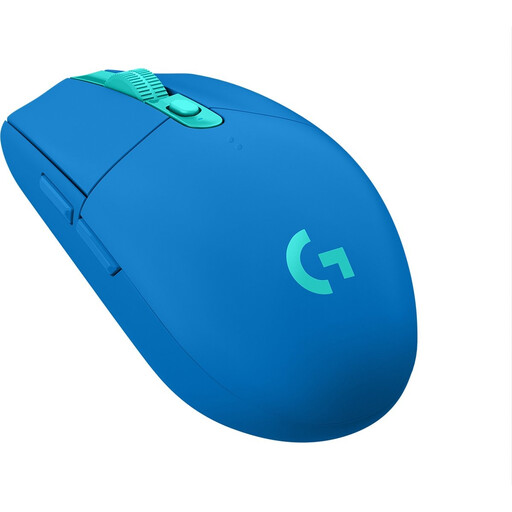
Logitech G305 LIGHTSPEED, blue
This wireless model is worth considering if you want to keep cables out of your limited mouse space.
Logitech lists a single AA battery and a 250-hour battery life for the G305. Remember that the battery will need replacing.
Joybuy
 No image available
Razer Basilisk V3 X HyperSpeed
A model to compare if you want to keep cables off your desk; before buying, check that the shape and controls suit your grip and game.
Bear in mind that the battery will need replacing: the product information lists an AA battery as its power source.
Joybuy
Frequently asked questions
Can I play EA SPORTS FC 27 on PC with a mouse and keyboard?
Yes. EA confirms that the existing mouse controls work with the WASD or arrow-key layout. This applies to FC 27 on PC; check other games and platforms separately.
How can I try using a mouse on a small desk without buying another one straight away?
First make room to move the mouse, check whether a cable catches on anything, and try a different sensitivity setting in the game or mouse software. A higher DPI can allow for smaller hand movements, but the setting that feels comfortable varies from player to player.
What if the mouse doesn’t suit my hand or breaks early?
Many online purchases usually come with a 14-day cooling-off period; check the terms and any applicable exceptions for your purchase. Separately, if a product is faulty, you have statutory rights against the seller. A manufacturer’s warranty doesn’t replace those rights.
Are there rules for wireless mice?
Radio equipment within the scope of the European Radio Equipment Directive must meet requirements before it can be placed on the EU market. The consolidated text of the directive requires distributors to check that equipment bears the CE marking before making it available; the CE marking alone doesn’t prove that a particular offer or version has been fully checked.


