Who is this guide to choosing a gaming mouse for?

Player who uses lots of shortcuts

Wants to control frequently used in-game actions with easy-to-reach buttons, and considers the layout, configuration software and risk of accidental clicks. Check whether your game or mod lets you assign actions to the mouse buttons; GIANTS Software provides information about Farming Simulator controls and settings.

Home worker who also plays games

Uses the same mouse for work and play, so grip and button reach are both important. The Netherlands’ Arboportaal highlights repetitive actions and static strain when working at a screen. An ergonomic label doesn’t guarantee that a mouse will be comfortable for everyone.

Player who shares a desk

Wants to know whether a fixed cable or wireless setup will suit the desk and computers in use. Check the available port, whether a receiver is needed and the connection options offered by the specific model.

What should you look for in a gaming mouse for farming simulators?

What to consider What to look for Who might prioritise this?
Easy-to-reach programmable buttons Check where the buttons are, whether the configuration software works with your computer, and whether you can assign the actions you want in your game. I want to perform recurring actions without changing my grip; around 31% of consumers give easy-to-reach programmable buttons top priority.
Grip and workstation Try resting your hand on the mouse to see if it feels relaxed and the side buttons are within easy reach. Consider your desk and armrest setup too. If I use the same mouse for long periods at work and for gaming, I want a shape that suits my hand; around 31% of consumers prioritise grip and workstation setup.
Wired or wireless Check the ports, cable length and whether a receiver is needed. For wireless models, check how they’re powered too. I want to know whether a cable will work at my desk or whether I’d rather switch wirelessly between compatible computers; around 23% of consumers put connectivity first.
Simple controls Decide which in-game actions you really want to assign and whether the buttons you need are easy to reach. I want a straightforward mouse with as few settings as possible; around 15% of consumers give simple controls top priority.

Common pitfalls when choosing a gaming mouse

  • Making maximum DPI the deciding factor

    A high maximum sensor resolution doesn’t tell you whether the shape, button placement and controls will feel comfortable for your hand or suit your farming simulator.

    First, find a grip and layout that work for you. Then compare the sensor settings of the models you’re considering.

  • Assuming extra buttons will work with every game straight away

    You need suitable software and your game or mod’s settings to assign a mouse button to the action you want. It takes time to set this up and check that it works.

    Check the configuration software for the exact model and test your most important actions before treating extra buttons as a reason to buy. For example, the Camera Zoom mod by SMI Modding Team on GIANTS Software ModHub uses the right mouse button and scroll wheel. This doesn’t prove that the base game or other mods use the same controls.

  • Treating an ergonomic claim as a guarantee against discomfort

    Trust describes the vertical GXT 145 Rexxa as a design that reduces strain. This isn’t proven to deliver the same health benefits for every user; Arboportaal also highlights repetitive actions and workstation setup.

    Try the shape and check that the buttons are easy to reach. Also consider your workstation setup and vary your tasks, without expecting a particular mouse to solve individual problems.

  • Choosing wireless without checking the connection and power source

    Wireless models can offer different connection options and ways of being powered. A cable-free desk doesn’t mean every model connects or gets its power in the same way.

    Check whether the exact mouse uses Bluetooth or a receiver, and which type of battery it needs. Logitech says the G305 uses one AA battery; check the specifications of other models separately.

Gaming mouse brands to compare

Logitech G

The wired G502 X is worth considering if you have a fixed workstation and want customisable controls. The wireless G305 LIGHTSPEED uses an AA battery.

  • Logitech lists a reversible DPI button, a two-mode scroll wheel and a weight of 89 g for the G502 X.
  • Logitech gives the G305 a battery life of 250 hours on one AA battery; actual battery life may vary depending on use.
  • These features apply to the models named and aren’t a judgement on every product from the brand.

Razer

The Basilisk V3 X HyperSpeed offers a wireless option with several customisable controls; the wired Basilisk V3 has a different scroll wheel layout.

  • According to Razer, the Basilisk V3 X HyperSpeed has nine programmable controls and 2.4 GHz and Bluetooth connectivity.
  • Razer describes the Basilisk V3’s scroll wheel as having a tactile mode and a free-spinning mode.
  • Don’t assume the Basilisk V3 X HyperSpeed has the same scroll wheel modes as the Basilisk V3 without checking.

SteelSeries

The Aerox 5 Wireless is a wireless option with several side buttons in a distinctive layout.

  • SteelSeries lists nine programmable buttons, including a side-button layout with five controls.
  • The number of buttons doesn’t tell you whether they’ll be comfortable to reach; try the layout to see how it suits your hand.

Trust

The GXT 121 Felox+ is wired and has six buttons, while the vertical GXT 145 Rexxa has more programmable controls.

  • Trust lists a 1.8 m USB-A cable and six buttons for the Felox+. For the Rexxa, Trust specifies a 45° design and ten programmable buttons.
  • Trust’s claim that the Rexxa reduces strain isn’t proof that the mouse prevents or treats individual problems.

Corsair

The DARKSTAR WIRELESS is worth considering if you want lots of direct key bindings and would like to try an extensive side-button layout.

  • Corsair lists fifteen programmable buttons and describes a cluster of six side buttons on the DARKSTAR WIRELESS.
  • More customisation doesn’t automatically mean you’ll need it in a farming simulator; judge the layout by the actions you want to use.

Gaming mice for farming simulators at Joybuy

This selection focuses on gaming mice for farming simulators at a home workstation, with a range of button layouts and grips, plus wired and wireless connections.

Turtle Beach Kone II Wired Gaming Mouse, black

Turtle Beach Kone II Wired Gaming Mouse, black

The wired version suits a fixed connection and anyone who wants to assign several actions to mouse buttons.

Joybuy lists 23 buttons; the product information also mentions Easy-Shift[+] and a 4D scroll wheel with tilt functionality.

The product information describes a shape for medium and large hands; check for yourself whether it suits your grip.

Joybuy
Logitech G G502 X, wired mouse for right-handed users

Logitech G G502 X, right-handed

This wired mouse suits a fixed workstation if you want to assign in-game actions to customisable buttons.

Joybuy lists a USB Type-A connection and thirteen programmable buttons; the product information also mentions a scroll wheel.

Joybuy
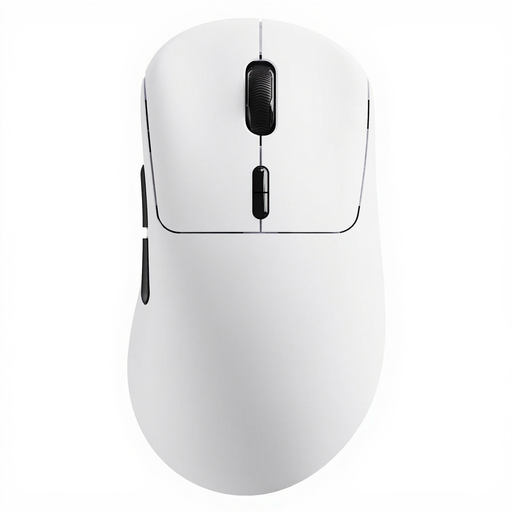
Rapoo VT3 Wireless gaming mouse, white

Rapoo VT3 Wireless, white

A wireless option to consider if you want to customise extra mouse buttons and value a cable-free desk.

The product name lists ten programmable buttons and a weight of 53 g.

Joybuy

Razer Pro Click V2 Vertical Edition

Razer Pro Click V2 Vertical Edition

The vertical shape and programmable buttons may be worth considering if you want one mouse for work and play; fit is a personal matter.

The product information lists wireless connectivity via HyperSpeed and Bluetooth, with controls that can be customised using Razer Synapse 4.

Joybuy

Razer Basilisk V3 X HyperSpeed gaming mouse

Razer Basilisk V3 X HyperSpeed

This wireless option suits anyone who wants to customise extra in-game actions and values having a choice of wireless connections.

Joybuy lists nine programmable buttons, with HyperSpeed Wireless and Bluetooth as connection options.

The product information lists an AA battery as the power source; bear this in mind when choosing.

Joybuy

Frequently asked questions about gaming mice for farming simulators

Do I need a mouse with lots of buttons for Farming Simulator 25?

The number of buttons alone doesn’t determine whether a mouse is right for you. Think about which actions you want to assign and check your game’s settings. For example, the Camera Zoom mod by SMI Modding Team on GIANTS Software ModHub uses the right mouse button and scroll wheel; those controls don’t automatically apply to the base game or other mods.

How do I set up extra mouse buttons?

First, check the configuration software for the exact model. Then assign the mouse button you want to a suitable key or action in your game. Corsair explains how to select a mouse button and set up an assignment in iCUE; these instructions don’t automatically apply to mice from other brands.

What can I do if my hand or arm gets tired while working and gaming?

Consider more than just the shape of your mouse: think about your workstation setup and varying your tasks too. The Netherlands’ Arboportaal highlights repetitive actions and prolonged static postures when working at a screen; no specific mouse is a proven solution for individual problems.

Am I always entitled to exactly two years of legal warranty on a gaming mouse in the Netherlands?

No. According to the Dutch government, the legal guarantee is your right to a product that works properly; its expected lifespan depends on the product and the circumstances. If there’s a fault, contact the seller. A manufacturer’s warranty is an extra and doesn’t replace this right.

Can I return a gaming mouse I bought online?

For distance purchases from a business, the Dutch government says you’re entitled to a 14-day cooling-off period in many cases. Before buying, check the seller’s information about the cooling-off period and returns policy. The same rules don’t apply to online purchases from a private seller.
