For a dedicated home-working setup where you also play a factory-building game, first choose a mouse that suits your hand and desk. Then decide how many extra buttons you’ll genuinely use. Programmable buttons and a multi-mode scroll wheel offer different ways to control your game, while a wireless mouse frees up space by removing the cable but means you’ll need to consider its connection and power supply. More buttons or a higher DPI value don’t, by themselves, make building more enjoyable.
Who is this guide for?
Frequent builder who uses shortcuts
You build and select things often, and want your most-used actions close to hand. Start by listing the game actions you’d genuinely like to reassign, rather than looking for the highest number of buttons. The Official Factorio Wiki describes individual mouse actions and customisable keys.
Home worker who spends long hours at a PC
You also use the same workspace outside the game, so fit, variety and a practical desk setup come first. Arboportaal advises varying your posture and taking regular short breaks when working at a screen; a different mouse isn’t a substitute for this.
Player with a shared desk
You want to switch easily between work and gaming, and are mainly choosing between more freedom of movement and having to manage a receiver or battery.
What should you consider when choosing?
First, decide which actions you want to assign and how the mouse will fit into your workspace. Then compare the controls and connection on the exact model, rather than looking only at the number of buttons or its DPI value.
| What to consider |
What should you check? |
Who is this important for? |
| Controls for building and selecting |
Note which actions you want to reassign, then check the number and position of the buttons, profile settings and scroll-wheel controls. The Official Factorio Wiki describes individual mouse actions; Corsair lists twelve adjustable side buttons for the Scimitar RGB Elite. |
If I build and select things often, I want key actions within reach without adding buttons I won’t use. Around 40% of consumers give the greatest priority to accessible game controls. |
| Fit for extended use |
Check the shape, hand orientation and position of the thumb buttons. TNO’s 2025 factsheet on screen work, published via Arboportaal, identifies mouse use as a factor in the risk of shoulder, arm, wrist and hand complaints. Varying your activities and setting up your workstation properly are therefore still important. |
If I also use the mouse for work over long periods, I want a shape and button layout that suit my hand and movements. Around 30% of consumers put fit and variety first. |
| Cable space and connection |
Check the connection type for the exact model, whether it needs a receiver, whether you have a spare port and what power supply it needs. Logitech lists one AA battery for the G305; wireless doesn’t automatically mean Bluetooth. |
If I share my desk or switch quickly between work and gaming, I don’t want a cable in the way, but I do want to know which receiver or power supply I’ll need. Around 20% of consumers give greatest priority to a tidy or shared desk. |
| Paying only for features you’ll use |
Compare the buttons and connection type with the tasks you do. Trust lists six buttons and a 1.8-metre USB-A cable for the GXT 121 Felox+; also check that any configuration software works on your system. |
If I only want to set up a few extra actions, I don’t want to pay for features I don’t need. Around 10% of consumers prioritise a straightforward purchase without unused extras. |
Things to look out for when buying
-
Assuming more buttons mean better controls
A large thumb panel gives you more ways to assign actions, but how useful it is depends on which actions you want to assign and how easily you can remember the layout.
Write down the actions you use most, then compare both the number and position of the buttons.
Allow time to set up the buttons logically and learn the layout.
-
Assuming wireless automatically means Bluetooth
Logitech describes the G305 as a LIGHTSPEED mouse powered by one AA battery. So check the connection and power supply for the exact model, rather than relying on a general product description.
Check the full model number and find out which receiver or connection it needs.
A receiver may take up a USB port, and a battery-powered mouse needs its batteries to be managed.
-
Taking a manufacturer’s guarantee to cover all your legal rights
The Dutch government says there is no fixed statutory guarantee period for all products in the Netherlands, and that you should contact the seller if a product is faulty.
Keep your proof of purchase and, if you’re offered an extended guarantee, check what additional cover it provides beyond your statutory rights.
Brands to compare
Logitech G
Worth comparing if you’re choosing between a wired mouse with a two-mode scroll wheel and a simpler wireless model.
- Logitech lists a two-mode scroll wheel for the G502 X.
- According to Logitech, the G305 uses one AA battery, while the wired G502 X needs space for its cable. These are features of specific models, not a judgement on the brand as a whole.
Corsair
The Scimitar RGB Elite is worth a look if you want an adjustable panel with side buttons.
- Corsair lists twelve adjustable side buttons and seventeen programmable buttons in total for this model.
- You’ll need to decide whether the layout suits your hand and the functions you want; the number of buttons doesn’t prove it will be more comfortable.
Razer
The wired Basilisk V3 is worth comparing if you want multiple programmable buttons and different scroll modes.
- Razer lists 10+1 programmable buttons and multiple scroll modes for the Basilisk V3.
- The listed features don’t show that building in a factory game will be faster.
SteelSeries
The wired Rival 5 has a button layout you can compare with both simpler models and mice with a larger thumb panel.
- SteelSeries lists nine programmable buttons for the Rival 5, including five side buttons.
- The number of buttons alone doesn’t tell you which layout will suit your hand or game best.
Trust
The wired GXT 121 Felox+ is a simpler model to compare if you don’t need a large thumb panel.
- Trust lists six buttons, configuration software and a 1.8-metre USB-A cable.
- Check that the number of buttons and the required software suit the features you want to use.
Gaming mice at Joybuy
This selection includes wired and wireless gaming mice with different numbers of buttons and options for customising your in-game controls.
 No image available
Logitech G502 HERO
A wired option to compare if you want to assign in-game actions and use a fixed PC setup.
The product information lists 11 programmable buttons and an adjustable weight system. The name specifies 25,600 DPI and a right-handed design.
Joybuy
 No image available
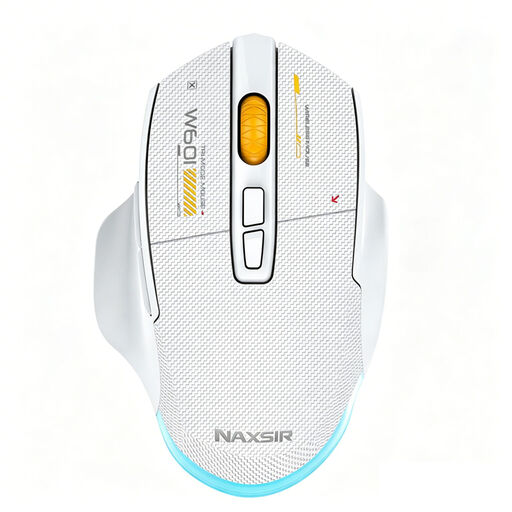
NAXSIR 3-in-1 gaming mouse
An option to compare if you want to combine programmable extra actions with several connection options.
The product name lists wired, 2.4G wireless and Bluetooth connections, seven programmable macro keys, 12,800 DPI and a white design.
Joybuy
 No image available
HyperX Pulsefire Saga
A wired option to consider if you want to customise button assignments and tailor the controls to your game.
The product information lists interchangeable parts and customisable button assignments via HyperX NGENUITY. The name specifies 26,000 DPI and a black design.
Joybuy
 No image available
AJAZZ AJ200 AI MC
An option to compare if you want to switch between several devices and reassign buttons.
The product information lists USB, 2.4G and Bluetooth, a charging dock, and software for button assignments and macros. The product name specifies 24,000 DPI and a weight of 63 g.
Joybuy
Frequently asked questions
Do I need a mouse with lots of buttons for a factory-building game?
No. Start with the actions you actually want to reassign. The Official Factorio Wiki describes individual mouse actions and customisable keys; a large thumb panel is only useful if you want to use its extra functions.
How can I make working from home for long periods more comfortable?
Choose a shape and desk setup that suit your hand and movements, vary your posture regularly and take short breaks. Arboportaal highlights variety and micro-breaks when working at a screen; a mouse alone won’t prevent discomfort.
What can I do if a mouse I bought online isn’t right for me or stops working?
For eligible online consumer purchases, you’ll generally have a 14-day cooling-off period; check the terms and any exceptions that apply to your purchase. If a product is faulty, contact the seller about your statutory rights. The Dutch government says there is no fixed statutory guarantee period for all products in the Netherlands.
What should I know about the rules for wireless gaming mice in the Netherlands?
Radio equipment must meet applicable requirements. According to the Dutch Authority for Digital Infrastructure, the manufacturer affixes a CE marking when those requirements are met. Check the marking and product information for the exact model; a general product listing doesn’t confirm that a specific model complies.


