What should you look for when choosing?
Mouse with plenty of thumb buttons
A good fit if: you want to assign different commands to mouse buttons and your game and software support this.
Bear in mind: check that you can reach each button with your usual grip. More buttons don’t automatically make an action available in your game.
All-round mouse with adjustable scroll wheel
A good fit if: alongside extra controls, you mainly want to choose between stepped and free-spinning scroll.
Bear in mind: both models mentioned, the Logitech G502 X and Razer Basilisk V3, are wired. According to Razer, automatic switching via Smart-Reel on the Basilisk V3 requires Razer Synapse.
Simpler wireless mouse
A good fit if: wireless positioning matters to you and you don’t need a large panel of thumb buttons.
Bear in mind: check the USB connection for the receiver and how you charge the mouse. The battery life of up to 94 hours quoted by Trust is a manufacturer specification.
The main decision is which need matters most to you: commands within thumb’s reach, a scroll mode that suits you, comfort in the hand or wireless positioning. Factorio Wiki says that controls can be customised in Factorio; check that the mouse buttons you want to use work with your game and software.
| What to consider | What should you check? | Which shoppers is this for? |
|---|
| Shortcuts within reach |
Check the position of the buttons and whether the required software and game settings let you assign your chosen commands. |
I want to assign repetitive building and management tasks to buttons, so I don’t have to reach for the keyboard as often. Shoppers who mainly want to use shortcuts account for around 33%. |
| Scrolling and pointing |
Check whether the wheel can rotate in stepped and free-spinning modes, and whether the mode you want works without software. |
If I often switch between precise pointing and scrolling, I want a wheel mode that suits both. Around 25% of shoppers prioritise scroll controls and pointing. |
| Comfort in the hand |
Assess the dimensions and how far you need to reach for the buttons with your usual grip; compare weights on a like-for-like basis. |
I want the shape to feel comfortable in my hand and the buttons to be easy to reach. Around 25% of shoppers prioritise fit and ease of handling. |
| Cable and connection |
Check the cable route or the space for a USB receiver, and whether you can use the mouse while it’s charging. |
If a cable restricts where I sit or play, I want more freedom to position my mouse without unnecessary extra controls. Around 17% of shoppers consider wireless positioning most important. |
Gaming mice at Joybuy
This Joybuy selection includes gaming mice with programmable buttons, wired scroll controls and wireless connection options.
 No image available
Turtle Beach Kone II Wired
A wired option if you’re looking for customisable mouse buttons and a cable suits your setup.
The product description lists 7 buttons and 23 customisable functions. It connects via USB-C; the product description says Swarm II software is needed to adjust DPI, macros and button assignments.
View at Joybuy
 No image available
AJAZZ AJ200 AI MC Wireless Gaming Mouse with Charging Dock
A wireless option if you want to switch between connection types and are looking for programmable buttons.
The product name lists a charging dock, tri-mode connectivity via BT, 2.4G or USB-C, and a 24000 DPI sensor. According to the product description, six buttons can be reassigned; driver software is listed for settings and macros.
View at Joybuy
 No image available
Logitech G G502 X
A wired all-round option if you want to combine programmable buttons with different scroll modes.
The product description lists 13 programmable buttons. Logitech G describes two scroll modes for the wired G502 X. The product title lists USB Type-A.
View at Joybuy
 No image available
RAPOO VT9Pro 4K Wireless Gaming Mouse
A wireless option if you’re looking for programmable buttons and a cable-free connection.
The product title lists 10 programmable buttons and a 4K edition. The product description mentions A HUB software for buttons and macros.
View at Joybuy
 No image available
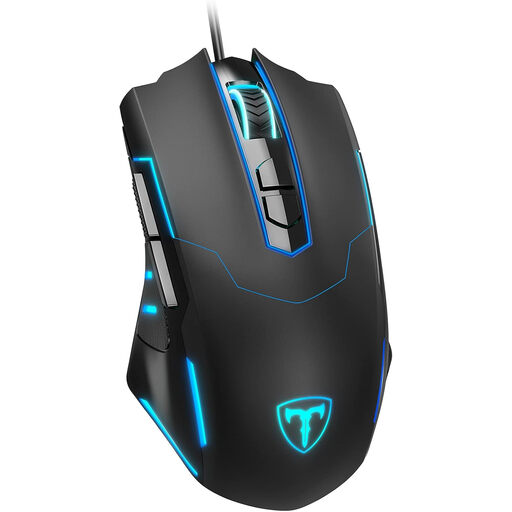
ET Gaming Mouse Wired
A wired option if you want to assign commands to mouse buttons and a cable suits your setup.
The product description lists 7 programmable buttons, adjustable DPI from 1200–7200 and a polling rate of 125–1000 Hz. According to the product description, software is required for the initial setup.
View at Joybuy
Frequently asked questions
Does a large screen automatically mean I need a mouse with the highest DPI?
No. Screen size alone doesn’t determine what you need. Check whether pointing feels comfortable with your screen settings and viewing distance; a model’s maximum DPI doesn’t prove it will make factory building better.
Can I assign building actions to thumb buttons without checking first?
No, check that this works with your game, mouse and software. Factorio Wiki explains that controls can be customised, and Corsair describes assigning keys via iCUE for the Scimitar RGB Elite. This doesn’t prove that every mouse button or macro will work in every factory-building game.
Can I use a wireless mouse while it’s charging?
It depends on the model; check the instructions for the exact version. Trust says the GXT 927 Redex+ can be used with a 2.4GHz USB receiver or the included Play & Charge cable. Don’t assume the same applies to other models without checking.
What are my rights if a mouse bought online isn’t suitable or breaks too soon?
According to ACM ConsuWijzer, online purchases generally come with a cancellation period of up to 14 days after delivery, subject to legal exceptions. This is separate from your rights if the product is faulty: according to ACM ConsuWijzer, if a fault occurs during normal use, the seller must offer an appropriate solution free of charge. This doesn’t mean there is always a fixed legal warranty period of two years.
When is CE marking required for a mouse?
According to the European Commission, CE marking is required when the applicable harmonised EU rules specify it for the product. CE marking is a declaration by the manufacturer, not a certificate issued independently; check the information for the specific model.


