
Players with limited charging options
You have few spare power sockets and don’t want to rely on charging your mouse during long gaming sessions.


Start with the power source: a mouse with replaceable batteries doesn’t need to be plugged in to charge, a rechargeable model needs time to charge, and a wired mouse doesn’t need a separate mouse battery. Then check that the connection, shape and any programmable buttons suit your PC and game. There’s no single right choice for every player.
You have few spare power sockets and don’t want to rely on charging your mouse during long gaming sessions.
You want to make recurring in-game actions easier to access, so you’re looking at customisable buttons and your game’s controls.
You’re happy to use a cable or charge your mouse, but don’t want to keep replacing loose mouse batteries.
First decide how you want to power your mouse. Then check that its connection, controls and shape suit your PC and game.
| What to consider | What should you check? | Who is this important for? |
|---|---|---|
| Power without charging | Check whether the exact model uses replaceable batteries and whether you have a spare USB port for the receiver. | If you don’t want to plug in a charging cable during long sessions, a mouse with replaceable batteries may be a priority; around 31% of consumers prioritise this. |
| Customisable controls | Check which buttons are programmable, what software is required and whether the game supports the key combinations you want to use. | If you want to make frequently used commands easier to access, check that your game’s controls support this; around 25% of consumers put customisable controls first. |
| Keep playing without changing batteries | Check whether the model can be used while charging and whether the cable and connection work with your PC. | If you want to avoid changing loose batteries but are happy to use a cable or charge your mouse, this power option is the main consideration; around 25% of consumers choose it as their top priority. |
| Shape and connection | Check the hand preference, fit, available USB ports and Bluetooth support for the exact model. | If comfort and connectivity are key to your setup, check these details before choosing based on ‘wireless’ alone; around 19% of consumers prioritise shape and connection. |
A mouse that connects via a USB receiver takes up a port. Bluetooth only works if both the exact mouse model and your PC support it.
Compare the available ports and connection modes before choosing. Don’t assume the Logitech G305 supports Bluetooth without checking: the Logitech product information consulted doesn’t confirm this.
Manufacturers quote battery life for specific models and connection modes. These figures don’t automatically apply to every mouse or usage scenario.
Check which mode the quoted battery life applies to, and if you use your mouse for long periods, plan for a suitable spare battery or charging option.
Factorio already has keyboard shortcuts for building and copying actions, as described on the official Factorio wiki. Extra mouse buttons are mainly useful if you want to assign specific commands yourself.
First make a note of the actions you use most often. Then check whether the mouse software and game settings support the assignments you want.
The Logitech G305 is an option with a replaceable AA battery if you don’t want to keep charging your mouse.
According to Razer, the Basilisk V3 X HyperSpeed combines customisable controls with two wireless connection modes.
According to SteelSeries, the Rival 3 Wireless Gen 2 offers 2.4 GHz and Bluetooth connections and uses replaceable batteries.
Trust offers a rechargeable wireless option in the GXT 926 Redex II and a wired option in the GXT 1113 Vylax.
These models cover three power options for factory-building games: rechargeable wireless with wired use, USB wired, and wireless with replaceable batteries.
 No image available
A good fit if you want a rechargeable wireless mouse that can also be used via USB.
The description lists a rechargeable battery, USB use and 8 programmable buttons. The stated 2.4 GHz connection uses a USB receiver.
 No image available
A good fit if you don’t want to charge or replace a mouse battery and can use a wired connection.
The title lists 26,000 DPI. The description mentions a flexible USB-A cable and a weight of 69 grams.
 No image available
A good fit if you want to play wirelessly with replaceable batteries and have a choice of connection options.
The description lists three modes: wired, Bluetooth and 2.4 GHz. It also specifies a weight of 54 grams and 24,000 DPI.
 No image available
A good fit for right-handed players who want programmable buttons and are happy to use a fixed cable.
The description lists 13 programmable buttons and a maximum resolution of 25,600 DPI. The mouse uses USB Type-A.
 No image available
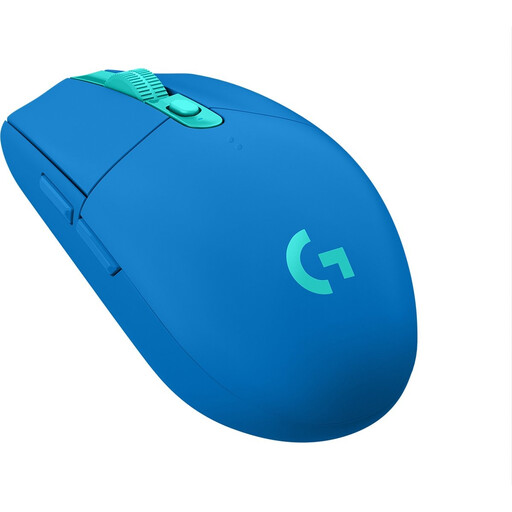
A good fit if you want to play wirelessly with a replaceable AA battery rather than recharge your mouse.
The description lists a nano receiver and one AA battery. Logitech G quotes a battery life of 250 hours for the G305; this is a manufacturer’s claim.
Not always: a Bluetooth mouse can connect without a separate USB receiver if your PC supports Bluetooth. The 2.4 GHz receiver mode on the models mentioned does require a suitable USB port. Check the connection options for both the mouse and your PC.
It depends on the mouse software and your game settings. The official Factorio wiki describes keyboard shortcuts for actions such as copying and pasting. Check whether the mouse button you want to use can send that input, then test the assignment in the game.
In the Netherlands, the Dutch government says there is no fixed statutory warranty period: you’re entitled to a product that works properly for as long as you can reasonably expect it to. A manufacturer’s warranty doesn’t replace this right, and the retailer is your point of contact if a product is faulty. Normal wear and tear or damage caused by your own use isn’t automatically covered by free repairs.
According to the Dutch government, used batteries must not go in general waste. You can take them to a shop or supermarket that sells batteries, for example. When buying a similar new appliance, you can hand in an old electrical device under the one-for-one take-back scheme; there are other collection points too.