
Players who enjoy long exploration sessions
You’ll want a shape and weight that suit your hand and grip when you’re holding the mouse for a long time. Lenovo Netherlands explains how the shape relates to palm, claw and fingertip grips.


Start by choosing a shape and weight that suit your hand and grip, then consider whether extra buttons or different scroll modes would be useful for your in-game actions. RGB lighting won’t solve tracking problems in a bright room: check your desk surface first, then choose a wired or wireless mouse based on how much room you need to move, connectivity and battery management.
You’ll want a shape and weight that suit your hand and grip when you’re holding the mouse for a long time. Lenovo Netherlands explains how the shape relates to palm, claw and fingertip grips.
If you want to control the map, inventory and other commands with ease, pay attention to the position and customisation of the buttons, as well as the scroll wheel.
You’ll want your mouse to work well on your own desk surface. Logitech G notes that transparent and glossy surfaces can be a limitation for optical gaming mice.
Start with the fit and the surface you play on. Then compare the controls and how the mouse connects and gets its power.
| Consideration | What to look for when buying | Who is this most relevant to? |
|---|---|---|
| Grip and comfort | Compare the shape, dimensions and weight with your hand and grip. Lenovo Netherlands describes palm, claw and fingertip grips as different ways to hold a mouse. | If I play for a long time, I want a shape and weight that feel comfortable in my hand. Around 36% of consumers prioritise grip and comfort above all else. |
| Buttons and scroll wheel | Check that the buttons are within easy reach and that the game lets you assign the commands you want. For scrolling, check the options available on the exact model. | If I often switch between the map, inventory and other commands, I want the controls within easy reach. Around 29% of consumers put in-game controls first. |
| Tracking on your desk | Check the surface you’ll actually use. Logitech G warns that optical gaming mice don’t work well on many transparent and glossy surfaces. A high maximum DPI doesn’t prove that a mouse will work on your surface. | If I play on a glossy or transparent desk, I want to know whether the mouse will work well on it. Around 21% of consumers make surface tracking their top priority. |
| Connectivity and power | Check the connection, any receiver and the battery type. A cable means you won’t need to change batteries; with wireless models, the connection mode may also matter. | If I don’t want a cable on my desk, or would rather not manage batteries, I compare connectivity and power options. Around 14% of consumers start with the connection and battery management. |
DPI describes the adjustable sensitivity, but it doesn’t tell you which surfaces an optical mouse works well on. Logitech G warns that many transparent and glossy surfaces can cause problems.
Assess your desk surface and preferred sensitivity separately. Don’t buy based only on the highest DPI figure.
Versions can differ in their wired or wireless connection, power source, buttons and scroll controls. Razer and SteelSeries, for example, list different features for the models mentioned here.
Before buying, check the full model name, connection type, power source and button layout of the version on offer.
In the Netherlands, your statutory rights when a product doesn’t meet reasonable expectations are separate from any manufacturer’s warranty. The Dutch government states that there is no fixed statutory two-year warranty period for all products.
Check exactly what any additional warranty covers, and remember to contact the seller if you have a valid claim under your statutory rights.
The Basilisk V3 and Basilisk V3 X HyperSpeed show how the controls and connectivity can vary between versions.
The Aerox 3 Wireless (2022) is an example of a wireless model with a stated weight of 68 g.
The GXT 922 Ybar is a wired option with adjustable DPI.
The G502 X LIGHTSPEED is an example of a wireless model with several customisable controls.
This selection includes wired and wireless gaming mice for players comparing grip, in-game controls, connectivity and weight.
 No image available
A wired version for players who want to control multiple commands while gaming.
The product title lists 11 buttons and 35,000 DPI; the product description mentions customisable controls and multiple scroll modes.
The cable may limit how freely you can move the mouse around your desk.
 No image available
An option to compare if you’re looking for a right-handed mouse with several connectivity options.
The product information lists RF, Bluetooth and USB Type-A, an optical sensor, 42,000 DPI and a weight of 54 g.
The product information warns that the RGB lighting may flash rapidly; take care if you’re sensitive to flashing lights.
 No image available
A wireless option for comparing different connection methods and a stated weight of 56 g.
The product title lists 2.4 GHz, USB-C, Bluetooth, a PAW3395 sensor, 26,000 DPI and a 400 mAh battery. The description mentions a magnetic charging dock.
The product information warns that the charging dock contains magnets; keep it away from pacemakers, medical implants, payment cards and ID cards.
 No image available
A wired option for players who want to control multiple in-game commands with their mouse.
The product information lists 13 programmable buttons, a scroll wheel, an optical sensor, 25,600 DPI and a USB Type-A connection.
This is a wired mouse with a USB Type-A connection.
 No image available
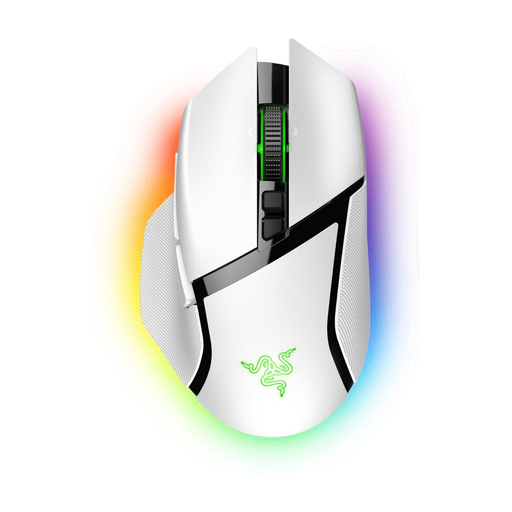
An option for combining wireless control with multiple in-game commands.
The product description lists 11 programmable buttons, a multi-mode scroll wheel and wireless connectivity. USB is also mentioned.
The Mouse Dock Pro for wireless charging is listed as a separate accessory.
No. RGB lighting won’t solve tracking problems. The buying information consulted describes RGB as a visual feature; Logitech G warns that optical gaming mice may struggle on certain transparent and glossy surfaces.
Not just because of the maximum DPI figure: DPI describes sensitivity, not whether the sensor is suited to a particular surface. Logitech G warns that optical gaming mice don’t work well on many transparent and glossy surfaces.
It depends on your preferences around freedom of movement, cables and battery management. A wired mouse won’t need its batteries changed; with wireless models, it’s worth checking the connection, receiver and power source for the exact version.
First check which commands your game lets you assign and which software works with your exact mouse model. Razer describes using Synapse and Hypershift to assign secondary commands on the Basilisk V3 X HyperSpeed; don’t assume this feature is available on other models.
If you have a valid claim under your statutory rights, contact the seller to resolve the issue. The Dutch government states that there is no fixed statutory two-year warranty period for all products in the Netherlands; statutory rights are separate from any manufacturer’s warranty.