
Vandaag of morgen in huis

Kwaliteit gegarandeerd

Welkomstaanbiedingen ontgrendelen: GRATIS bezorging | Tot 80% korting | Gratis 30 dagen JoyPlus-proefperiode
Download de app
A gaming mouse should suit your play style, hand and desk. Yet many buyers focus mainly on a high DPI figure or eye-catching RGB lighting. This can leave you with a mouse that feels too heavy or uncomfortable, or is difficult to configure in practice.
Look out for these common pitfalls:
DPI indicates how far the cursor moves in response to a certain physical mouse movement. A gaming mouse with adjustable DPI usually offers several profiles for games such as FPS, MOBA and RTS titles. For precision in an FPS, you’ll often use a lower setting; a higher setting may feel more comfortable for large screens or fast camera movements.
An optical gaming mouse uses an optical sensor to track movement. As well as the maximum DPI, check:
A polling rate of 1,000 Hz means that, according to the product specifications, the mouse sends up to 1,000 signals per second. Higher rates, such as 8,000 Hz, can be appealing for fast-paced PC games, but may use more system resources. According to the product information for models such as the HyperX Pulsefire Haste 2 and AJAZZ AJ159, the maximum polling rate is 8,000 Hz.
A lightweight gaming mouse is appealing to players who make lots of quick movements. According to the specifications, the HyperX Pulsefire Haste 2 weighs around 52 grams without its cable. The Razer Cobra is listed at 58 grams. That’s considerably less than many ergonomic models, which weigh around 100 grams or more.
Pay attention to the shape, too:
A vertical ergonomic mouse, such as the Trust Bayo II or Logitech MX Vertical, is primarily designed for office and everyday use. These models aren’t automatically a good choice for competitive gaming. As well as being comfortable, an ergonomic gaming mouse should suit fast movements, button use and your grip.
A wired gaming mouse connects via USB and doesn’t need a battery. This makes it easy to set up and avoids interruptions for charging. Do check the cable length and flexibility, though. A stiff cable can catch on the edge of your desk when gaming at low sensitivity.
A wireless gaming mouse keeps your desk tidy and gives you more freedom of movement. Check whether the model has:
Extra programmable buttons can be useful for MOBA and RTS games. A programmable gaming mouse lets you assign functions, macros or DPI profiles. Check that the software works with your operating system. For some models, macros or settings are only available when the mouse is connected by cable.
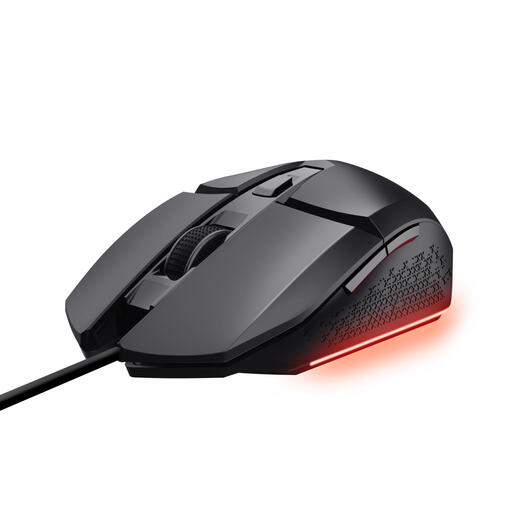
Why it suits this profile: This wired gaming mouse offers basic features for PC gamers, without a battery or wireless receiver. Its settings are designed for players looking for their first gaming mouse.
It’s about more than RGB: the mouse has an optical sensor, adjustable DPI from 200 to 6,400 and six buttons.
1.5-metre cable, three RGB settings and software-programmable buttons.
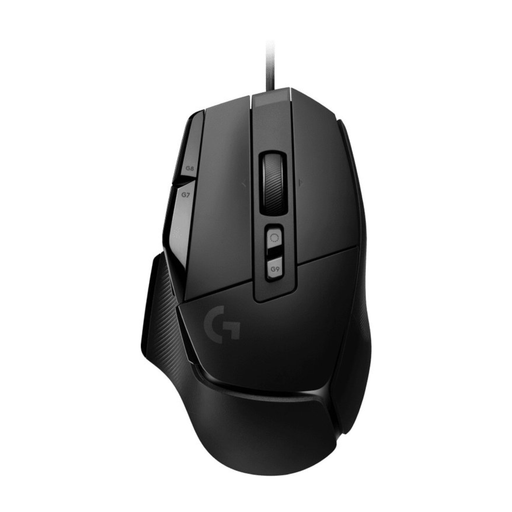
Why it suits this profile: This right-handed model is designed for users who want plenty of functions at their fingertips for MMO, MOBA and RTS games.
The wired connection means you won’t run out of battery. The product specifications also list an optical sensor, a maximum of 25,600 DPI and a polling rate of up to 1,000 Hz.
Up to 13 control functions according to the product information, and a weight of 89 grams.
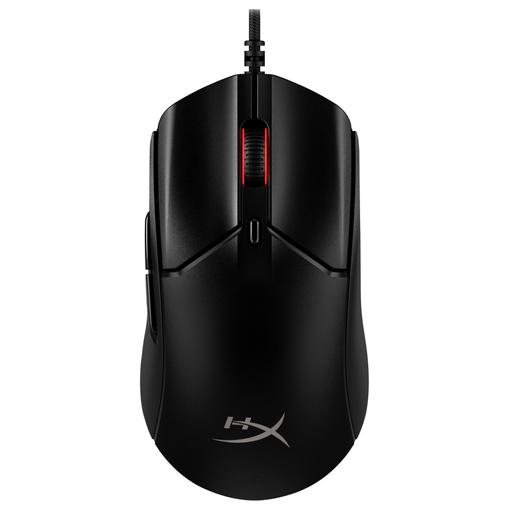
Why it suits this profile: For players who prioritise low weight, fast movements and adjustable software features over the convenience of wireless connectivity.
The product details list a weight of 52 grams without the cable, a wired USB connection and software for DPI, macros and RGB.
Optical HyperX 26K sensor, adjustable up to 26,000 DPI and a polling rate of up to 8,000 Hz according to the product specifications.
We’ve put together a complete, up-to-date list of products that meet these strict selection criteria and the applicable European safety regulations.
It depends on what matters most to you. A wired gaming mouse has a direct USB connection and doesn’t need charging. A wireless gaming mouse gives you more freedom of movement, but check the connection, battery life and whether a receiver is included. For competitive PC games, 2.4 GHz is usually more practical than Bluetooth alone.
There’s no single setting that works for every player. Start with a moderate DPI and adjust it for each game and screen size. A mouse with adjustable DPI gives you room to experiment. There’s no need for a maximum of 25,600 or 42,000 DPI if you never use that setting.
Its lifespan depends on how you use and clean it, the strain on the cable and the quality of the switches. Brands sometimes list a click lifespan, such as 10 million or 100 million clicks. According to the manufacturer’s own information, this is a product specification, not a guarantee of a particular lifespan. Use the mouse on a clean surface, don’t pull on the cable and take breaks during long sessions.
