
Vandaag of morgen in huis

Kwaliteit gegarandeerd

Welkomstaanbiedingen ontgrendelen: GRATIS bezorging | Tot 80% korting | Gratis 30 dagen JoyPlus-proefperiode
Download de app
A gaming mouse should respond accurately, feel comfortable in your hand and suit the way you play. It’s easy, however, to pay over the odds for features you’ll barely use. A high DPI figure sounds impressive, but it doesn’t automatically translate into a better experience in an FPS game. Wireless doesn’t automatically mean you can play without interruptions either.
Joybuy Product Recommendation Officer helps you evaluate the key specifications of a gaming mouse in practical terms. That way, you compare models based on verifiable data instead of only on marketing copy.
A gaming mouse with high DPI might quote 26,000, 30,000 or even 44,000 DPI. In practice, many users play with a much lower setting. More important are adjustable DPI, predictable tracking and software that lets you save profiles.
Therefore, check:
An optical sensor gaming mouse is standard in modern models. The quoted DPI value is a technical ceiling and not a direct yardstick for better performance.
A wireless gaming mouse can operate via Bluetooth, a 2.4GHz receiver or both. Bluetooth is handy for general use and compatibility, but a dedicated receiver is usually the sensible choice if you want a wireless mouse with low latency.
Also pay attention to power. A model with an AA or AAA battery can run for a long time, but will need replacements. A rechargeable mouse requires a USB cable and needs topping up regularly. In addition, check whether you have enough USB ports for the receiver.
An ultra-light gaming mouse of around 53 to 70 grams can be ideal for quick movements and low sensitivity. A heavier model can feel more stable, especially if you use lots of programmable buttons.
Shape is at least as important as weight. An ergonomic gaming mouse for right-handed use won’t automatically suit a left-handed player. Look at dimensions, hand position and grip style:
For FPS games, control over small movements matters. An FPS gaming mouse with adjustable DPI lets you tailor sensitivity per game. For MOBA and RTS games, extra buttons and profiles may be more important than an extremely high DPI.
The polling rate indicates how often the mouse sends data to the computer. Many models run at 1,000 Hz. Some recent models quote 4,000 or 8,000 Hz. A higher value can refine data transmission, but the effect also depends on your PC, monitor and settings. So check whether the required software and hardware are supported.
A wired gaming mouse has continuous power and requires no battery planning. The downside is cable drag, especially if the cable rubs against a monitor stand or part of your desk. A flexible cable and enough space on your desk can help reduce this.
A wireless gaming mouse gives you more freedom of movement. When buying, look for:
A programmable gaming mouse can store macros, hotkeys or functions for a specific game. For an FPS player, five or six buttons are often enough. For MOBA, RTS or MMO games, a model with eleven or more buttons can be more practical.
RGB lighting doesn’t affect tracking. An RGB gaming mouse can complement your desk setup, but check whether the lighting can be switched off. Brand software may be required to adjust buttons, DPI, polling rate and lighting profiles.
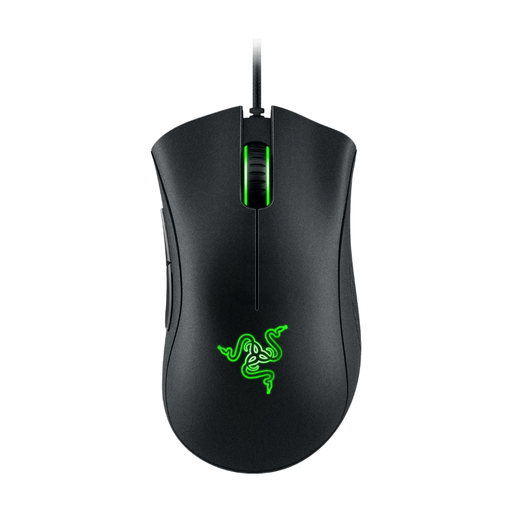
Why it suits this profile: A straightforward wired model with no battery makes the move to PC gaming simple. The right-handed shape is ergonomically designed and the DPI is adjustable.
You’re not paying for wireless features or an extreme DPI figure. The specifications list an optical sensor up to 6,400 DPI, USB connection and five programmable buttons.
6,400 DPI, 1,000 Hz polling rate according to the product data, and a 2.10 meter cable.

Why it suits this profile: The low weight and 2.4GHz wireless connection suit players who value rapid movements and a tidy desk.
The specifications mention both wireless and wired use, so you can switch over while charging. The mouse weighs 54 grams and has a rechargeable battery.
Focus Pro 35K optical sensor, up to 8,000 Hz polling rate and, according to the product description, up to 95 hours of use per charge.
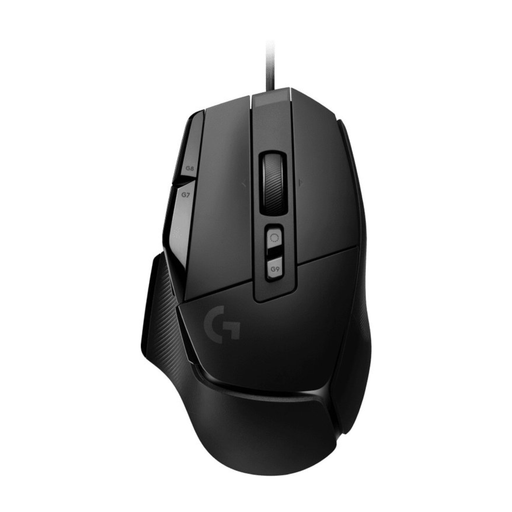
Why it suits this profile: This model targets right-handed players who want plenty of functions within reach for MOBA, RTS or other games with multiple commands.
The wired connection prevents battery interruptions. The shape, the 89-gram weight and the larger number of buttons make it clear this isn’t an ultra-light FPS mouse.
Optical HERO 25K sensor, USB connection and, according to the specifications, 11 programmable buttons with a DPI switch.
We’ve compiled a complete, up-to-date list of products that fully meet these strict selection criteria and comply with applicable European safety regulations.
A legal guarantee of at least two years applies to many consumer products in the EU, but always check the specific terms of sale and any exceptions.
It can be, especially with a model that uses a 2.4GHz receiver and offers low latency. Bluetooth is mainly convenient for general use. Check the stated polling rate, battery life and included receiver before you buy.
There’s no fixed value that works for every player. An adjustable sensor up to several thousand DPI is sufficient for many games. In FPS games, mouse mat, display resolution, in-game sensitivity and personal preference together play a bigger role than the maximum DPI figure alone.
Lifespan depends on click frequency, cable or battery use, cleaning and daily transport. Brands may state a click rating such as 10 million, 60 million or 90 million clicks. According to the brand’s own information, such a value is a product specification; it’s not a guarantee of the lifespan of every individual mouse.
