Start with a shape that suits your hand and grip, then compare the weight, tracking and click response for the movements you practise. In a dark room, a mouse without RGB or with adjustable lighting may be more comfortable. A wireless mouse gives you more freedom of movement, while a wired one means you won’t need to recharge it. The highest DPI or polling rate alone won’t determine which mouse is right for you.
Who is this guide for?
Players practising quick movements
When practising repeated aim corrections and large mouse movements, a suitable shape, low weight and responsive performance all matter. RTINGS highlights weight, click latency and sensor latency as factors to consider in an FPS mouse.
Players who prioritise grip and fit
If you practise for long periods, you can choose a mouse shape to suit your hand size and whether you use a palm, claw or fingertip grip. RTINGS stresses that the shape should suit your hand and preferred grip.
Players looking to reduce distracting lights
In a dark room, you may want to avoid or adjust your mouse lighting without losing sight of how well the shape fits your hand.
What should you look for?
| Buying concern |
What to look for |
Who is this most relevant to? |
| Quick movements |
Compare weight, tracking and measured click and sensor latency; don’t focus only on the maximum DPI. |
If I often practise quick aim corrections and large sweeping movements, I want to know how the weight and responsiveness suit those movements. Around 36% of consumers say quick movements are their main buying concern. |
| Comfort during long sessions |
Check the shape, dimensions, hump and how easily you can reach the side buttons with your hand and grip. |
When I practise for a long time, I want to hold the mouse comfortably and reach the buttons without straining my grip. Fit is the top priority for around 29% of consumers. |
| Lighting in a dark room |
Check whether the mouse has no RGB lighting or lets you adjust it, and whether the setting you want works with that exact mouse and its software. |
If I play in a dark room, I want to be able to avoid or adjust the mouse lighting without choosing a shape that doesn’t suit my hand. For around 21% of consumers, limiting light is their main buying concern. |
| Connectivity and power |
Find out how the mouse is powered, whether it needs a receiver, and whether a cable or wireless connection suits your gaming setup. |
If I plan long sessions, I want to avoid interruptions to recharge, or be able to move without a cable. Connectivity and power are the main buying concern for around 14% of consumers. |
Common buying mistakes
-
Comparing only the highest DPI or polling rate
A quoted maximum doesn’t tell you on its own whether the shape, weight and actual responsiveness are right for the way you practise. RTINGS also highlights low weight, click latency and sensor latency as factors to consider in an FPS mouse.
Start with your grip and the movements you make. Compare complete models and use independent measurements where available.
-
Comparing battery life without checking the connection mode
Battery life figures for different connection modes aren’t directly comparable. The Logitech G305 uses one AA battery, while Glorious lists different battery life figures for the Model O 2 Wireless over 2.4 GHz and Bluetooth.
Check the battery or power details for the connection mode you plan to use while practising.
Depending on the model, you may need to replace an AA battery or plan time to recharge.
-
Assuming similar product names refer to the same model
The Logitech G PRO X SUPERLIGHT, PRO X SUPERLIGHT 2 and PRO X2 SUPERSTRIKE are different model names. The Joybuy listing we checked for a PRO X SUPERLIGHT 2 contains conflicting information about its power supply and connection.
Check the full model name and the manufacturer’s specifications before ordering; don’t rely on a search result alone to identify the exact version.
Brands to consider
Logitech G
The PRO X SUPERLIGHT 2 and G305 LIGHTSPEED offer different wireless options to consider when weighing up shape, weight and lighting.
- Logitech lists the PRO X SUPERLIGHT 2 at 60 g.
- RTINGS describes the G305 as a model without RGB and measured its standard weight at 101.7 g. It considers this a drawback for quick FPS movements. The G305 uses one AA battery.
Razer
The Viper V3 Pro and Viper V4 Pro are lightweight wireless esports mice for players considering this shape.
- Razer lists the black Viper V3 Pro at 54 g and the black Viper V4 Pro at 49 g.
- Check the exact version and assess the shape separately from the stated weight; Razer’s weight and speed claims are manufacturer specifications.
SteelSeries
The Aerox 3 is available in both wired and wireless versions with RGB, giving you the option to weigh up cable use and lighting.
- SteelSeries lists the wired Aerox 3 Onyx at 59 g and the Aerox 3 Wireless Onyx at 68 g.
- Check which RGB settings are available for your chosen version and software configuration.
Glorious
The Model O3 Wired is a wired RGB option for anyone looking to avoid recharging.
- Glorious lists the Model O3 Wired at 54 g, with a cable and two RGB zones.
- The cable needs to allow you to move freely, and the lighting may be a consideration in a dark room.
ZOWIE
The EC2-DW is an asymmetrical wireless option to compare if hand position and horizontal movements matter to you.
- ZOWIE says it can be used without a required driver and comes with a 4K receiver.
- An asymmetrical shape won’t suit everyone, so consider the dimensions and your own grip.
Gaming mice at Joybuy
These product picks are wireless gaming mice for practice sessions with plenty of movement. If you’re considering a version with RGB, check that the lighting suits your dark gaming space.
 No image available
AJAZZ AJ159 PRO Wireless Gaming Mouse, White
A wireless option to consider if you want to compare multiple connection options for movement practice.
56 g; PAW3395 sensor; 2.4G, USB-C and Bluetooth; RGB backlighting; white version.
View at Joybuy
 No image available
AJAZZ AJ200 AI MC Wireless Gaming Mouse
A wireless option with an ergonomic shape to compare if it suits your hand and grip.
63 g; PAW3311 sensor; tri-mode BT/2.4G/USB-C; RGB lighting on the charging dock.
View at Joybuy
 No image available
AULA SC620 Wireless Gaming Mouse, White
A wireless option to consider if you want to compare programmable buttons as well as movement performance.
67 g; PixArt PAW3311 sensor; BT5.0/2.4G/USB-C; seven programmable buttons; RGB lighting.
View at Joybuy
 No image available
Logitech G G309 LIGHTSPEED Wireless Gaming Mouse
This wireless option could suit you if you want to avoid mouse lighting; bear in mind that an AA battery is listed as a power option.
View at Joybuy
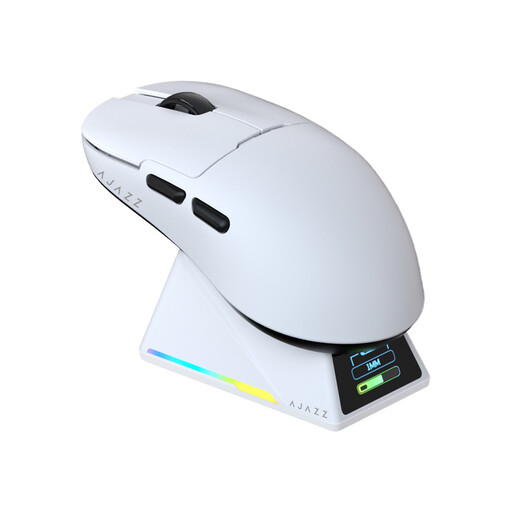 No image available
AJAZZ AJ159 APEX Wireless Gaming Mouse
A wireless version to compare if you’re looking for a mouse with multiple connection modes.
PAW3950 sensor; tri-mode; magnetic charging dock; RGB lighting; the title lists up to 42,000 DPI.
View at Joybuy
Frequently asked questions
Is a higher maximum DPI automatically better for practising movements?
No. A higher maximum DPI alone won’t determine which mouse is right for you. Compare the shape, weight and responsiveness first; RTINGS lists low weight, click latency and sensor latency as relevant features in an FPS mouse. Then choose a sensitivity you can use consistently.
How can I adjust mouse lighting in a dark room?
It depends on the mouse and its software. For compatible SteelSeries devices, SteelSeries explains how to adjust the lighting through GG and Engine. Check which settings are available for your exact version. RTINGS describes the Logitech G305 as a mouse without RGB.
What can I do if a mouse I bought online doesn’t fit or breaks?
In the Netherlands, online purchases from a business generally come with a 14-day cooling-off period, although exceptions may apply. If a product is faulty, you can contact the seller. The Dutch government states that there is no fixed statutory two-year guarantee period for all products.
Are there European requirements for wireless gaming mice?
Yes. Radio equipment placed on the EU market must meet the applicable product requirements and carry CE marking, as explained by the Dutch Authority for Digital Infrastructure. These requirements concern the product and its placement on the market, not a gaming licence for the user.


