What should you consider when choosing?
First, check which connections are available and how the mouse is powered. Then compare the freedom of movement and fit of the models that meet those requirements.
| What to consider |
What should you look for? |
Who is this most relevant to? |
| Power and connections |
Check the available sockets and USB ports separately, as well as the receiver required and the power source for the exact version. |
I want to practise without a charging break, but I also want to know whether I’ll need to replace batteries or use a USB port. Around 36% of consumers prioritise power and available connections. |
| Freedom of movement and connection |
Check whether the mouse uses a cable, a 2.4 GHz receiver or Bluetooth, and which port it needs. |
When making broad movements, I don’t want a cable getting in the way, and I care about the gaming connection. Around 29% of consumers give movement control and connection top priority. |
| Shape and grip |
Compare the shape, hand size and button placement. Check the weight of the exact version, without assuming that a lower figure automatically means better control. |
If I practise often, I want a shape that suits my hand and grip. Around 21% of consumers consider fit the most important factor. |
| Running costs and aftercare |
Check the battery type and whether it needs replacing, and find out who the seller is and what warranty terms apply. |
I want to budget for replacement batteries in advance and know who to contact if something goes wrong. Around 14% of consumers prioritise running costs and aftercare. |
Gaming mice at Joybuy
These Joybuy product picks are wireless gaming mice. For each version, check how it’s powered, which connection options are available and whether you’ll need a free USB port.
 No image available
ASUS ROG Harpe Ace Aim Lab Edition
An option to compare if you want to weigh up different connection methods during practice.
The product title lists RF Wireless, Bluetooth, USB Type-A and a 36,000 DPI optical sensor.
Check which connection mode you want to use and whether the required port is available.
View at Joybuy
 No image available
Logitech G G309 LIGHTSPEED
A wireless option if you don’t want a mouse cable during practice.
The product information lists an AA battery and an included receiver. Allow for battery replacement and check which USB port the receiver needs.
View at Joybuy
 No image available
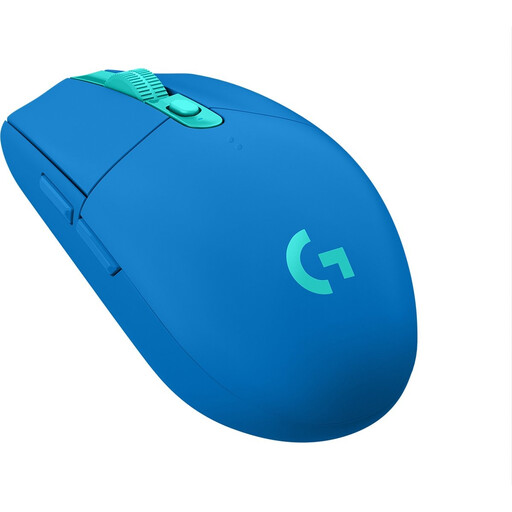
Logitech G305 LIGHTSPEED, blue
A good fit if you want to practise wirelessly without having to schedule time to charge the mouse.
According to the product information, this version uses an AA battery and a wireless receiver. Allow for battery replacement and check which USB port is needed.
View at Joybuy
 No image available
Razer Basilisk V3 X HyperSpeed
A wireless option to consider if you’re looking for a mouse shape that suits your grip.
The product information lists an AA battery and HyperSpeed Wireless. Check the power source for this version and allow for battery replacement.
View at Joybuy
 No image available
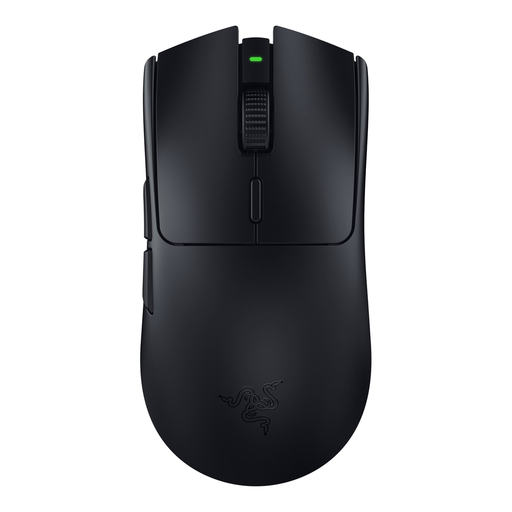
Razer Viper V3 HyperSpeed, black
A wireless option for competitive practice sessions when you want to move the mouse without a cable.
The product information lists an AA battery and Razer HyperSpeed Wireless. Allow for battery replacement and check which USB connection the receiver needs.
View at Joybuy
Frequently asked questions
Do you need a wireless mouse if you have few sockets?
No. A wired mouse can be an alternative if you have a free USB port and the cable won’t restrict your movement. A wireless receiver also uses a computer port, so work out whether mains sockets, USB ports or room for a cable are in shortest supply.
Which connection mode is best for competitive practice?
Always check the manual for the exact model. CORSAIR describes wired, 2.4 GHz with a receiver and Bluetooth connections for the M75 WIRELESS, and recommends wired or 2.4 GHz for the best gaming performance. Check that you have a free USB port for the receiver.
Where can you dispose of a flat AA battery or an old gaming mouse?
The Dutch government advises against putting flat batteries in general waste; take them to a collection point. For a discarded electric mouse, the Dutch government lists the recycling centre and, when a private individual buys a similar new device, the one-for-one take-back scheme.
Who should you contact if a mouse develops a fault too soon during normal use?
Report the problem to the seller. According to ACM ConsuWijzer, statutory guarantees for a faulty product may entitle you to a free repair, replacement or refund; a manufacturer’s guarantee does not replace this right.


