What factors should you consider?
AA battery and wireless receiver
A good fit if: you don’t want to plan a place to charge your mouse and have a spare USB port for the receiver.
Bear in mind: you’ll eventually need to replace the AA battery; wireless doesn’t automatically mean Bluetooth.
Wired via USB
A good fit if: you’re happy to have a cable on your desk and want to avoid changing batteries or charging the mouse.
Bear in mind: you’ll need to allow for the cable and a USB connection on your computer.
Wireless with extra controls
A good fit if: you want to assign lots of commands and your chosen model and software support them.
Bear in mind: you’ll also need a way to charge a rechargeable mouse; not every game needs extra buttons.
Bluetooth without a USB receiver
A good fit if: USB ports are in short supply and your computer supports Bluetooth.
Bear in mind: Bluetooth doesn’t mean you can avoid charging a rechargeable mouse.
A power socket and a USB port are two different constraints. The table distinguishes the main buying priority for consumers looking for a mouse for city-building games in a space with few power sockets.
| Factor to consider |
What should you check? |
Who does this matter to? |
| Power without an extra socket |
Check whether the mouse is battery-powered or wired, and whether it needs a receiver or USB port. |
If I have few power sockets, I want to know whether I can use a battery or connect a USB cable without needing an extra mains adapter. For around 36% of consumers, power without an extra socket is the main buying priority. |
| Buttons for commands |
Decide which commands you want to assign and check whether the game and mouse software support those settings. |
I want to keep frequently used game commands within reach without having to use the keyboard every time. Assigning commands is the main buying priority for around 29% of consumers. |
| Fit and scrolling |
Check the hand orientation, dimensions, button placement and available scroll modes for the exact version. |
During long gaming sessions, I want a mouse that feels comfortable in my hand and scrolls smoothly. Fit and scrolling are the main buying priority for around 21% of consumers. |
| Changing and charging batteries |
Check the battery type or charging method, and if battery life is quoted, check which connection mode it refers to. |
I want to know in advance whether I’ll need to replace batteries or charge the mouse later. Battery and charging maintenance is the main buying priority for around 14% of consumers. |
Brands to consider
These examples show the types of controls and connections available in the product ranges mentioned; the brand names do not indicate whether a specific model is available.
Logitech G
The G305 LIGHTSPEED is a wireless AA battery option; the G502 X LIGHTSPEED offers more customisable controls.
- Logitech G lists one AA battery for the G305. Logitech Support describes its connection via the supplied USB receiver.
- Logitech G lists 13 customisable controls for the G502 X LIGHTSPEED.
- The product information consulted lists both HERO 25K and HERO 44K sensors. Check the specification for the exact version before using it as a buying criterion.
Razer
The Naga V2 HyperSpeed is designed for those who want lots of controls under their thumb and a choice between Bluetooth and 2.4 GHz.
- Razer lists 21 programmable controls, including scroll functions.
- Razer quotes different maximum battery life figures for Bluetooth and HyperSpeed. These are manufacturer estimates, not a guarantee for every user.
- Lots of buttons are only useful if the layout suits your game and how you play.
SteelSeries
The Aerox 9 Wireless combines plenty of programmable buttons with a choice of Bluetooth or 2.4 GHz.
- SteelSeries lists 18 programmable buttons, including a 12-button side panel.
- SteelSeries lists different default polling rates for Bluetooth and receiver mode. Those figures alone don’t prove a noticeable advantage in a particular city-building game.
Logitech
The MX Master 3S is a useful point of comparison if scrolling and non-gaming use matter to you, but it isn’t automatically a replacement for a gaming mouse.
- Logitech lists Bluetooth Low Energy, Logi Bolt, a thumb wheel and seven customisable buttons.
- The standard and Bluetooth editions differ in what’s included in the box. Check whether the version you’re considering comes with a USB receiver.
Wired gaming mice at Joybuy
The products below are wired USB gaming mice. They’re a good fit if you want to avoid charging the mouse, but you’ll need a free USB port and a cable.
 Image unavailable
Razer Basilisk V3 35K, wired
A wired option if you don’t want to charge your mouse and have a spare USB port.
The product name lists 11 buttons and 35,000 DPI.
Joybuy
 Image unavailable
Shark Gaming Velocity M70
A wired gaming mouse for anyone who wants to avoid changing batteries or charging the mouse.
Bear in mind that you’ll need a USB connection and a cable to your computer.
Joybuy
 Image unavailable
HyperX Pulsefire Saga, wired
A wired option if you don’t want to plan time to charge your mouse.
The product name lists RGB lighting and 26,000 DPI. The USB cable needs a free port.
Joybuy
 Image unavailable
Logitech G G502 X, wired USB Type-A
The wired version is a good fit if you don’t want to charge your mouse and have a spare USB Type-A port.
This is the wired G502 X, not the G502 X LIGHTSPEED.
Joybuy
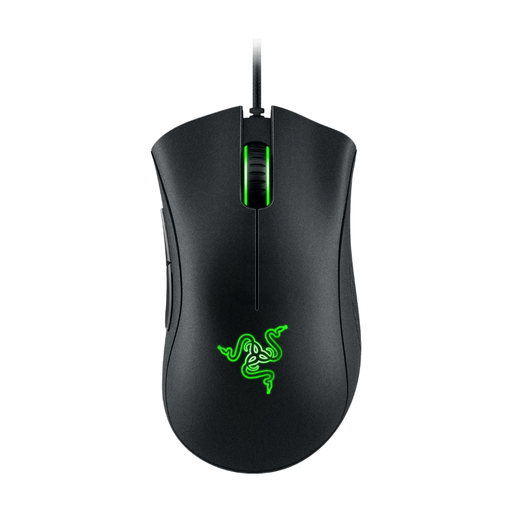 Image unavailable
Razer DeathAdder Essential (2021), wired
A wired option if you don’t want to replace batteries or charge your mouse.
The product name lists programmable controls and 6,400 DPI; the mouse needs a USB port and cable.
Joybuy
Frequently asked questions
Do you always need a free USB port for a wireless mouse?
No, not with every model. According to Logitech Support, the Logitech G305 LIGHTSPEED uses a USB receiver; the Razer Naga V2 HyperSpeed and SteelSeries Aerox 9 Wireless also offer Bluetooth, according to their manufacturers. Your computer must support Bluetooth, so check the connection method for the exact mouse you’re considering.
Can you assign game commands to extra mouse buttons straight away?
Not without checking the settings for your game and computer. The Cities: Skylines Wiki describes customisable controls for Cities: Skylines and notes that the information was checked against version 1.16 at least in part; don’t use it as a guide to the controls in Cities: Skylines II. Logitech G lists G HUB for the G502 X LIGHTSPEED, but check for yourself that the assignments you want work.
How should you dispose of used batteries and an old mouse?
The Dutch government advises against putting used batteries in general waste; dispose of them separately, for example at a shop that collects batteries. A discarded mouse is electrical equipment: as a private individual, you can take it to a collection point or use the take-back scheme when buying a similar new device.
What returns period and warranty apply to an online purchase in the Netherlands?
According to the Dutch government, many online purchases by consumers come with a 14-day cooling-off period, but whether it applies depends on the purchase. You’re also entitled to a product that meets reasonable expectations; the Netherlands has no fixed statutory warranty period, and a manufacturer’s warranty doesn’t replace your statutory rights. Check the terms for your specific purchase with the seller.


