
Vandaag of morgen in huis

Kwaliteit gegarandeerd

Welkomstaanbiedingen ontgrendelen: GRATIS bezorging | Tot 80% korting | Gratis 30 dagen JoyPlus-proefperiode
Download de app
A gaming mouse needs to do more than look eye-catching. For fast-paced FPS games, weight, sensor performance and response time are crucial. For MOBA games or office work, extra buttons and a suitable shape are often more important. If you focus mainly on a high DPI rating or RGB lighting, you could easily end up buying a mouse that is uncomfortable to use in practice.
This buying guide will help you compare specifications fairly and avoid common buying mistakes.
A gaming mouse with a high DPI can move the cursor across the screen extremely quickly. That does not automatically mean the sensor feels more accurate at every setting. Most players use a much lower sensitivity in games than the maximum DPI value.
You should also consider:
A maximum value of 24,000, 30,000 or 35,000 DPI mainly indicates the available adjustment range. For everyday use and most games, a sensor with flexible settings is more practical than an extremely high number.
A wireless gaming mouse with a 2.4GHz connection can be designed for low latency, while Bluetooth is particularly useful for laptops, tablets and office work. However, check whether the USB receiver is included, which port is required and how the mouse is charged.
A Bluetooth gaming mouse is convenient when switching between several devices, but many users prefer a dedicated 2.4GHz connection for competitive gaming. A wired mouse also eliminates the need to manage a battery. The trade-off is having a cable on your desk.
An ergonomic gaming mouse is not automatically suitable for every hand. Pay attention to the mouse’s dimensions, weight and shape. A right-handed model may be less comfortable if you play with your left hand. The way you hold the mouse — palm grip, claw grip or fingertip grip — also makes a difference.
A vertical mouse can offer a completely different wrist position, but it often takes time to get used to. If possible, try the shape first and always check the stated dimensions.
An optical sensor tracks movement using a light source and camera system. DPI indicates how sensitive the mouse is: at a higher setting, the cursor travels further for the same physical movement. For precise FPS control, a lower DPI combined with larger arm movements may feel more comfortable.
The polling rate indicates how many times per second the mouse position is reported. 1,000 Hz is a common value. Some models support 8,000 Hz, but your computer, game and settings must be able to process this higher frequency effectively.
For fast movements, many FPS players choose a lightweight gaming mouse. Models weighing around 54 to 70 grams generally feel nimble. A heavier mouse may feel more stable and provide a calmer experience during extended office work or strategy games.
As well as weight, compare:
A programmable gaming mouse is useful if you want to activate commands, shortcuts or functions quickly. Six buttons may be enough for many players; models with eleven or more buttons are better suited to MMO, MOBA or productivity tasks.
Check which software is required and whether it works with your operating system. RGB lighting is primarily visual. An RGB gaming mouse can complement your desk set-up, but lighting does not automatically improve control.
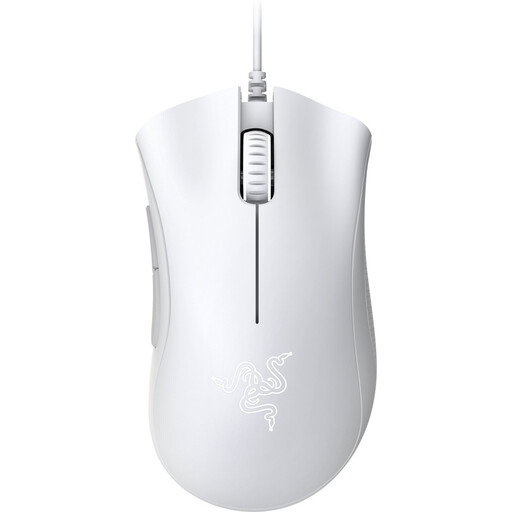
Why it suits this profile: A straightforward wired gaming mouse for PC and laptop use, with no battery or wireless settings to manage. Its right-handed shape and five buttons make it easy to use for casual gaming and everyday tasks.
The product information lists a 6,400 DPI optical sensor and a USB connection. You therefore are not paying for an unnecessarily extreme DPI range or battery management.
96 grams, five programmable buttons and a polling rate of up to 1,000 Hz according to the product specifications.

Why it suits this profile: Suitable for players looking for extra controls, wireless flexibility and a distinctly ergonomic shape for gaming and productivity.
The choice is not based on DPI alone: the mouse has 11 programmable buttons and 2.4GHz, Bluetooth and wired connections.
35,000 DPI, approximately 112 grams and Razer Chroma RGB according to the product description.

Why it suits this profile: A wireless gaming mouse for FPS players who value low weight and a right-handed ergonomic shape.
The product information mentions both wireless and USB-C use. This means you can continue playing while charging and are not entirely dependent on the battery.
63 grams, up to 30,000 DPI and a stated battery life of up to 90 hours. The quoted click lifespan is a claim from Razer’s product information.
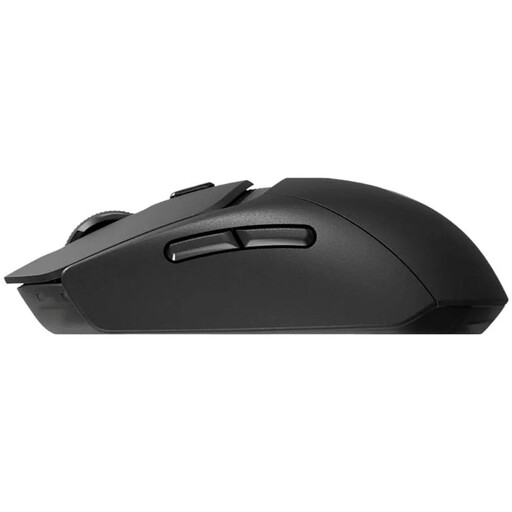
Why it suits this profile: Ideal if you want to use a gaming mouse with both a PC and laptop and switch between 2.4GHz and Bluetooth.
You do not need a permanent cable and can adapt the connection to suit your use. An AA battery means charging via a dedicated cable is not necessary.
HERO 25K optical sensor, six programmable buttons and, according to Logitech, more than 300 hours of use from a single AA battery.
We have put together a complete, up-to-date list of products that fully meet these strict selection criteria and the applicable European safety regulations.
It can be, particularly if the model has a dedicated 2.4GHz receiver. Check the connection, polling rate and battery solution. Bluetooth is practical for general use, but is less often chosen when the lowest possible latency is a priority.
For most users, an adjustable range of up to a few thousand DPI is already sufficient. A higher maximum DPI gives you more choice, but does not determine tracking quality on its own. Also consider the sensor, polling rate, grip and weight.
Its lifespan depends on usage, cleaning, cable strain and the quality of the switches. Manufacturers sometimes state a click rating, such as millions of clicks. According to the brand’s own specifications, this is a stated design standard, not a guarantee that every mouse will last exactly that long. Clean the sensor and mouse feet carefully, and keep liquids away from the electronics.
