
Vandaag of morgen in huis

Kwaliteit gegarandeerd

Welkomstaanbiedingen ontgrendelen: GRATIS bezorging | Tot 80% korting | Gratis 30 dagen JoyPlus-proefperiode
Download de app
Buying a gaming mouse seems simple until you have to choose between a wireless gaming mouse, a lightweight gaming mouse, an ergonomic gaming mouse or a model with lots of programmable buttons. Marketing copy often focuses on extremely high DPI, RGB lighting or long battery life. These features are not automatically important for the way you play.
The right choice mainly depends on your grip, hand size, favourite games and how you connect the mouse. Below, you’ll find what to look out for and which models suit different user profiles.
A gaming mouse with high DPI can move the cursor very quickly across the screen. That does not automatically mean you will aim more accurately. Many FPS players actually use lower in-game sensitivity and make larger movements with their arm.
So don’t just look at the maximum DPI figure. Also check:
A lightweight gaming mouse weighing 54 or 58 grams can feel comfortable for fast aiming movements. However, a compact model feels different from a wide mouse with palm support. A mouse that is too small or too large can make your grip uncomfortable, even if it is lightweight.
Pay attention to the dimensions, shape and position of the thumb buttons. Left-handed users should also check whether the mouse is symmetrical or specifically designed for right-handed use.
A wireless gaming mouse is practical at a desk, without a cable rubbing across your mouse mat. However, check which type of wireless connection is used. A 2.4GHz receiver is generally designed for low latency during gaming, while Bluetooth is convenient for laptops and everyday use. Not every Bluetooth gaming mouse offers the same features in Bluetooth mode.
Also consider the battery method. Some models use an AA battery, while others have a built-in battery and USB-C charging. A rechargeable mouse avoids disposable batteries, but it does need to be charged regularly.
An optical gaming mouse uses an optical sensor to track movement. When comparing models, check the sensor type, maximum DPI range and available adjustment increments. A range of 8,500 to 12,000 DPI is more than enough for many users. Higher values may be useful for people with multiple screens or very high mouse sensitivity.
Bear in mind that product listings sometimes show different sensor specifications. For example, the Logitech G PRO X SUPERLIGHT 2 is listed with both a HERO 2 description and a HERO 25K Max specification. Therefore, check the current specifications on the product page before ordering.
The polling rate indicates how often the mouse sends information to the computer each second. 1,000 Hz means up to 1,000 reports per second. Some models support 4,000 or 8,000 Hz.
A higher polling rate can be particularly relevant for fast-paced FPS games and monitors with a high refresh rate. However, it also means a greater load on your PC and potentially shorter battery life. For office work and casual gaming, 1,000 Hz is often sufficient.
A mouse weighing under around 70 grams is generally considered lightweight, but weight is only one factor. An ergonomic gaming mouse with a vertical shape can offer a different hand position from a low, symmetrical FPS mouse. Choose based on your grip:
Also check the number of buttons and whether they are programmable. Extra buttons can be useful for MMO or strategy games. For competitive FPS games, five or six buttons often provide straightforward control.
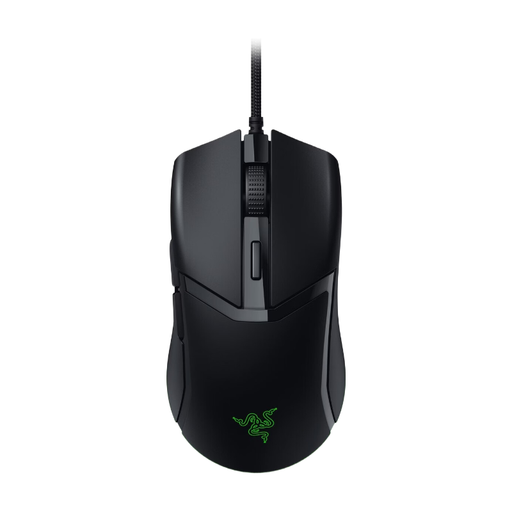
Why it suits this profile: A wired mouse eliminates the need for charging and additional wireless receivers. This model is suitable for PC and Mac users looking for a lightweight mouse with RGB lighting and adjustable sensitivity.
The key specifications are easy to understand: an optical sensor of up to 8,500 DPI, a wired connection and six buttons. You are not paying for a battery or wireless technology you do not need.
58 grams, six buttons, adjustable DPI in increments of 50 and Razer Chroma RGB according to the product description.
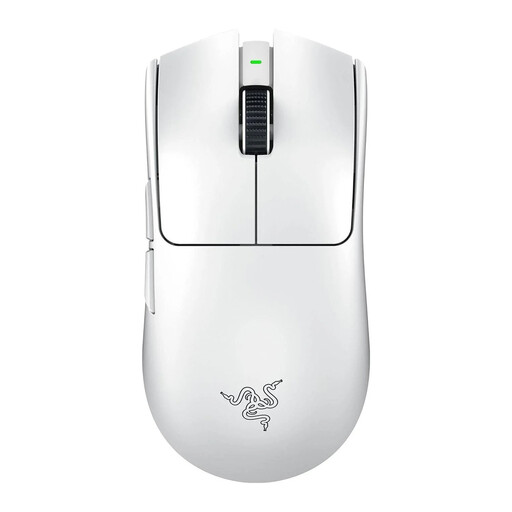
Why it suits this profile: This model is aimed at FPS players who value wireless freedom of movement, low weight and a high polling rate.
The combination of 54 grams, an optical sensor and an 8,000 Hz polling rate makes the relevant performance measurable rather than based on marketing language alone.
54 grams, a Focus Pro 35K optical sensor according to the product details and a stated battery life of up to 95 hours.

Why it suits this profile: For MOBA, RTS and simulation games, extra buttons are often more important than extremely low weight. This wired Logitech gaming mouse is designed for right-handed users who want functions within easy reach.
The mouse uses a fixed USB connection, so you do not need to monitor the battery level. The many buttons are designed for functions and shortcuts, not just appearance.
Up to 25,600 DPI, an optical sensor and 11 programmable buttons according to the listing.
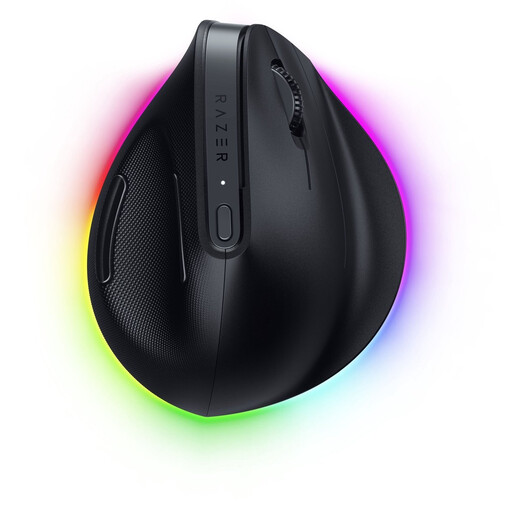
Why it suits this profile: The vertical shape and support at the base are designed for users who want to use one mouse for both office work and gaming.
The product specifications make it clear that this is a right-handed vertical model weighing 150 grams. This allows you to assess in advance whether the shape and weight suit your desk setup.
Bluetooth and Razer HyperSpeed, six buttons, adjustable functions and, according to the brand description, battery life of up to six months.
We’ve put together a complete, up-to-date list of products that fully meet these strict selection criteria and the applicable European safety regulations.
It can be, provided the model offers a stable 2.4GHz connection with a receiver and the polling rate is suitable for your PC and monitor. Bluetooth is particularly convenient for everyday use, but check whether all gaming features are also available in Bluetooth mode.
Its lifespan depends on the switches, cable, battery and how it is used. Manufacturers sometimes state a click rating, such as 10 million or 90 million clicks. According to brands’ own claims, these figures indicate expected lifespan under specific conditions and are not a guarantee for every type of use. A minimum statutory guarantee of two years applies to the products mentioned, according to the product information and EU consumer regulations.
A model with a built-in battery uses electricity when charging. A mouse with an AA or AAA battery may involve recurring battery costs. Wired models do not need a battery or charging cycle. So don’t compare only the purchase price; also consider the power method and how you use the mouse each day.
