
Vandaag of morgen in huis

Kwaliteit gegarandeerd

Welkomstaanbiedingen ontgrendelen: GRATIS bezorging | Tot 80% korting | Gratis 30 dagen JoyPlus-proefperiode
Download de app
Buying a gaming mouse seems simple, until you have to choose between wireless and wired, a 1,000 or 8,000 Hz polling rate, and a 12,000 or 44,000 DPI sensor. Marketing often focuses on big numbers, but shape, weight and software can have just as much impact on your gaming experience.
Look out for these three common pitfalls:
DPI determines how quickly the pointer moves across the screen in response to a given physical movement. A high-DPI gaming mouse mainly gives you more settings to choose from; it doesn’t automatically make you more accurate. Many FPS players use a lower sensitivity and make larger movements with their arm.
The polling rate tells you how often the mouse sends data to the computer:
Always check whether the required receiver is included. According to the product specifications, 4,000 Hz on the GravaStar Mercury M1 depends on a separate 4K receiver; a 1K receiver is listed as standard.
A lightweight gaming mouse weighing around 50 to 70 grams can feel comfortable for fast movements and low sensitivity. A heavier model may feel more stable, or offer more buttons and a larger body.
Don’t look at weight alone. Also consider:
An ergonomic gaming mouse will usually better support one hand and grip style, while a symmetrical shape can be more versatile. However, an ergonomic label doesn’t guarantee that the shape will feel comfortable for everyone.
A wireless gaming mouse usually uses 2.4 GHz for low latency. Bluetooth is handy for laptops and everyday use, but it won’t always offer the same settings or polling rate as a dedicated gaming receiver. A tri-mode model with USB, Bluetooth and 2.4 GHz gives you more flexibility.
Also check:
A programmable gaming mouse is useful for MMOs, simulations and productivity, but five or six well-placed buttons are often enough for an FPS gaming mouse.
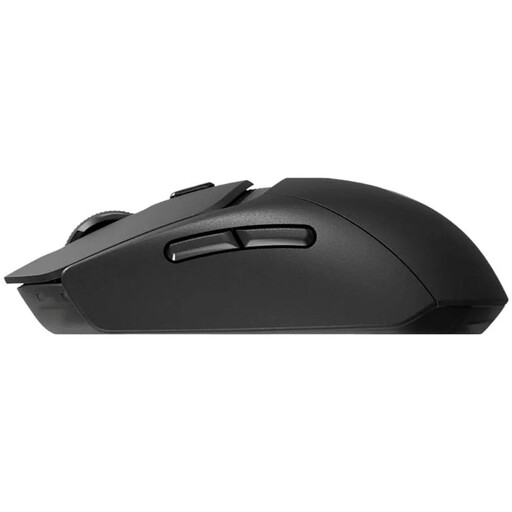
Why it suits this profile: This wireless mouse combines LIGHTSPEED with Bluetooth and uses an AA battery. It’s a good fit for gamers who want to play without a cable and would rather not charge a built-in battery.
The specifications list a weight of 86 grams, six programmable buttons and a maximum polling rate of 1,000 Hz. That means you’re not paying purely for extreme DPI or polling figures.
HERO 25K optical sensor, Bluetooth and a battery life of over 300 hours from one AA battery, according to the product information.
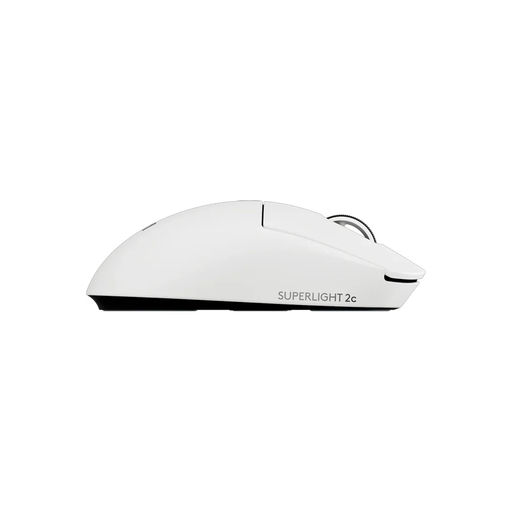
Why it suits this profile: Its compact shape and low weight make it a good choice for players with smaller hands or anyone who prefers a lightweight esports mouse.
The product details list a weight of 53 grams, five buttons and a compact body. This makes it easier to compare its size and weight with your own preferences before you buy.
HERO 2 sensor, LIGHTSPEED connectivity, adjustable DPI and a battery life of up to 95 hours, according to the product description.

Why it suits this profile: This model is aimed at users looking for wireless 8K polling, a low weight and plenty of customisation options for competitive games.
The product information explicitly lists 8,000 Hz, alongside 1,000 Hz battery settings, and warns that a high polling rate may increase CPU usage.
53 grams, up to 10 programmable buttons, adjustable X/Y DPI and a battery life of up to 750 hours at 1,000 Hz, according to the product information.
A wireless mouse for PC keeps your desk tidy and is handy if you regularly move between workspaces. Pay attention to the receiver: position it close to the mouse using the supplied extension cable. This can help reduce interference from other wireless devices.
A wired model, such as the Logitech G G502 X, doesn’t need a battery and stays connected throughout long sessions. It has an ergonomic right-handed shape, 13 buttons according to the product description and a maximum resolution of 25,600 DPI. Its higher weight of 89 grams and cable make it less suitable for players who want maximum freedom of movement, but it can be a good choice for MMOs, simulations and keyboard shortcuts.
For RGB models, also check whether you really want lighting. An RGB gaming mouse may suit your setup, but lighting has no direct effect on tracking or response time.
Not automatically. DPI determines sensitivity, while accuracy also depends on the sensor, software, surface and sensitivity settings in your game. Look for a model that makes it easy to adjust the DPI.
Not always. A higher polling rate can be useful with high refresh rates and competitive games. However, check that your PC can handle it. According to the product information for some 4K and 8K models, a high polling rate may use more CPU resources.
It depends on the battery type, how intensively you use it, the connection and your charging habits. Manufacturers’ stated battery life usually depends on the conditions. A mouse with a replaceable AA battery avoids interruptions for charging; a built-in battery needs regular charging, but the mouse may be lighter and more compact.
We’ve put together a complete, up-to-date list of products that fully meet these strict selection criteria and the applicable European safety regulations.
