
Vandaag of morgen in huis

Kwaliteit gegarandeerd

Welkomstaanbiedingen ontgrendelen: GRATIS bezorging | Tot 80% korting | Gratis 30 dagen JoyPlus-proefperiode
Download de app
A gaming mouse should suit your play style, hand and computer. Yet many gamers choose one based mainly on a high DPI figure, eye-catching RGB lighting or a promising product name. This can leave you with a mouse that feels too heavy in practice, runs out of battery quickly or is uncomfortable to hold.
Use these pointers to compare a gaming mouse using specifications you can check. Then explore some options for different needs, from a first wireless mouse to a model for intensive FPS and MOBA sessions.
A gaming mouse with a high DPI can move the pointer very quickly across the screen. That doesn’t automatically mean its sensor will feel more accurate for every player. Many FPS players actually use lower sensitivity, so larger mouse movements allow for small adjustments when aiming.
So don’t focus only on the maximum DPI figure. Also check:
A gaming mouse with RGB lighting can complement an illuminated setup, but lighting makes no difference to the fit or tracking. You may also need extra software to customise colours and effects. If you mainly want a quiet or simple workspace, you may be able to switch the lighting off.
Think of RGB as an extra feature. The dimensions, button layout and weight have a much bigger impact on how the mouse feels day to day. If you’d like to pair lighting with a suitable surface, you can also browse the RGB lighting mouse range.
A wireless gaming mouse avoids cable drag, but needs a rechargeable or replaceable battery. Check whether the model:
Stated battery life usually depends on the settings, connection and lighting. So treat a claim such as ‘up to 80 hours’ as a maximum quoted by the manufacturer, not a guaranteed playing time in every situation.
A lightweight gaming mouse weighing around 60 to 75 grams can feel comfortable for quick movements in FPS games. A heavier model may feel more stable or offer more support for a palm grip. There’s no one weight that suits everyone.
Compare the dimensions with your hand and consider the shape:
DPI indicates how sensitively the mouse responds to movement. An adjustable range of, for example, 800 to 4,800 DPI is already suitable for many PC and laptop gamers. Models with 16,000, 26,000 or more DPI mainly offer a wider range; you don’t have to use the maximum setting.
The polling rate indicates how often the mouse’s position is reported to the computer. 1,000 Hz is a common setting. Higher rates, such as 4,000 or 8,000 Hz, may require more processing power. Some brands therefore state in their product information that a high polling rate can affect performance on less powerful computers.
A programmable gaming mouse can be useful for MOBA and MMO games, as well as productivity tasks. Check how many buttons are actually programmable and whether the software works with your operating system. Also check how profiles are stored: some mice save settings in onboard memory, while others rely on software running on your PC.

Why it suits this type of user: This wireless gaming mouse combines a 2.4GHz receiver with six programmable buttons, RGB lighting and a weight of around 75 grams.
As well as RGB lighting, the specifications list an adjustable optical sensor from 800 to 4,800 DPI, so you’re not paying for lighting alone.
Weighs 75 grams, charges via USB-C and offers up to 80 hours of battery life according to Trust; you can continue using it as a wired mouse while it charges.

Why it suits this type of user: This right-handed model is designed for players looking for plenty of customisation options and extra buttons.
The product information lists 11 programmable buttons and support for 2.4GHz, Bluetooth and wired use.
Optical sensor with up to 35,000 DPI, 11 programmable buttons and Razer Chroma RGB, according to the product specifications.
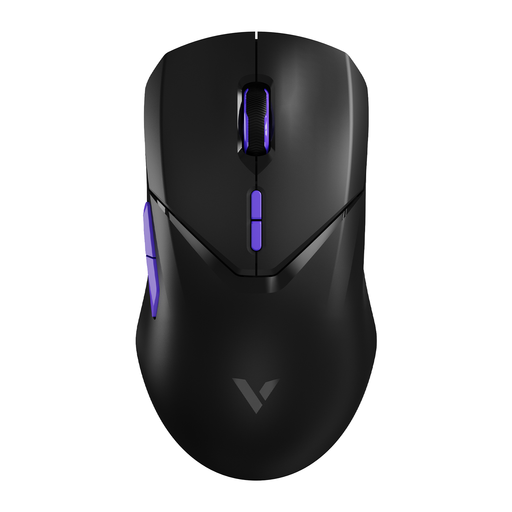
Why it suits this type of user: This model is for gamers who value a lightweight mouse, a high polling rate and a long stated battery life.
The 4K mode is a specific feature, but check in advance that your PC can handle the higher polling rate without a drop in performance.
Weighs 68 grams, features a PAW3398 optical sensor with up to 26,000 DPI and offers up to 180 hours of battery life according to RAPOO.
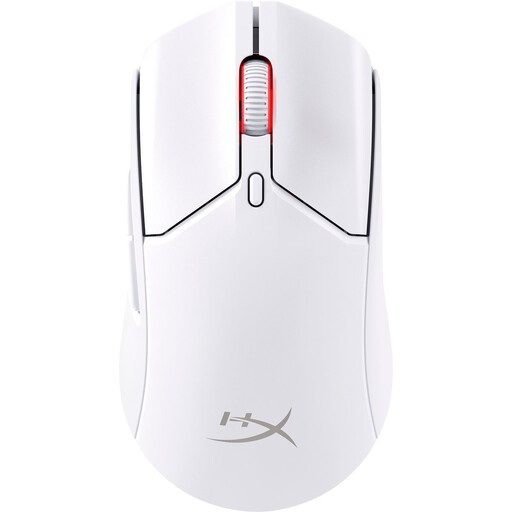
Why it suits this type of user: A lightweight wireless mouse for players who want to make quick movements and use both 2.4GHz and Bluetooth.
According to the product information, you can also use the mouse via its cable while it charges, so a flat battery is less likely to interrupt your session.
Weighs around 60 grams, features a HyperX 26K sensor and six programmable buttons, and offers up to 100 hours of battery life according to HyperX.
We’ve put together a complete, up-to-date list of products that meet these strict selection criteria and current European safety regulations.
Yes, it can be. For gaming, it’s best to choose a model with a 2.4GHz connection and USB receiver. Bluetooth is handy for laptops and everyday use, but check the stated polling rate and compatibility. A model that also works as a wired mouse gives you another option if the battery runs flat.
For most users, an adjustable range of up to a few thousand DPI is enough. A gaming mouse with 16,000, 26,000 or 35,000 DPI offers more settings, but you don’t have to use the maximum. Focus on the sensor, adjustability and how the mouse feels in your hand.
It varies by model and usage. RGB lighting, connection mode and polling rate can all affect battery life. Check whether the manufacturer quotes a maximum, whether the battery is replaceable and whether you can keep playing while the mouse charges. This helps avoid surprises during a long gaming session.
