
Vandaag of morgen in huis

Kwaliteit gegarandeerd

Welkomstaanbiedingen ontgrendelen: GRATIS bezorging | Tot 80% korting | Gratis 30 dagen JoyPlus-proefperiode
Download de app
A gaming mouse should feel comfortable in your hand, respond accurately and suit the games you play. However, it is not wise to focus solely on a high DPI figure or eye-catching RGB lighting. These features do not automatically tell you anything about the overall user experience.
For Dutch PC and laptop gamers, three pitfalls are particularly important:
A gaming mouse with adjustable DPI lets you change the cursor speed. Higher sensitivity can be convenient for office work, while you will often use a lower setting in an FPS game for more controlled movements. More DPI is therefore not automatically necessary.
Pay attention to these three details:
The sensor should also suit your surface. A clean desk and a suitable mouse mat help keep movement smooth and consistent. High sensor resolution cannot compensate for a poor grip or an uneven surface.
A lightweight gaming mouse is particularly appealing to FPS players who frequently make large, fast movements. Models weighing around 70 grams generally feel different from mice weighing more than 100 grams. The right weight depends on your preferences, mouse mat and playing style.
Also consider:
An ergonomic gaming mouse with clear thumb support can be comfortable during longer sessions. A symmetrical model may offer more flexibility, but does not always provide the same level of support for your hand. Check the dimensions before ordering.
A wired gaming mouse draws power via USB and does not need to be charged. You also do not need a battery indicator. Do pay attention to the cable, though: a stiff or short cable can restrict your freedom of movement. A flexible cable with sufficient length is more practical on a desk where the PC is positioned underneath.
A wireless gaming mouse keeps your desk free from cables. Check whether the model works via Bluetooth, 2.4GHz or both. For gaming, a supplied USB receiver is often useful. Also check the battery life, charging connection and whether you can continue playing while the mouse is charging.
A programmable gaming mouse can offer extra functions in MOBA, RTS and productivity software. Think of shortcuts, macros or assigning a specific action to a thumb button. Do check that the required software works with your operating system. With some models, certain functions are only available in wired mode or through Windows software.
An RGB gaming mouse mainly adds lighting to your setup. With some mice, you can adjust effects, colours and brightness. Treat RGB as an additional feature rather than a reason to compromise on the sensor, shape or connection.
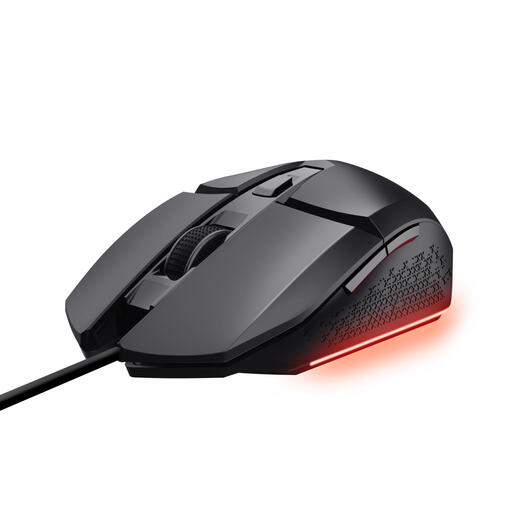
Why it suits this profile: This wired gaming mouse offers a straightforward entry point with six buttons, adjustable DPI and customisation software. It is practical for PC gamers who do not want to manage a battery or wireless receiver.
The fixed USB connection prevents battery issues. The optical sensor and DPI button make the most important settings easy to adjust directly.
DPI from 200 to 6400, six buttons, RGB lighting with three settings and a 1.5-metre cable.
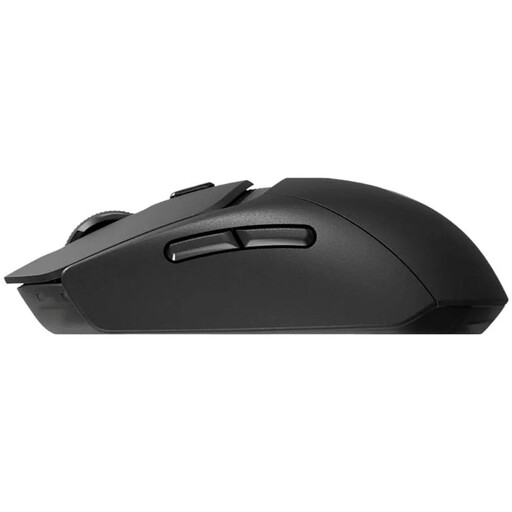
Why it suits this profile: The combination of LIGHTSPEED, Bluetooth, six programmable buttons and an optical sensor offers flexibility for gaming and everyday use on PC or Mac.
You can choose between a wireless radio connection and Bluetooth. The manufacturer also states that it offers more than 300 hours of use with a single AA battery; actual battery life depends on usage and settings.
HERO 25K sensor according to the product information, weight of 86 grams and maximum polling rate of 1000 Hz.
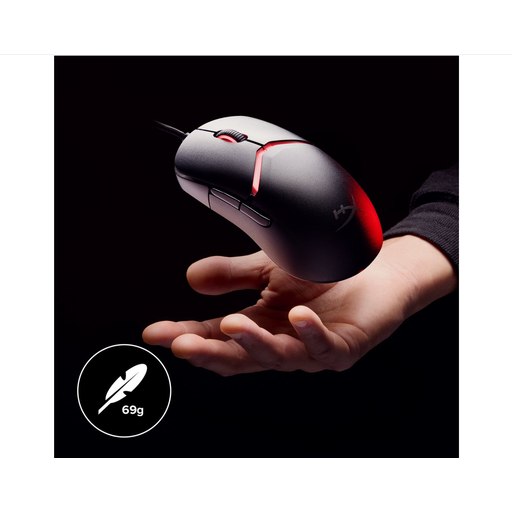
Why it suits this profile: This model is aimed at players who value low weight, extensive customisation options and a high polling rate for FPS and fast-paced competitive games.
The 69-gram weight and flexible USB cable reduce the drawbacks of a cumbersome wired mouse. The modular components let you customise the fit.
26,000 DPI, polling rate of up to 8000 Hz, six buttons and RGB customisation via HyperX NGENUITY according to the product information.
We have compiled a complete, up-to-date list of products that fully meet these strict selection criteria and the applicable European safety regulations.
Always check the official compatibility information. The Trust GXT 109 Felox is listed as suitable for Windows and Mac. With wireless models, you should also check whether the USB receiver and configuration software work with your system.
It can be, particularly when the model uses a 2.4GHz connection with a USB receiver. Pay attention to battery life, weight and whether you can play while the mouse is charging. Bluetooth is practical for general use, but not every model uses Bluetooth as its primary gaming connection.
Lifespan depends on the switches, cable, scroll wheel, intensity of use and maintenance. Manufacturers sometimes provide a click rating, but this is a product specification rather than a guarantee of a particular service life. Keep the sensor and mouse mat free from dust, do not pull on the cable and do not use liquids when cleaning. In the EU, consumers also benefit from the legal guarantee of conformity; additional rights may apply in the event of problems.
