
Vandaag of morgen in huis

Kwaliteit gegarandeerd

Welkomstaanbiedingen ontgrendelen: GRATIS bezorging | Tot 80% korting | Gratis 30 dagen JoyPlus-proefperiode
Download de app
A gaming mouse needs to suit your play style, hand size and setup. Yet many gamers still choose based on a high DPI number, flashy RGB lighting or a well-known brand name. That can lead to a mouse that’s too heavy, uncomfortable to hold, or packed with features you’ll never use.
In this buying guide from the Joybuy Product Recommendation Officer, we compare the practical features of a gaming mouse. You’ll learn what to look for in a wireless gaming mouse, a wired gaming mouse, an ergonomic gaming mouse and a lightweight gaming mouse.
DPI tells you how sensitive the mouse can be set. A gaming mouse with high DPI can be handy for fast movements, but a higher maximum value doesn’t automatically mean a better gaming experience. In practice, many players use a lower setting for more control.
So also pay attention to:
A sensor with 6,400 or 8,500 DPI can be enough for many players. Models with 26,000, 30,000 or 35,000 DPI mainly offer extra adjustment range for users who consciously make use of it.
A wireless gaming mouse gives you more freedom of movement, but you need to consider charging, a wireless receiver or Bluetooth compatibility. Also check whether the mouse can be used wired while charging.
The Logitech G PRO X SUPERLIGHT 2 LIGHTSPEED, for example, uses wireless technology and USB-C charging. The Razer Viper V3 Pro Wireless works wirelessly and can be connected via USB-C. The Razer Orochi V2 uses an AA or AAA battery; according to the product specifications, this model does not have a rechargeable battery.
RGB lighting doesn’t change the sensor’s performance. It’s mainly a choice for the look of your desk. Check whether the lighting can be switched off and whether you need separate software.
Lots of buttons are only useful if you actually use them. An MMO player can benefit from many programmable buttons, while an FPS player often prefers a simple, lightweight mouse with few obstacles during fast movements.
Weight affects how easily you lift and move the mouse. A lightweight gaming mouse of around 50 to 60 grams can feel comfortable with low sensitivity and large arm movements. A heavier model can feel more stable.
Also consider the shape:
The Razer Pro Click V2 Vertical Edition weighs 150 grams according to the product specifications and has a vertical shape. That makes this model particularly interesting for users who deliberately want such a design, not for those looking for a lightweight FPS mouse.
The models mentioned use optical sensors. An optical gaming mouse works with a sensor that registers the surface beneath the mouse. Use the mouse on a clean, suitable surface and keep the sensor opening free of dust.
The polling rate indicates how often the mouse sends data to the computer. 1,000 Hz is a common setting. Some models support 4,000 or 8,000 Hz. A higher polling rate can demand extra system resources and is mainly relevant when your computer, monitor and game settings align with it.
A wired gaming mouse receives power directly via USB and doesn’t need a battery or rechargeable cell. That’s practical for a fixed PC setup. Do pay attention to the cable length and flexibility.
A wireless gaming mouse is more convenient if you want a tidy desk or use the mouse with multiple devices. Check beforehand:
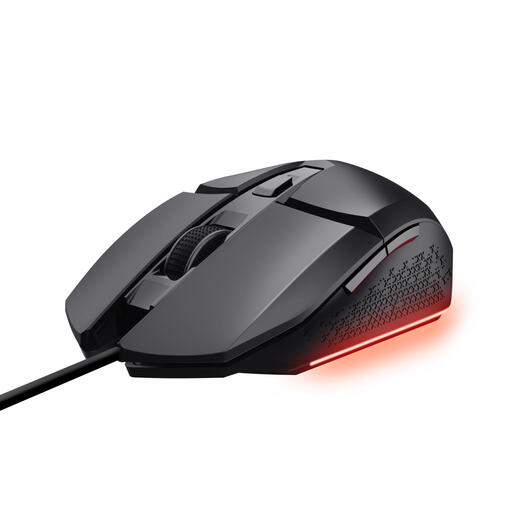
Why this fits the profile: This wired gaming mouse offers a straightforward start with six buttons, adjustable DPI and RGB lighting, without needing a battery or wireless receiver.
The maximum resolution of 6,400 DPI stops you from paying solely for a high DPI number. The USB cable eliminates charging concerns.
Optical sensor, six buttons, adjustable DPI up to 6,400 and a 1.5-metre cable.

Why this fits the profile: For players who value wireless freedom and a low weight, this model combines 60 grams with LIGHTSPEED connectivity and USB-C charging, according to the product specifications.
The low weight is clearly specified and the battery is rechargeable. Just check beforehand whether five buttons are enough for your games.
60 grams, wireless LIGHTSPEED technology, HERO 2 sensor and USB-C connection.

Why this fits the profile: This model is aimed at users who want a vertical mouse shape, wireless connection and use with multiple devices.
Choosing a vertical shape makes the fit clear from the start. The mouse supports USB-C, Bluetooth and Razer HyperSpeed.
30,000 DPI, six programmable buttons, 18-zone RGB and multi-device connection.

Why this fits the profile: The stated 54 grams, six buttons and wireless connection suit players who value fast movements and a simple shape.
The weight and polling rate are listed as product specifications. The mouse has no unnecessary row of extra buttons.
54 grams, optical Focus Pro 35K sensor, up to 8,000 Hz and stated battery life of up to 95 hours.
We’ve put together a full, up-to-date list of products that fully meet these strict selection criteria and comply with current European safety regulations.
For FPS games, many players choose a lightweight mouse with an optical sensor, few buttons and a shape that doesn’t hinder fast movements. Also look at the weight, grip and polling rate. A high DPI number isn’t necessary if you mainly play with low sensitivity.
A modern wireless gaming mouse can offer low response times according to the product specifications, but the result depends on the connection, receiver and settings. A wired gaming mouse has the practical advantage that you don’t need to charge a battery. For both types, a stable USB connection or wireless link is important.
The lifespan depends on use, storage and maintenance. Keep the sensor and mouse feet clean, don’t pull on the cable and avoid contact with liquids. Manufacturers sometimes state a click lifespan; according to the brand’s own research, that is a product estimate and not a guarantee for every user. In the EU, these products are covered by a minimum statutory warranty of two years, with additional rights that may apply under applicable Dutch law.
