
Vandaag of morgen in huis

Kwaliteit gegarandeerd

Welkomstaanbiedingen ontgrendelen: GRATIS bezorging | Tot 80% korting | Gratis 30 dagen JoyPlus-proefperiode
Download de app
A gaming mouse might seem simple at first: plug it in and play. But many buyers make the same mistakes. They choose a model with an extremely high DPI without checking how adjustable the sensor is, pay extra for RGB lighting they barely use, or overlook the shape of the mouse. After a few weeks, this can mean less control, an awkward grip or a cable that gets in the way while you play.
In this buying guide, we compare key specifications and match different gaming mice to specific types of user. That way, you can choose more confidently between a wireless gaming mouse, a wired gaming mouse, an ergonomic gaming mouse or an ultralight gaming mouse.
A gaming mouse with a high DPI sounds appealing, but a higher figure doesn’t automatically mean a better gaming experience. Many players actually use lower sensitivity in FPS games for more controlled movements. What matters more is whether the DPI is easy to adjust and whether the optical sensor tracks movement smoothly.
So, check:
A wireless mouse for your PC keeps your desk tidy and gives you more freedom of movement. On the other hand, you’ll need to charge or replace the battery. Don’t just look at the stated battery life; check the charging options too. Some models can still be used while charging via USB-C.
A model such as the Logitech G309 uses an AA battery and has a stated battery life of over 300 hours. Other mice have a built-in battery, such as the Razer DeathAdder V3 Pro White, with a stated battery life of up to 90 hours.
An ergonomic gaming mouse should suit your hand size, grip and play style. A right-handed shape won’t suit everyone. Weight matters too. An ultralight gaming mouse weighing around 54 to 70 grams can feel comfortable for fast FPS movements, while a heavier model with extra buttons may offer more control in MOBA or RTS games.
DPI determines how many pixels the cursor moves in response to a given physical movement. A setting of 800 to 1600 DPI works well for many players, but gamers who regularly switch between games may benefit from having several adjustable profiles.
The polling rate shows how often the mouse reports its position to the computer. 1000 Hz is a common figure. According to their product specifications, some wired models go up to 8000 Hz, such as the Razer DeathAdder V3 and HyperX Pulsefire Saga. Your computer, software and game will need to support the higher frequency, though.
A low weight makes it easier to lift and reposition the mouse quickly. According to the product information, the Razer Viper V3 Pro weighs 54 grams, the Logitech G PRO X SUPERLIGHT 2 weighs 60 grams and the Razer DeathAdder V3 Pro White weighs 63 grams. Also check:
Programmable buttons are useful for shortcuts, macros or abilities in MOBA and RTS games. For FPS players, too many buttons can get in the way. A model with six buttons can be a good middle ground; according to its specifications, the Logitech G G502 X has 11 programmable buttons.
RGB lighting doesn’t affect tracking or response speed, so think of RGB on a gaming mouse as a design choice. Check whether you can turn the lighting off using the software, too. If you use several accessories, you may be able to synchronise their lighting within the same software environment.
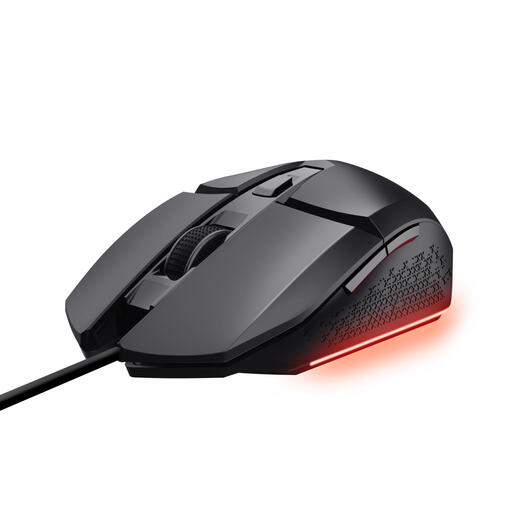
Why it suits this type of user: This wired gaming mouse offers adjustable DPI, six buttons and RGB lighting, without the need to worry about a battery. Its 1.5-metre cable is suitable for a standard PC setup.
The DPI is adjustable up to 6400, and the software supports button and macro settings. So you don’t have to rely solely on a high fixed DPI setting.
Optical sensor, six programmable buttons, RGB lighting and support for PC and Mac, according to the product description.

Why it suits this type of user: Weighing 60 grams, with a wireless LIGHTSPEED connection, USB-C charging and a HERO 2 sensor, this mouse is a good fit for players who want to avoid cable drag during competitive gaming.
The specifications list both the battery and USB-C charging option, as well as the wireless receiver. This means you can factor in how you’ll charge it before making your choice.
60 grams, a HERO 2 sensor of up to 32,000 DPI according to the product information, and a polling rate of up to 4000 Hz.
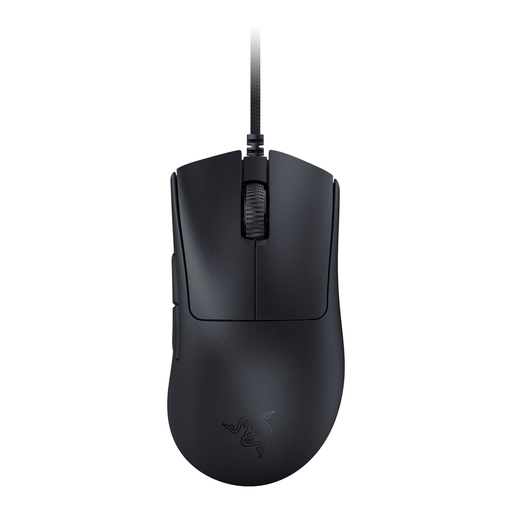
Why it suits this type of user: This wired FPS gaming mouse combines a right-handed ergonomic shape with a weight of 59 grams. It’s a good choice for players who make quick movements and don’t want to charge a battery.
The fixed USB connection means a flat battery won’t interrupt your gaming session. The specifications also list a polling rate of up to 8000 Hz and an optical sensor.
59 grams, a Focus Pro sensor of up to 30,000 DPI and six programmable buttons, according to the product specifications.
We’ve put together a complete, up-to-date list of products that meet these strict selection criteria and current European safety regulations.
It depends on the connection and your preference. A 2.4GHz connection with a USB receiver is designed for low latency. Bluetooth is useful for compatibility and lower power consumption, but is less commonly chosen for competitive FPS games. Also check whether the receiver needs a free USB port.
Its lifespan depends on the switches, cable, battery and how often you use it. Product information sometimes lists a click rating, such as 90 million clicks for certain optical switches. This is a technical figure provided by the manufacturer, not a guarantee of the mouse’s overall lifespan. Keep the sensor and mouse mat clean, and don’t pull on the cable if you have a wired model.
Many mice work as basic pointing devices via USB or Bluetooth. You may need specific software to use programmable buttons, DPI profiles and RGB settings. So, check macOS support before buying. The Trust GXT 109 is explicitly listed as compatible with PC and Mac; other models may offer more limited software features on Mac.
