
Vandaag of morgen in huis

Kwaliteit gegarandeerd

Welkomstaanbiedingen ontgrendelen: GRATIS bezorging | Tot 80% korting | Gratis 30 dagen JoyPlus-proefperiode
Download de app
Buying a gaming mouse seems simple, until you have to choose between wireless and wired, high DPI, a low polling rate, extra buttons and different shapes. Marketing terms don’t always tell you what you actually need. A mouse with 30,000 DPI, for example, isn’t automatically better suited to your play style than one with 8,000 DPI.
For PC gamers, FPS players and streamers, three things matter most: reliable tracking, a shape that suits your hand and grip, and a connection that works for the way you use it. Read on to find out what to look for and which models suit different types of user.
DPI indicates how sensitive you can make the mouse. A high-DPI gaming mouse offers plenty of adjustment options, but many players actually use lower sensitivity for controlled movements during FPS games. So look at the sensor, whether you can adjust the DPI settings, and how consistently the mouse tracks.
An optical sensor is common in modern models. Also check whether you can adjust the DPI using software, a button, or both.
The polling rate indicates how many times per second the mouse sends its position to the computer. At 1,000 Hz, this happens up to 1,000 times per second; with an 8K polling rate mouse, it rises to 8,000 times per second.
A higher rate can be useful, particularly for fast movements, but it also places greater demands on your system and screen. Not every player will notice a big difference between 1,000 Hz and 8,000 Hz. So don’t just focus on the figure: check whether you can adjust the polling rate too.
An ergonomic gaming mouse is often shaped for a specific hand and is usually designed for right-handed use. A symmetrical model may be a better fit for a claw grip, fingertip grip or left-handed use. Weight matters too: a lightweight gaming mouse is easy to move, while a heavier model may offer greater stability.
Before you buy, check the dimensions, number of buttons and hand orientation. Extra buttons are only useful if you can reach them without changing your grip.
A wireless gaming mouse using 2.4 GHz lets you move freely without a cable on your desk. Bluetooth is handy for laptops and everyday use, but not every model is designed to offer the lowest latency over Bluetooth. A wired gaming mouse doesn’t need a battery and stays directly connected during long sessions.
Some models combine 2.4 GHz, Bluetooth and USB-C. This is useful if you want to use the same mouse with a gaming PC, laptop and other devices. Do check that the programming software works in all connection modes. For example, the ET Wireless Gaming Mouse is listed as supporting programming software only on Windows and in wired mode.
Many players choose a lightweight mouse for FPS games, as quick changes of direction take less effort. Models weighing around 53 to 70 grams are considered lightweight. An ergonomic shape with a thumb rest can be more comfortable for long gaming sessions, but may be less suitable if you regularly switch hands.
Check the difference between the weight of the mouse itself and its weight including packaging. Product pages may show both.
A gaming mouse with programmable buttons is useful for MMO, MOBA and RTS games, as well as for shortcuts when streaming or working. Check:
RGB lighting doesn’t affect performance. Think of it as a customisable look, and check whether you can switch it off.

Why it suits this type of user: This wireless gaming mouse combines 2.4GHz connectivity and USB-C charging with a straightforward set of features for PC and laptop gamers looking for their first gaming mouse.
The specifications list 4800 DPI, a polling rate of up to 1000 Hz and six programmable buttons. That means you’re not paying solely for RGB lighting.
73 grams, an optical sensor, RGB lighting and a stated battery life of up to 80 hours.

Why it suits this type of user: This model is designed for players looking for an exceptionally lightweight mouse, wireless 8K polling and extensive settings for competitive games.
The product description mentions more than just 8K wireless: it also lists a weight of 53 grams, independent X/Y DPI settings, and software for Windows and Mac.
53 grams, up to 30,000 DPI, ten programmable buttons and a battery life of up to 750 hours at 1000 Hz, as stated in the product description.
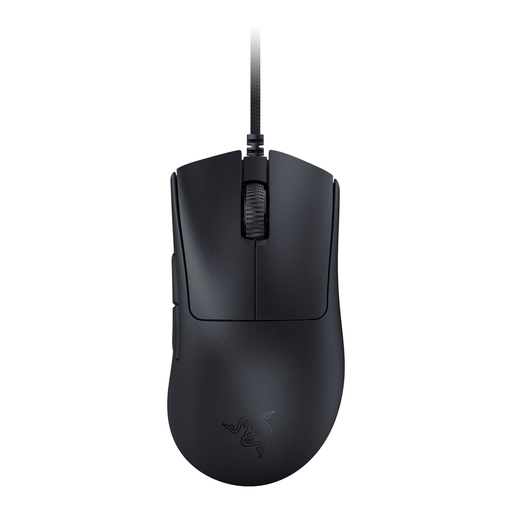
Why it suits this type of user: Right-handed players looking for a wired ergonomic gaming mouse for FPS games get a simple connection without having to manage a battery.
This model isn’t about wireless features or lighting: it uses a cable and an optical sensor, with a polling rate of 8000 Hz according to the product specifications.
59 grams, 30,000 DPI, six programmable buttons and an ergonomic shape for right-handed use.

Why it suits this type of user: With 2.4 GHz, Bluetooth and USB-C, this mouse suits people who game on a PC and also work with a laptop or several devices.
The connection options are clearly distinguished. Bear in mind that, according to the product information, programming through the software only works on Windows when the mouse is connected by cable.
Up to 10,000 DPI, eight programmable buttons, RGB lighting and three connection modes.
We’ve put together a complete, up-to-date list of products that meet these strict selection criteria and the applicable European safety regulations.
Yes, provided the mouse has a stable 2.4GHz connection and a suitable polling rate. Also check the battery life and whether you can keep playing while it charges. Bluetooth is especially handy for general use, but isn’t always the first choice for competitive FPS games.
It depends on your screen, game and play style. A range of a few thousand DPI gives most PC gamers enough settings to choose from. A higher maximum DPI is mainly useful if you want to try out lots of settings; it doesn’t guarantee more accurate aiming.
Lifespan depends on the switches, cable or battery, how intensively you use it and how well you maintain it. Manufacturers sometimes state a click rating, such as 10 million, 90 million or 120 million clicks. These figures are based on manufacturers’ own claims and refer to design or laboratory values; they don’t guarantee a particular lifespan. Keep the sensor clean, avoid liquid damage, and check the warranty and returns terms before you buy.
