
Vandaag of morgen in huis

Kwaliteit gegarandeerd

Welkomstaanbiedingen ontgrendelen: GRATIS bezorging | Tot 80% korting | Gratis 30 dagen JoyPlus-proefperiode
Download de app
A gaming mouse needs to suit your game, your hand and your desk. Yet the choice is often driven by a high DPI number or flashy RGB lighting. These aren't always the features you'll notice during a long gaming session. A lower price can also mean a fixed cable, fewer programmable buttons, or a shape that doesn't match your grip.
This buying guide helps PC gamers and esports enthusiasts compare specifications in a practical way. You'll learn what to look for in a wireless gaming mouse, wired gaming mouse, optical sensor and ergonomic design. After that, you'll find three recommendations for different user profiles.
DPI indicates how sensitively the cursor responds to movement. A gaming mouse with high DPI might support 18,000, 30,000 or even 42,000 DPI. In practice, however, many users play at a much lower setting. So don't just look at the maximum, but especially at:
For FPS games, accurate, consistent movement is often more important than an extremely high maximum value.
A wireless gaming mouse gives you more freedom of movement, but pay attention to the type of power source. Some models use an AA or AAA battery, while others have a built-in rechargeable battery. So check:
The stated battery life is a product specification from the brand. According to Razer's own claims, the Orochi V2 lasts up to 1,000 hours via Bluetooth and up to 450 hours via HyperSpeed Wireless. According to Logitech G's product information, the G309 achieves more than 300 hours with an AA battery. Actual battery life may vary depending on connection mode and settings.
A compact, symmetrical mouse can be handy for small to medium-sized hands, or for those who alternate between palm, claw or fingertip grip. A larger ergonomic gaming mouse offers more support for the right hand, but is usually less suitable for left-handed users.
Check the length, width, height and weight before you buy. An ultralight gaming mouse under 70g can support fast movements. A heavier model can offer more stability instead. Neither is automatically the right choice for every player.
An optical gaming mouse uses an optical sensor to track movement. Alongside DPI, look at the maximum polling rate. This indicates how often the mouse sends information to the computer per second. A higher polling rate can be relevant for competitive games, but sometimes demands more system resources.
For daily use and most games, an adjustable sensor with multiple sensitivity levels is practical. If you mainly play fast-paced FPS games, you can also look at weight, glide speed and the ability to adjust the lift-off distance.
A wired gaming mouse via USB is ready to use straight away and doesn't need a battery. A cable of 1.5 to 2 metres usually offers enough room on a desk, but cable drag can be noticeable at low sensitivity.
Wireless models with a 2.4GHz receiver are designed for gaming. Bluetooth is handy for laptops and everyday use, but check that your computer supports Bluetooth. Models with tri-mode connection often combine 2.4GHz, Bluetooth and USB-C.
Extra buttons are useful for MMOs, MOBAs, simulation games and productivity. For simple FPS setups, two side buttons are sometimes enough. Check whether the buttons are genuinely programmable and whether the software is compatible with your operating system.
RGB lighting doesn't change how the mouse performs. Treat it as a visual feature. On some mice you can adjust colours and effects; on others, lighting is limited or absent altogether.
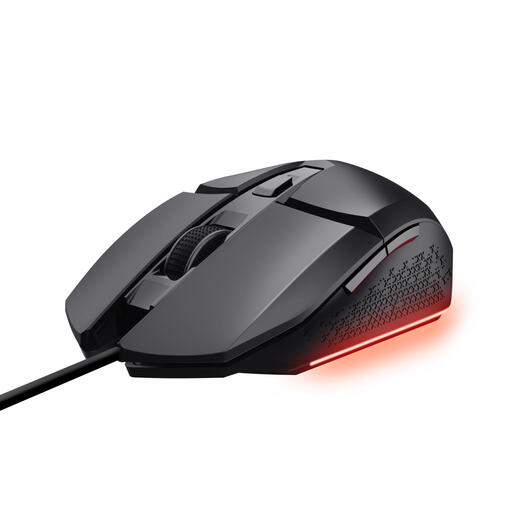
Why this fits the profile: This wired gaming mouse is suitable for PC gamers who don't want to charge a battery and are looking for basic features at a clear price.
The adjustable DPI ranges from 200 to 6,400 and isn't just listed as a marketing maximum. The fixed cable eliminates battery maintenance.
Optical sensor, six buttons, programmable functions, RGB with three settings and a 1.5-metre cable.
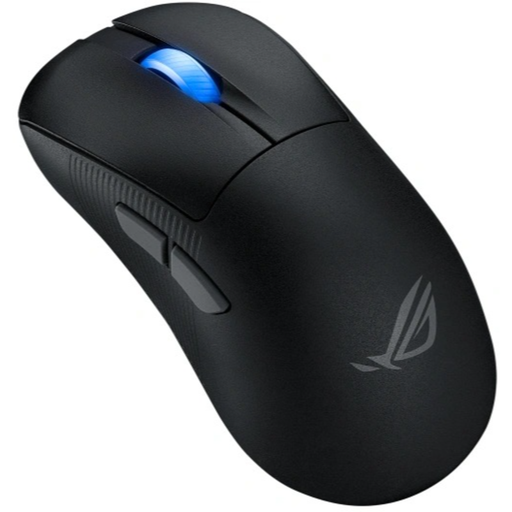
Why this fits the profile: This model is aimed at right-handed players who want to combine a lightweight ergonomic shape with multiple connection options.
The specifications list 54g, RF Wireless, Bluetooth and USB. This means you're not reliant on a single connection method.
Optical sensor up to 42,000 DPI, polling rate up to 8,000 Hz in wired mode, RGB lighting and stated battery life of up to 134 hours.

Why this fits the profile: Players looking for plenty of customisation options and a lightweight mouse get three connection modes and a charging dock here.
According to the product information, the mouse can be used via Bluetooth, 2.4GHz or USB-C. The magnetic charging dock reduces the hassle of loose charging cables.
56g, sensor up to 42,000 DPI, polling rate up to 8,000 Hz, RGB charging dock and software for buttons, macros and settings.
We've put together a full, up-to-date list of products that fully meet these strict selection criteria and comply with current European safety regulations.
A USB mouse has a direct physical connection and doesn't need to be charged. However, modern wireless models with a 2.4GHz receiver are also designed for fast response. Check the connection mode, polling rate and whether a receiver is included. Bluetooth is practical for everyday use, but isn't always the first choice for competitive FPS games.
That depends on your screen, game settings and play style. An adjustable range from a few hundred DPI up to several thousand DPI gives you enough room to start. A gaming mouse with high DPI is only useful if you actually use those higher values. Test different settings and focus on smooth movements rather than just the maximum.
The lifespan depends on the switches, cable, battery or rechargeable battery, and daily use. Brands sometimes mention a click rating, but this is a stated product specification and not a guarantee for every user. Clean the sensor and mouse feet carefully, don't pull on the cable, and store a wireless model according to the battery instructions. The statutory warranty in the EU is usually at least two years; additional rights may apply under Dutch consumer law.
