
Vandaag of morgen in huis

Kwaliteit gegarandeerd

Welkomstaanbiedingen ontgrendelen: GRATIS bezorging | Tot 80% korting | Gratis 30 dagen JoyPlus-proefperiode
Download de app
Buying a gaming mouse seems simple, until you have to choose between DPI, polling rate, weight, wireless connectivity, RGB lighting and programmable buttons. A high price doesn’t automatically mean a mouse will suit your play style. On the other hand, an affordable model may be all you need for casual gaming and everyday computer use.
The right choice depends mainly on your grip, favourite games, available space and how you connect the mouse. Read on to find out what to look for and which models suit different types of user.
A gaming mouse with a high DPI can move the cursor across the screen more quickly. That doesn’t automatically mean you’ll aim more accurately. Many FPS players actually use a lower sensitivity, combined with larger mouse movements. So check whether you can adjust the DPI and quickly switch between different levels.
A polling rate indicates how often the mouse reports its position to the computer. 1,000 Hz means up to 1,000 updates per second; 4K and 8K gaming mice can increase this rate. A higher setting can put more strain on your system. According to the product information for some models, 4K or 8K can use more CPU resources. If you experience stuttering or frame drops, a lower setting may be a better choice.
An RGB gaming mouse may look great on your desk, but lighting doesn’t change its shape, weight or sensor. Pay attention to the connection, too. A wireless gaming mouse with a 2.4GHz receiver is designed for low latency, while Bluetooth is mainly useful for everyday use and connecting to multiple devices. Also check where you’ll place the USB receiver and whether you can use the mouse while it’s charging.
An optical gaming mouse uses an optical sensor to track movement. As well as the maximum DPI, look at practical features such as adjustable levels, tracking speed and software support. A maximum of 26,000 or 35,000 DPI is only relevant if you actually need that setting; lower values are enough for office work and most games.
A lightweight gaming mouse weighing around 50 to 75 grams can feel comfortable for fast movements in FPS games. A heavier model may feel more stable. Shape is just as important. An ergonomic gaming mouse designed for right-handed use won’t always suit a left-handed player. Check the dimensions and choose a model that suits your palm, claw or fingertip grip.
A wired mouse doesn’t need a battery and is ready to use straight away. For wireless models, check:
Be aware of the difference between programmable buttons and buttons that only change the DPI or perform a fixed function. If you use macros or profiles, you’ll need software and may also need onboard memory.
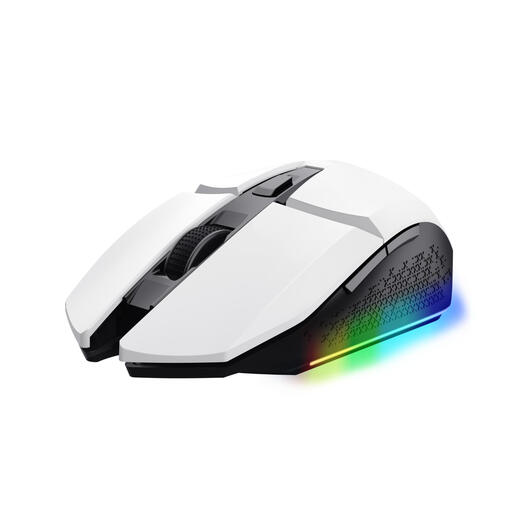
Why it suits this profile: This wireless gaming mouse offers the essentials for PC gamers who don’t want to spend too much. Its DPI is adjustable from 800 to 4,800, and it has six buttons.
The product information lists specific DPI levels, a 2.4GHz receiver and a rechargeable battery. So you’re not paying just for lighting or looks.
Up to 80 hours of battery life according to the product information, RGB lighting and the ability to use it while charging.

Why it suits this profile: This ergonomic model is designed for users who want plenty of buttons and settings for gaming and everyday computer use.
As well as the sensor specification, the product information lists an ergonomic shape, 11 programmable buttons and both wireless and wired connectivity.
35,000 DPI according to the product details, 11 programmable buttons and Razer Chroma RGB.
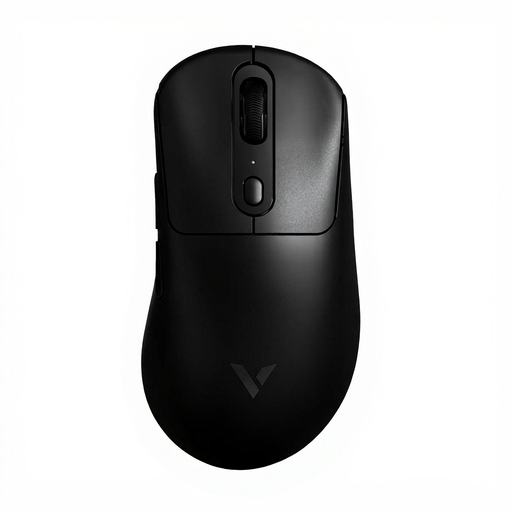
Why it suits this profile: For FPS and MOBA players looking for a lightweight wireless mouse with a high polling rate, this model combines a weight of 59 grams with wireless 8K support.
The specs list not only 8K polling, but also 30,000 DPI, adjustable X/Y DPI and up to 200 hours of battery life according to the product information. Do check that your PC can handle 8K properly.
59 grams, a PAW 3950 optical sensor according to the product details and 10 programmable buttons.
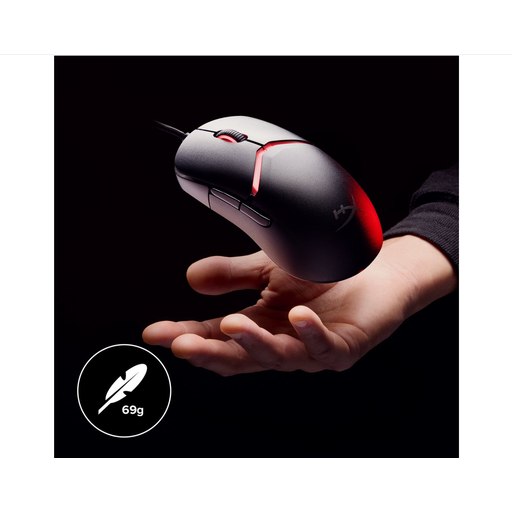
Why it suits this profile: A lightweight wired gaming mouse is a practical choice if you don’t want to charge a battery and are looking for a polling rate of up to 8,000 Hz.
You avoid battery maintenance, and the product information mentions a flexible cable. Before buying, check that your desk has enough room for a cable.
69 grams, up to 26,000 DPI and an 8,000 Hz polling rate according to the product details.
We’ve put together a complete, up-to-date list of products that meet these strict selection criteria and comply with the applicable European safety regulations.
A 2.4GHz connection with a USB receiver is generally designed for fast wireless communication. Check the polling rate, connection mode and battery life in the product specifications. Bluetooth is mainly useful for everyday use, but it isn’t the preferred gaming connection for every model.
It depends on your screen, game and play style. An adjustable mouse with a range of, for example, 800 to 4,800 DPI is enough for many users. Higher values offer more options, but they don’t automatically make a mouse more accurate.
Keep the sensor and glide pads free of dust, and use a soft, dry cloth. Don’t use liquid on the sensor or USB connection. For a wireless model, you can extend the battery’s lifespan by avoiding prolonged periods with the battery completely drained. Always check the manufacturer’s safety instructions before cleaning.
