
Vandaag of morgen in huis

Kwaliteit gegarandeerd

Welkomstaanbiedingen ontgrendelen: GRATIS bezorging | Tot 80% korting | Gratis 30 dagen JoyPlus-proefperiode
Download de app
Buying a gaming mouse sounds simple, until you have to choose between wireless or wired, 4,800 or 18,000 DPI, and a lightweight model or a more ergonomic shape. Marketing copy often focuses on impressive numbers, while comfort, connectivity and controls are just as important.
Pay particular attention to these three pitfalls:
An optical gaming mouse uses an optical sensor to register movement. Don’t just check the maximum DPI; also look at whether the sensitivity is adjustable and how finely you can change the increments.
A range of 800 to 4,800 DPI is sufficient for many users. Models with 18,000, 25,600 or 44,000 DPI offer more flexibility, but that does not automatically mean you will play more accurately. Also consider the software, sensor stability and the option to save multiple DPI profiles.
For example, the Razer Cobra Wired Gaming Mouse lists an adjustable optical sensor of up to 8,500 DPI, with 50 DPI increments. According to the product information, this model also has six buttons and a USB connection.
A wired gaming mouse receives a constant power supply via USB. You don’t need to charge a battery or use a wireless receiver. A well-designed cable, such as a flexible cable construction, can reduce drag during fast movements.
A wireless gaming mouse usually works via a 2.4GHz USB receiver. Check:
Bluetooth is particularly useful for office work and multiple devices. For competitive gaming, a dedicated wireless connection or USB cable is often more practical. The stated performance is based on product specifications; results may vary depending on your computer, surface and settings.
A lightweight gaming mouse weighing around 53 to 75 grams generally feels nimble. This suits players who frequently lift and reposition their mouse. A heavier model may feel more stable instead.
Also consider hand orientation. Many ergonomic gaming mice are designed exclusively for right-handed use. A symmetrical mouse is not automatically fully suitable for left- and right-handed use: check whether buttons are available on both sides.
Five or six buttons are often enough for FPS games. In MOBA and RTS games, extra programmable buttons can be useful. For office work, a quiet wireless mouse with three buttons may make more sense than a model with RGB lighting and gaming software.

Why it suits this profile: This wireless gaming mouse combines a 2.4GHz receiver with a rechargeable battery and six buttons. It gives beginners a straightforward starting point without immediately having to choose a wired model.
The specifications list a range of 800 to 4,800 DPI, so you are not relying solely on an extremely high DPI claim. The battery is rechargeable, and you can continue playing while it charges.
75 grams according to the product information, six programmable buttons, USB-C charging and RGB lighting.

Why it suits this profile: Its compact size and low weight suit FPS players looking for a lightweight mouse with a wireless LIGHTSPEED connection.
Alongside its high stated sensor resolution, this model offers a compact 53-gram design, five programmable buttons and a rechargeable battery. There is no RGB lighting, so you are not paying for a feature you do not need.
HERO 2 optical sensor up to 44,000 DPI, up to 95 hours of battery life according to the product information, and a polling rate of up to 8,000 Hz with suitable software.
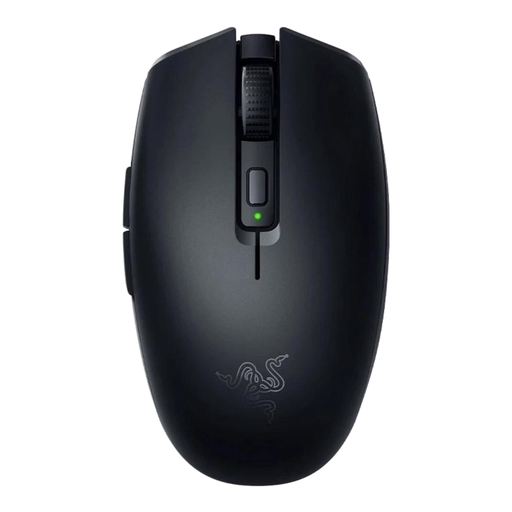
Why it suits this profile: This compact Razer gaming mouse is designed for users who switch between gaming, laptop use and portability.
You are not limited to a single connection: this model supports Razer HyperSpeed Wireless and Bluetooth. Its symmetrical shape is suitable for left- and right-handed use, but check beforehand that it suits your grip.
Up to 18,000 DPI, six programmable buttons and a stated battery life of up to 450 hours via HyperSpeed or 1,000 hours via Bluetooth.

Why it suits this profile: This ergonomic mouse is designed for everyday work rather than fast gaming movements. Its vertical shape, with a 57-degree angle, does take some getting used to.
Here, you are deliberately choosing shape and working comfort rather than RGB, numerous buttons or extreme DPI. If possible, test whether a vertical mouse feels comfortable in your hand.
Bluetooth and 2.4GHz connectivity, adjustable up to 4,000 DPI, five buttons and a rechargeable battery.
We have put together a complete, up-to-date list of products that fully meet these strict selection criteria and the applicable European safety regulations.
It can be, provided the model offers a suitable 2.4GHz connection with a USB receiver. Also check the battery status and whether you can continue playing while it charges. Bluetooth is useful for general use, but it is not always the first choice for competitive gaming.
For everyday use and many games, an adjustable range of around 800 to 4,800 DPI is often sufficient. A higher maximum DPI provides extra settings, but does not automatically make the mouse more accurate. Match the DPI to your screen resolution, game and personal sensitivity.
Its lifespan depends on the switches, cable or battery, intensity of use and maintenance. Some brands state a click lifespan, such as 60 or 90 million clicks. According to the brands’ own claims, these are expected specifications, not a guarantee for every user. Keep the mouse dry, clean the sensor and use a suitable mouse mat to minimise wear.
