
Vandaag of morgen in huis

Kwaliteit gegarandeerd

Welkomstaanbiedingen ontgrendelen: GRATIS bezorging | Tot 80% korting | Gratis 30 dagen JoyPlus-proefperiode
Download de app
A gaming mouse needs to do more than simply move quickly. In FPS games, a predictable sensor is essential, while extra buttons are often more important for MOBA and RTS games. Comfort, connectivity and battery life also matter when using your mouse every day.
Marketing does not always make the choice easier. A high DPI figure may sound impressive, but it says little about how comfortable a mouse feels in practice. Below, we explain the main pitfalls and specifications to consider before buying a gaming mouse for PC or gaming mouse for laptop.
DPI indicates how sensitively the cursor responds to movement. A mouse with 30,000 or 42,000 DPI is not automatically more accurate than a model with 4,800 or 12,000 DPI. Many players actually use a lower setting in games for greater control.
You should also consider:
A gaming mouse with adjustable DPI is practical if you switch between, for example, low sensitivity for FPS games and a higher setting for desktop use.
A polling rate of 4,000 Hz or 8,000 Hz means that the mouse reports its position more often per second. This can make movements feel smoother, but it also increases CPU usage. On some computers, this may affect gaming performance.
A 4K gaming mouse or 8K gaming mouse is particularly interesting if:
If you experience problems such as stuttering or frame drops, you can reduce the polling rate to 1,000 Hz.
An ultra-light gaming mouse can be comfortable for fast movements, but a low weight is not comfortable for everyone. A heavier model may feel more stable. You should also check the shape: a right-handed mouse is not automatically suitable for a left-handed user.
RGB lighting does not change tracking or click response. Choose a gaming mouse with RGB because the lighting suits your desk setup, rather than treating it as a substitute for good ergonomics.
A wired gaming mouse does not need charging and offers a direct USB connection. The downside is cable drag, particularly when the cable is not flexible enough or rubs against the edge of your desk.
A wireless gaming mouse usually uses 2.4 GHz via a USB receiver. Bluetooth is convenient for laptops and office devices, but check whether the mouse has a separate low-latency mode for gaming. A model with USB-C can often be used in wired mode while charging.
For wireless models, look out for:
A mouse weighing approximately 54 to 75 grams generally falls into the lightweight category. The right choice depends on your grip and hand size. If necessary, measure the distance from your wrist to the tip of your middle finger.
An ergonomic gaming mouse with thumb support or a vertical design is a different category from a classic FPS mouse. For example, the Razer Pro Click V2 Vertical weighs 150 grams and has a vertical body. This may appeal to users who combine work and gaming, but the shape takes some getting used to.
A programmable gaming mouse is useful if you want shortcuts, macros or game functions within easy reach. Do not just check the number of buttons; also make sure the configuration software works with your operating system.
For FPS games, five or six easily accessible buttons are often enough. MOBA and RTS players may benefit from more profiles or side buttons. Also check whether settings are saved to the mouse’s internal memory. This is useful if you use the mouse with multiple PCs.
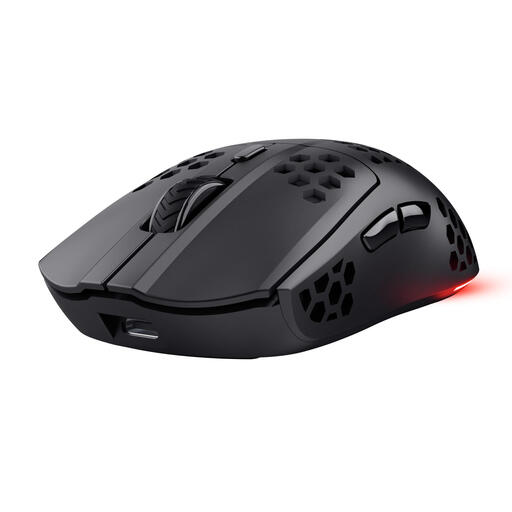
Why it suits this profile: This wireless model combines a low weight with straightforward settings for PC and laptop use. The 2.4GHz receiver and USB-C cable make switching between modes simple.
The specifications state a weight of 73 grams, six programmable buttons, adjustable DPI from 800 to 4,800 and a polling rate of 1,000 Hz. You are not paying solely for lighting or an impressive marketing figure.
Wireless 2.4GHz connection, battery life of up to 80 hours, USB-C and RGB lighting in a honeycomb body.
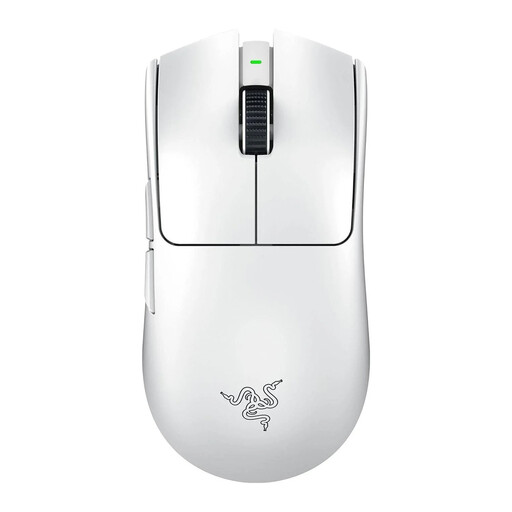
Why it suits this profile: The combination of a 54-gram weight, wireless connection and stated polling rate of up to 8,000 Hz is aimed at players who place a high value on fast FPS input.
The product details mention more than a high DPI figure: they also specify the weight, six buttons, USB-C and battery life of up to 95 hours. Do check whether your PC can make practical use of an 8K polling rate.
54 grams, a Focus Pro 35K sensor according to the product specification, and support for both wireless and wired use.

Why it suits this profile: For MOBA, RTS and simulation games, having plenty of buttons and a wired connection can be more important than a low weight.
The USB connection means you do not need to recharge while playing. The product specification lists 13 buttons, a DPI switch and a weight of 89 grams, making the trade-off clear.
Ergonomic right-handed design, 25,600 DPI according to the product listing, and multiple programmable functions.
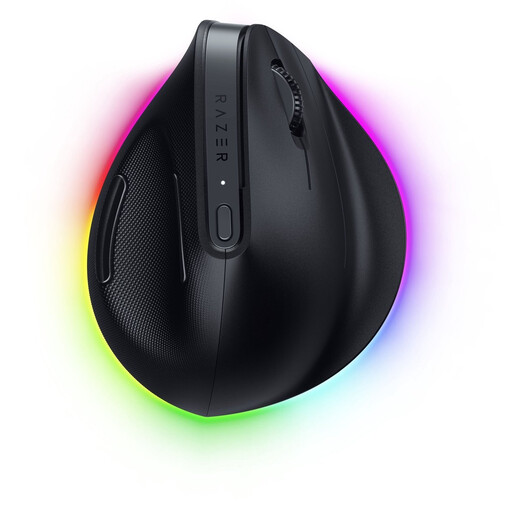
Why it suits this profile: The vertical design and support at the base are intended for users who spend long periods working and gaming.
The focus here is not on achieving the lowest possible weight: this model weighs 150 grams. The ergonomic design, six programmable buttons and multi-device connectivity are the relevant features.
Bluetooth, HyperSpeed and USB-C, plus stated battery life of up to six months and 18-zone RGB lighting.
We have put together a complete, up-to-date list of products that fully meet these strict selection criteria and the applicable European safety regulations.
That depends on the connection. A 2.4GHz connection via a USB receiver is generally designed for low latency. Bluetooth is mainly useful for compatibility and energy-efficient use. Also check the polling rate and make sure the receiver is not positioned behind metal components or too far away from the mouse.
Its lifespan depends on the switches, cable, battery and how it is used. A wired model does not have a built-in battery that loses capacity, whereas a wireless model will need charging more frequently over time. Only use the supplied or a suitable USB-C cable, and clean the sensor with a dry cloth or air without liquid.
For most games, an adjustable range of approximately 800 to 3,200 DPI is already suitable. Higher values offer extra flexibility, but your screen resolution, mouse mat, grip and personal preference determine the result. Look at the complete package of sensor, weight, shape and software rather than focusing only on the highest DPI figure.
