
Vandaag of morgen in huis

Kwaliteit gegarandeerd

Welkomstaanbiedingen ontgrendelen: GRATIS bezorging | Tot 80% korting | Gratis 30 dagen JoyPlus-proefperiode
Download de app
Buying a gaming mouse seems straightforward, until you have to choose between DPI, polling rate, wireless connections, extra buttons and RGB lighting. A higher price doesn’t automatically mean a mouse will suit your hand, your games or your workspace, either. PC gamers, FPS players and people working from home often have different requirements.
Use this practical guide to avoid paying for features you won’t use. You’ll also find out which models suit different needs, from an affordable wireless mouse to an ultra-light gaming mouse for long sessions.
A mouse with a high DPI may sound appealing, but a higher figure doesn’t automatically make it more accurate. DPI mainly determines how far the cursor moves in response to the same physical hand movement. For many users, an adjustable range of 800 to 4,800 DPI is more than enough.
Also look at the sensor, tracking speed and how precisely you can adjust the sensitivity. In practice, an optical gaming mouse with stable tracking may feel better to use than a model with an extremely high DPI setting that you rarely need.
A wireless gaming mouse can help keep your desk tidy, but check the connection type first. A 2.4GHz receiver is generally designed to minimise lag while gaming. Bluetooth is handy for laptops, tablets and office work, but not every model uses the same wireless technology or polling rate.
Also check whether the receiver needs a free USB-A port. If your laptop only has USB-C ports, you may need an adapter.
An ergonomic mouse won’t necessarily suit every hand. Check its length, width and height, as well as the shape of the thumb rest. A right-handed model may feel comfortable with a palm grip, but less so for left-handed users or those who use a claw grip.
A symmetrical or ambidextrous mouse offers greater flexibility. Also consider the weight: an ultra-light gaming mouse can feel comfortable for fast movements in FPS games, while some users prefer a little more stability for productivity.
DPI stands for dots per inch and indicates a mouse’s sensitivity. Adjustable DPI lets you switch between slow, precise movements and fast navigation. For office work, settings between 800 and 1,600 DPI are often practical; gamers can use multiple profiles.
Check whether the mouse uses an optical sensor and whether you can adjust the DPI with a button or through software. Bear in mind that claims such as “pixel-perfect” tracking come from the brand’s product description and shouldn’t be taken as a guaranteed result for every user.
The polling rate indicates how many times per second the mouse sends information to your computer. 1,000 Hz means up to 1,000 updates per second. Models with 4,000 or 8,000 Hz may appeal to competitive gamers, but can require more system resources and drain the battery faster.
For everyday use and most games, 1,000 Hz is a practical benchmark. For wireless models, check whether the highest polling rate is actually available wirelessly.
A gaming mouse weighing around 50 to 75 grams is considered light. This can help with large movements in FPS games, but comfort also depends on the balance and shape. Check the following too:
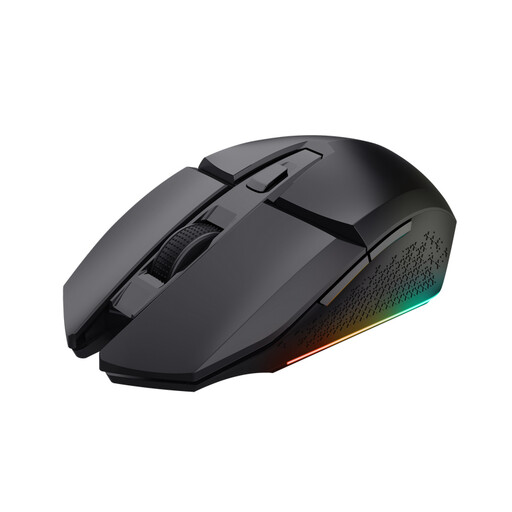
Why it suits this profile: This wireless gaming mouse combines a 2.4GHz connection, adjustable DPI and a rechargeable battery with straightforward controls.
The product description gives an adjustable range of 800 to 4,800 DPI, so you’re not stuck with a single sensitivity setting. The battery is rechargeable and, according to Trust, lasts for up to 80 hours.
Optical sensor, six buttons, RGB lighting and the option to keep playing while charging via USB.
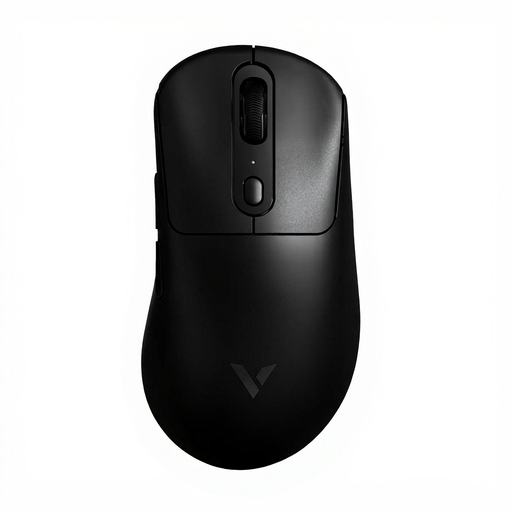
Why it suits this profile: This model is aimed at players who value low weight, a high polling rate and a wide range of DPI settings.
The product specifications list a weight of 59 grams, a PAW 3950 optical sensor and independent X/Y DPI adjustment. This lets you fine-tune the sensitivity on each axis instead of choosing just one overall DPI setting.
8KHz polling according to the product description, one plus eight programmable buttons and a stated battery life of up to 200 hours.
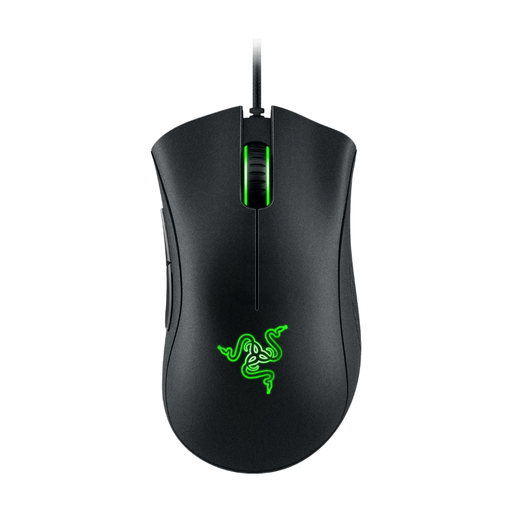
Why it suits this profile: Right-handed players who would rather not deal with a battery or wireless receiver get a wired, ergonomic mouse with adjustable controls.
The specifications explicitly state that it has a right-handed shape, so you can consider the fit before buying. The USB cable means no charging or wireless interference, but you’ll need enough desk space.
6,400 DPI, five buttons, an optical sensor and a stated polling rate of 1,000 Hz.
We’ve put together a complete, up-to-date list of products that meet these strict selection criteria and the applicable European safety regulations.
It can be, provided the model supports a stable 2.4GHz connection and a suitable polling rate. Also check the battery level and whether you can keep using it while it charges. Bluetooth is mainly handy for office work and devices without a spare USB port.
Its lifespan depends on the switches, cable, battery and how you use it. Manufacturers sometimes give a click rating, but this is a stated product specification, not a guarantee for every situation. Keep the sensor clean, don’t pull on the cable and charge a wireless model with a suitable cable.
For everyday use, 800 to 1,600 DPI is often enough. For gaming, the right setting depends on your screen, game and playing style. It’s better to choose a mouse with several adjustable levels than to focus solely on the highest DPI figure. That way, you can tailor the setting to each game without paying extra for features you don’t need.
