
Vandaag of morgen in huis

Kwaliteit gegarandeerd

Welkomstaanbiedingen ontgrendelen: GRATIS bezorging | Tot 80% korting | Gratis 30 dagen JoyPlus-proefperiode
Download de app
A gaming mouse needs more than eye-catching RGB lighting. For FPS, MOBA and RTS games, the sensor, shape, connection and buttons are what really determine how well the mouse performs. These features also matter for everyday use on a PC or Mac.
Many buyers focus only on the highest DPI figure or the number of lighting effects. That can result in a mouse that is too heavy, uncomfortable to hold or packed with features you barely use. These practical checks will help reduce the chance of making the wrong purchase.
DPI indicates how sensitively the cursor responds to movement. A gaming mouse with adjustable DPI can be useful if you use different sensitivity settings for different games. However, an extremely high maximum DPI is not automatically beneficial. Also check:
For most players, a stable optical sensor and a well-adjustable range are more practical than a high maximum alone.
A wireless gaming mouse can connect via Bluetooth or a 2.4GHz receiver. Bluetooth is convenient for laptops and everyday use, while a 2.4GHz connection is often preferred for gaming. Also consider the battery life and whether you can continue playing while the mouse is charging.
A wired gaming mouse does not need a battery and is ready to use straight away via USB. The cable can, however, drag across your desk. So check the cable length and flexibility.
An ergonomic gaming mouse should suit your hand size, grip and preference for left- or right-handed use. Look at the dimensions and weight, not just the product image. A vertical shape, such as that of the Razer Pro Click V2 Vertical Edition, feels very different from a low-profile, lightweight mouse.
Also consider the number of buttons. A gaming mouse with programmable buttons is useful for macros, shortcuts and abilities in MOBA or RTS games. For straightforward FPS games, extra buttons may simply be unnecessary.
An optical gaming mouse uses an optical sensor to track movement. Check the stated DPI range and maximum polling rate. A polling rate of 1000 Hz means that the mouse can send up to 1000 updates per second to the computer. Some models list higher values, but these may use more system resources.
Also check whether the manufacturer provides software for DPI profiles, macros and lighting. On some models, advanced settings only work in wired mode or under Windows.
A lightweight gaming mouse can be comfortable for fast movements in FPS games. Models weighing around 56 to 70 grams are considerably lighter than ergonomic mice weighing approximately 110 to 150 grams. A heavier mouse may feel more stable and provide greater support.
At the very least, compare:
RGB is primarily a visual feature. Check whether the lighting can be switched off and whether the effects can be adjusted using software. An RGB gaming mouse may offer several modes, but not every model provides full colour or zone customisation.
Also check whether “programmable buttons” can genuinely be customised through software. A separate DPI button or side button is not the same as a fully configurable button profile.
The options below are matched to verifiable specifications such as connection type, sensor, weight, DPI and number of buttons.
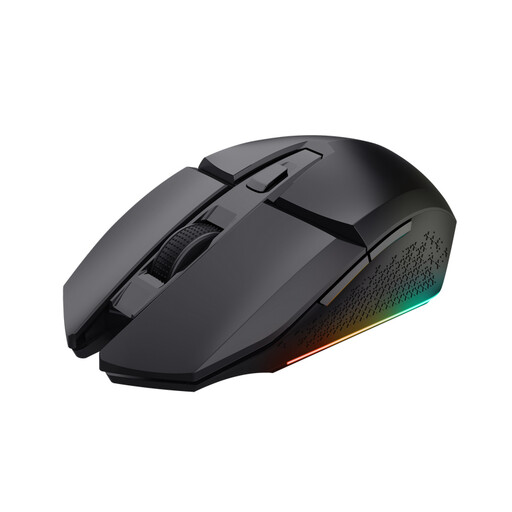
Why it suits this profile: This wireless gaming mouse combines a 2.4GHz receiver with a rechargeable battery and adjustable DPI from 800 to 4800. That makes it suitable for PC gamers who want to get started without a major investment.
The specifications state a battery life of up to 80 hours, and you can continue playing while it charges. You are therefore not entirely dependent on a fully charged battery.
Six buttons, four RGB options, an optical sensor and a symmetrical shape for left- and right-handed use.
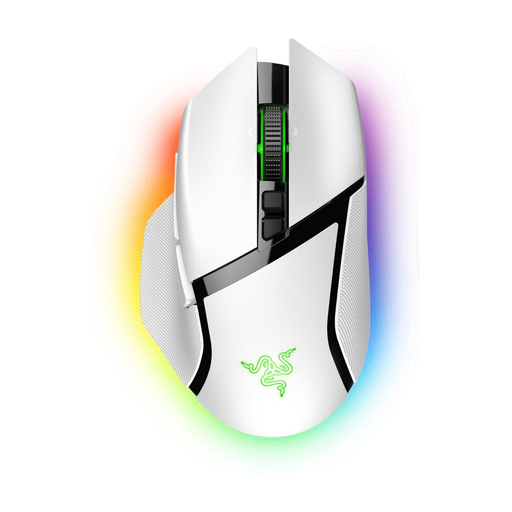
Why it suits this profile: This ergonomic gaming mouse offers wireless HyperSpeed and Bluetooth connectivity, wired use via USB-C and eleven buttons, according to the product specifications.
You can adapt the connection to suit your situation. If the battery runs out, wired use is still possible; Razer Synapse is required for settings.
Razer Focus Pro 30K optical sensor, up to 90 hours of battery life according to the product information, and Chroma RGB lighting.
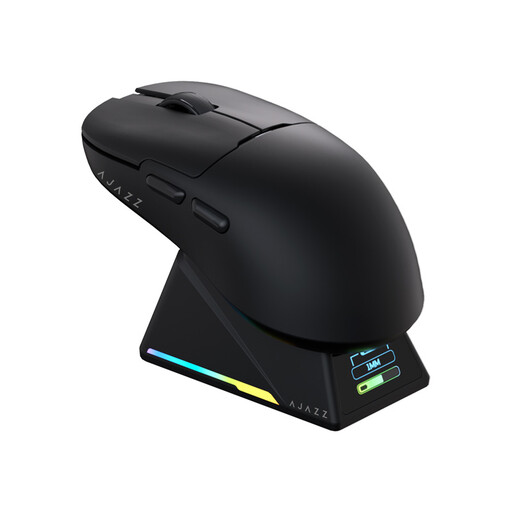
Why it suits this profile: With tri-mode connectivity, a stated weight of 56 grams, a PAW3950 sensor and a polling rate of up to 8000 Hz, this model is aimed at players looking for plenty of customisation options.
The mouse is not limited to a single connection method: Bluetooth, 2.4GHz and USB-C are available. However, check beforehand that your computer supports the required software.
Magnetic charging dock with TFT display, programmable buttons and support for small and medium-sized hands.
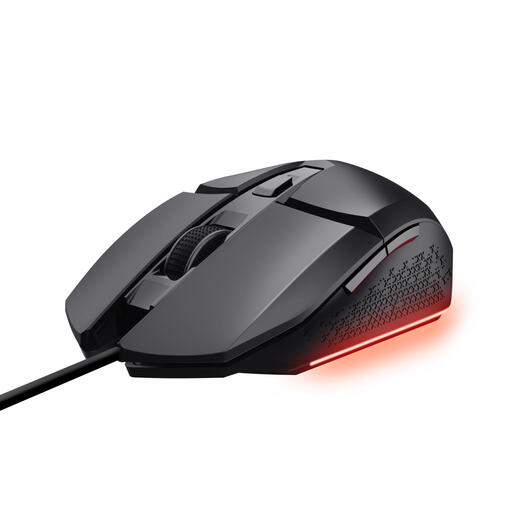
Why it suits this profile: This wired gaming mouse has an optical sensor, DPI of up to 6400, six buttons and a 1.5-metre cable. According to Trust, the buttons, lighting and macros can be customised through software.
The USB connection eliminates the need for battery maintenance. The cable is longer than those on many compact models, but check that it suits your desk layout.
Adjustable DPI from 200 to 6400, three RGB settings and software for buttons and macros.
We have put together a complete, up-to-date list of products that fully meet these strict selection criteria and the applicable European safety regulations.
For a gaming mouse for PC, USB support is usually straightforward. With a gaming mouse for Mac, you need to check the available USB connection, Bluetooth and software compatibility. A USB-A receiver may, for example, require an adapter with certain Mac models.
Also check whether the programming software is only available for Windows. The mouse itself may still work with a Mac, but advanced features such as macros or RGB profiles may not.
That depends on your screen, game and playing style. Choose a model with several adjustable DPI levels so that you can fine-tune the sensitivity. A range of 800 to 6400 DPI is sufficient for many users; higher values are mainly relevant if you intend to use them deliberately.
It can be, particularly if the mouse offers a 2.4GHz connection with a USB receiver. Check the battery life, charging method and whether you can continue playing while it charges. Bluetooth is particularly practical for mobile and everyday use, but is less commonly chosen for competitive setups.
Its lifespan depends on the switches, cable, battery and how it is used. Manufacturers may state a click rating, but this is a product specification rather than a guarantee for every user. Keep the sensor and mouse mat clean, avoid liquids and do not pull on the cable. With wireless models, the battery is an additional component to keep an eye on.
