
Vandaag of morgen in huis

Kwaliteit gegarandeerd

Welkomstaanbiedingen ontgrendelen: GRATIS bezorging | Tot 80% korting | Gratis 30 dagen JoyPlus-proefperiode
Download de app
Buying a gaming mouse seems simple, until you have to choose between wireless, wired, lightweight, ergonomic, programmable and a sensor with thousands of DPI. Marketing often focuses on big numbers, while details such as hand shape, connectivity and battery type have more impact on everyday use.
As a Joybuy Product Recommendation Officer, I focus on product specifications you can verify. That way, you can avoid paying for features you won’t use or choosing a mouse that feels uncomfortable after a few weeks.
A gaming mouse with a high DPI can offer high sensitivity, but that doesn’t automatically mean you’ll play more accurately. Many users set their DPI lower for greater control, especially in shooters. So look at whether you can adjust the DPI, as well as the polling rate and the mouse’s weight.
A wireless gaming mouse can connect via 2.4 GHz, Bluetooth or both. Bluetooth is handy for laptops and office work, while a USB receiver is often the more practical choice for gaming. Also check whether a receiver is included, which port your PC has and how the mouse is charged.
An ergonomic mouse won’t automatically suit every hand. Consider its width, height, shape and orientation. A vertical mouse can be comfortable for office work, but is less suitable if you make quick, low movements while gaming. Left-handed users should also check that the buttons and shape are genuinely suitable for use on either side.
An optical mouse uses an optical sensor to track movement across a surface. The DPI value indicates how sensitive the cursor is to movement. Models such as the HyperX Pulsefire Haste 2 offer adjustable resolution up to 26,000 DPI, according to the product information. The ASUS ROG Keris II Ace lists up to 42,000 DPI.
That maximum is mainly a technical upper limit. For everyday use, a stable sensor and well-chosen settings are often more important than the highest DPI setting. So check whether you can adjust the sensitivity in increments and whether software is available for profiles or buttons.
A lightweight gaming mouse can feel comfortable when making large arm movements and quick changes of direction. Product weights vary considerably: the ASUS ROG Keris II Ace weighs 54 grams, while the Trust Bayo II weighs 121 grams. You’re most likely to notice the difference when working or gaming for hours at a time.
Also consider your grip:
A wired gaming mouse doesn’t need a battery and can be used straight away via USB. The trade-off is a cable, which can get in the way at low sensitivity. A wireless mouse gives you more freedom of movement, but you’ll need to think about charging or batteries.
The polling rate indicates how often the mouse sends data to your computer. Some models list 1,000 Hz, while others go up to 8,000 Hz. A higher rate can require more system resources, so check whether your computer and games can make good use of this setting.
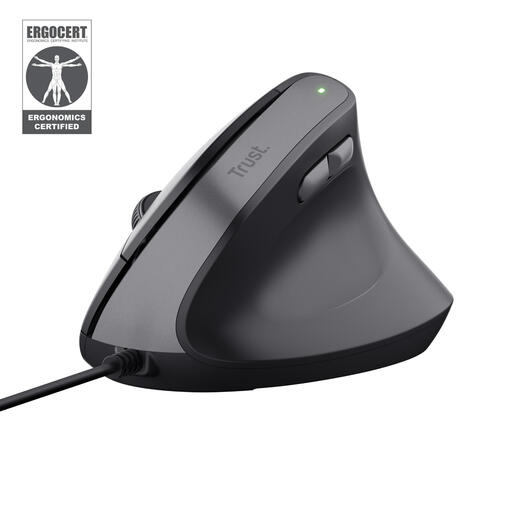
Why it suits this profile: This wired ergonomic mouse is plug and play via USB, with a 57-degree vertical angle. That makes it suitable for office and home use, without the need to manage batteries.
You can see up front that this isn’t a wireless gaming mouse, but a model with a fixed USB cable, five buttons and adjustable DPI from 800 to 2,400.
Vertical shape, two thumb buttons, 121 grams and a 1.5-metre cable.
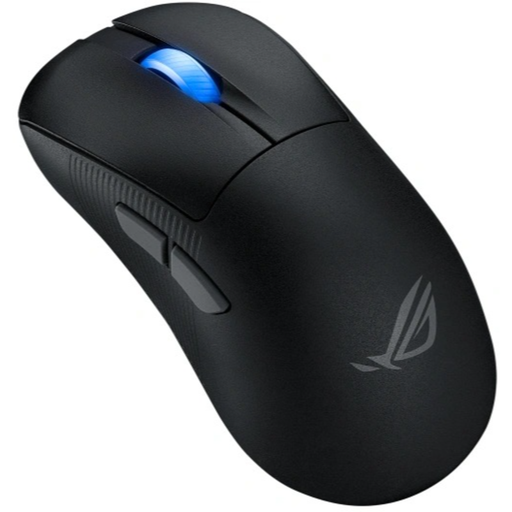
Why it suits this profile: This right-handed model combines RF wireless, Bluetooth and USB connectivity, and weighs 54 grams. It’s designed for users looking for several connection options and a lightweight body.
You’re not limited to Bluetooth: the product information also lists RF wireless and wired use. The software lets you adjust the DPI.
Optical sensor up to 42,000 DPI, RGB lighting, four buttons and up to 134 hours of battery life, according to the product information.
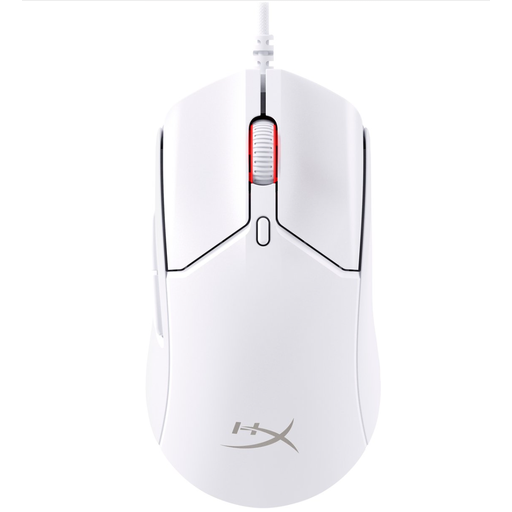
Why it suits this profile: This lightweight gaming mouse is designed for players looking for a wired connection, low weight and programmable features. According to the product information, its symmetrical shape is suitable for both left- and right-handed use.
The specifications explicitly list a 1.8-metre cable, a weight of 52 grams without the cable, six buttons and an optical sensor. That makes the key practical details clear before you buy.
Up to 26,000 DPI, polling rate up to 8,000 Hz, RGB lighting and PTFE feet, according to the product information.
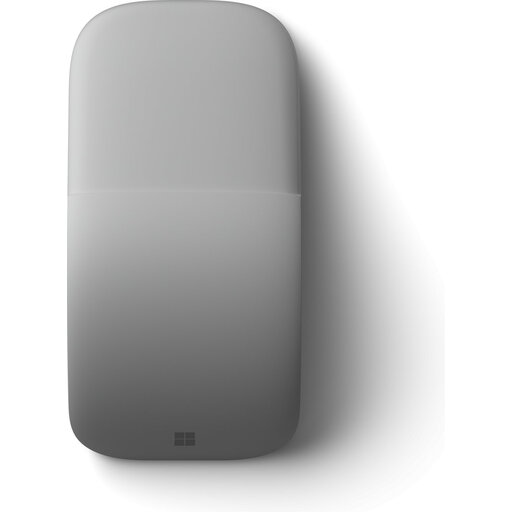
Why it suits this profile: This Bluetooth mouse is slim, lightweight and folds flat for easy storage. It’s designed for portability, not competitive gaming.
The product information lists Bluetooth 4.0 or later and a fixed DPI of 1,000. So it’s clear this isn’t a fully fledged gaming mouse.
82.5 grams, wireless range up to 10 metres, two buttons and suitable for both left- and right-handed use.
We’ve put together a complete, up-to-date list of products that meet these strict selection criteria and the applicable European safety regulations.
It depends on the connection. A model with a 2.4 GHz receiver is generally designed for fast wireless communication, while Bluetooth is particularly useful for compatibility with laptops and multiple devices. Check the stated polling rate, battery life and whether a USB receiver is included.
Its lifespan depends on the switches, cable, scroll wheel, battery and how you use it. Manufacturers sometimes list a click rating, but this is a technical product specification, not a guarantee of how long the mouse will last in use. Keep the sensor and surface clean, and don’t pull on the cable.
RGB lighting doesn’t change tracking or DPI. It can complement a lit-up setup, but it isn’t essential. If you’re on a tight budget, it’s better to prioritise weight, shape, connectivity and programmable buttons.
