
Vandaag of morgen in huis

Kwaliteit gegarandeerd

Welkomstaanbiedingen ontgrendelen: GRATIS bezorging | Tot 80% korting | Gratis 30 dagen JoyPlus-proefperiode
Download de app
A gaming mouse needs to offer more than a striking design and a high DPI rating. Its shape, connection, weight and buttons all affect how comfortable it is to use every day. The wrong choice could leave you with a cable dragging across your desk, a mouse that feels too heavy or features your computer isn’t powerful enough to handle.
Look out for these common pitfalls:
DPI determines how far the cursor moves in response to a given hand movement. A high-DPI gaming mouse can be useful with large screens or high resolutions, but an extremely high maximum setting doesn’t guarantee a better gaming experience. Check the sensor type too. An optical gaming mouse uses an optical sensor for tracking; practical accuracy also depends on the surface, software and settings.
The polling rate tells you how often the mouse sends data each second. 1000 Hz is a common setting. Models with 4000 or 8000 Hz may appeal to competitive PC gamers, but some manufacturers’ product information warns that a higher setting can put extra strain on the CPU. So try different settings in the games you play.
A lightweight gaming mouse weighing around 50 to 70 grams can feel comfortable for fast FPS movements and broad sweeps across a mouse mat. A heavier model may feel more stable and offer more buttons. Don’t just consider the weight: check the dimensions and how you hold the mouse too:
An ergonomic gaming mouse is usually shaped for one hand. Always check which hand it’s designed for.
A wired gaming mouse doesn’t need a battery and connects directly via USB. This makes it a good choice for fixed PC setups and anyone who doesn’t want to worry about charging. A wireless gaming mouse gives you more freedom to move. Check how it connects: 2.4 GHz is generally intended for a fast dongle connection, while Bluetooth can be handy with compatible laptops and other devices.
Extra buttons are particularly useful in MMO, MOBA and strategy games. Check how many buttons are actually programmable and whether the accompanying software works with your operating system. A programmable gaming mouse may support profiles, macros or shortcuts, but the available features vary by brand.
RGB lighting is mainly a visual choice. An RGB gaming mouse can complement your desk, but the lighting won’t affect sensor performance or weight.
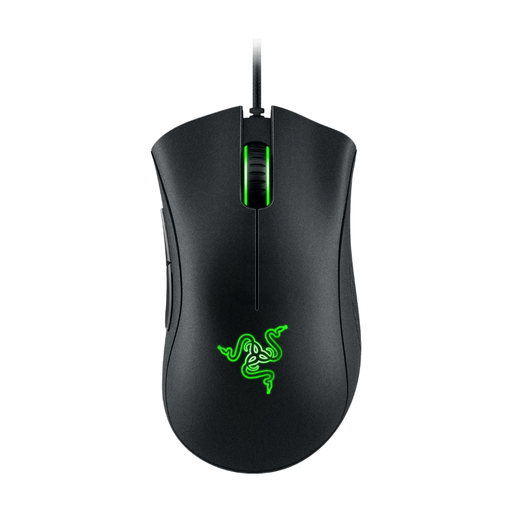
Why it suits this profile: A practical wired gaming mouse for anyone who wants to get started without a battery or wireless receiver. According to the product specifications, its shape is designed for right-handed use.
The fixed USB connection means no charging worries, and the specifications state a 1000 Hz polling rate without focusing on unnecessarily high settings.
6400 DPI, five buttons, an optical sensor and a 2.10-metre cable.

Why it suits this profile: For PC gamers looking for a lightweight wireless gaming mouse with plenty of customisation options and a long stated battery life.
According to the product description, this model combines wireless 8K polling with built-in memory. Check that your PC can handle the higher polling rate.
53 grams, up to 30,000 DPI, ten programmable buttons and, according to the manufacturer, up to 750 hours of battery life at 1000 Hz.
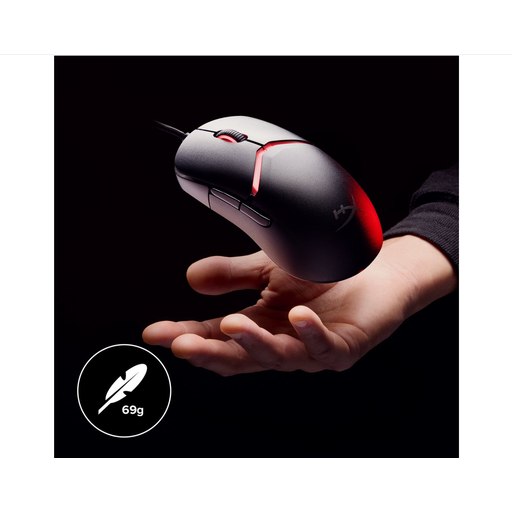
Why it suits this profile: For players who want a lightweight mouse with customisable parts, RGB lighting and a high polling rate for fast-paced games.
The wired connection means you don’t need to manage a battery. The stated 8K polling rate is adjustable, so you don’t have to use the highest setting.
69 grams, optical switches, up to 26,000 DPI and magnetically interchangeable grip parts, according to the product description.
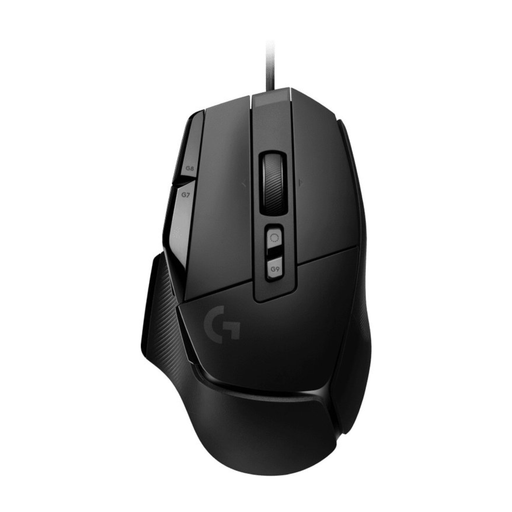
Why it suits this profile: A wired gaming mouse for right-handed players who prefer plenty of programmable features and a sturdier weight over ultra-light movement.
The USB connection means no charging, and its ergonomic shape is clearly specified for right-handed use. Check that 89 grams suits your grip.
Up to 25,600 DPI, an optical sensor, an ergonomic design and several programmable buttons.
We’ve put together a complete, up-to-date list of products that meet these strict selection criteria and comply with current European safety regulations.
It can be, particularly with a 2.4GHz connection and a suitable receiver. Check the stated polling rate, connection mode and battery life. Bluetooth is convenient for laptops, but not every model offers the same settings over Bluetooth as it does via its wireless dongle.
Its lifespan depends on use, switches, cable and maintenance. Manufacturers sometimes state a click rating, such as a specified number of million clicks. This is a product specification, not a guarantee of the mouse’s overall lifespan. Keep the sensor and mouse feet clean, and avoid spills or sharply bending the cable.
No. Lower DPI and polling settings are enough for many users. A higher setting may be useful with certain monitors or competitive setups, but check your software, game settings and system load first. Choose the feature only if you’ll actually use it.
