
Vandaag of morgen in huis

Kwaliteit gegarandeerd

Welkomstaanbiedingen ontgrendelen: GRATIS bezorging | Tot 80% korting | Gratis 30 dagen JoyPlus-proefperiode
Download de app
Buying a gaming mouse seems simple, until you have to choose between DPI, weight, connectivity, buttons and ergonomics. A high DPI rating doesn’t automatically mean a mouse is right for you. A wireless gaming mouse can also be inconvenient if its receiver is easy to lose or the battery needs frequent charging.
This buying guide explains what to look for and which models suit different needs. Our recommendations are based on verifiable product specifications, not just marketing claims.
DPI indicates how sensitively a mouse responds to movement. A mouse with 24,000 DPI sounds impressive, but many people work or game at a much lower setting. What matters more is whether you can adjust the DPI and whether the sensor suits your screen resolution and play style.
A very high DPI usually isn’t necessary for office work. For a competitive FPS game, however, a precise sensor with several adjustable levels can be useful.
A wireless mouse usually connects via Bluetooth or a 2.4GHz USB receiver. Bluetooth is handy for laptops and tablets, while 2.4GHz is often preferred for gaming because of its direct connection. Also check that your PC has a spare USB-A port if the mouse uses a nano receiver.
For a wireless gaming mouse, also check:
A lightweight gaming mouse weighing 54 to 75 grams can help you make quick movements, but not everyone finds a low weight comfortable. A larger model offers more palm support, while a vertical mouse requires a very different grip.
So, check:
An optical mouse uses a sensor to track movement across a surface. As well as the maximum DPI, check the available settings. According to its product specifications, the Trust GXT 929 Helox can be set from 800 to 4800 DPI. The Razer DeathAdder Essential has an optical sensor of up to 6400 DPI. The Shark Velocity M70 offers settings from 500 to 12,000 DPI.
Adjustable DPI is particularly useful if you use the same mouse for different games, photo editing and everyday tasks.
The polling rate indicates how often the mouse reports its position to the computer. A rate of 1000 Hz means up to 1000 updates per second. This can matter in fast-paced games, but in practice the difference depends on your computer, screen and game settings.
Don’t just look at the highest figure. A stable connection and a sensor suited to the way you use your mouse are just as important.
A gaming mouse with programmable buttons can activate shortcuts, functions or macros. Check that the software works with your operating system. Some models can only be customised in Windows or when the mouse is connected by cable.
RGB lighting is mainly a visual feature. If you’re considering a gaming mouse with RGB, check whether you can switch off the lighting, which effects are available and whether you can adjust them using software. There’s no need to pay extra for lighting if you’re mainly looking for quiet office hardware or a simple mouse for your PC or laptop.
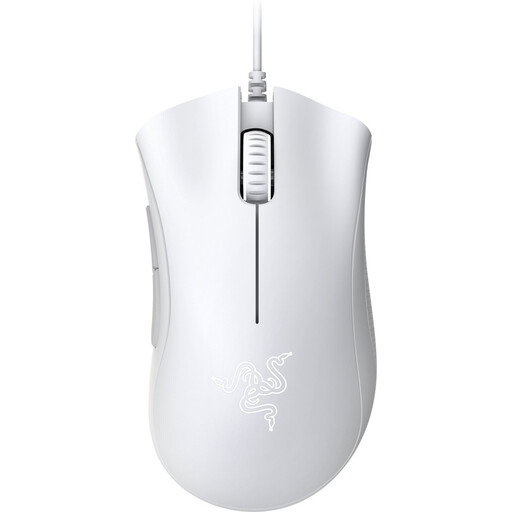
Why it suits this user: This wired gaming mouse connects easily via USB and has an ergonomic shape for right-handed users. It’s a good choice if you want to get started without having to manage a battery.
There’s no wireless connection or built-in battery to maintain. The DPI is adjustable, and according to the product information, you can customise the five buttons.
6400 DPI, optical sensor, 1000Hz polling rate and a 2.10-metre cable.
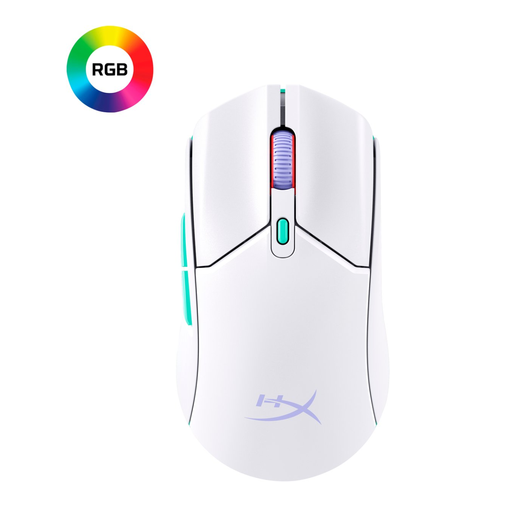
Why it suits this user: This lightweight wireless gaming mouse combines Bluetooth and 2.4GHz connectivity with a symmetrical shape. It’s a good option if you want flexibility and a mouse weighing around 70 grams.
The two connection options let you pair the mouse with a PC, laptop or other compatible device. Check that it’s compatible with your operating system and that you have the right ports before buying.
Up to 12,000 DPI, 1000Hz polling rate, Bluetooth 5.2 and a stated battery life of up to 100 hours with an AAA battery.

Why it suits this user: This mouse is designed for PC and laptop gamers who want a lightweight build, wireless 2.4GHz connectivity and programmable buttons.
According to the product description, the built-in battery lasts for up to 80 hours. You can keep using the mouse while it charges via USB-C, and store the receiver inside it.
Around 73 grams, adjustable 800–4800 DPI, six programmable buttons and RGB lighting.
We’ve put together a full, up-to-date list of products that meet these strict selection criteria and the applicable European safety requirements.
For working from home or sharing a workspace, a quiet computer mouse may be more practical than a gaming mouse. The Logitech M330 Silent Plus connects wirelessly via a USB receiver and uses an optical sensor. According to the product information, its clicks are up to 90% quieter than those of traditional mice. The Trust Ozaa+ is designed for use with multiple devices: it supports a 2.4GHz receiver and two Bluetooth channels, as well as horizontal scrolling.
If a natural hand position is your priority, consider a vertical mouse. The Trust Bayo II Wireless has a 57-degree angle, a rechargeable battery and DPI settings from 800 to 2400. It’s designed for a different type of use than a lightweight gaming mouse, so check that the shape feels comfortable before you order.
It can be, especially if the model has a 2.4GHz connection and a stated polling rate of 1000 Hz. Check the battery life, the distance to the receiver and whether you can keep playing while the mouse charges. Bluetooth is handy for general use, but is less commonly chosen for fast-paced PC games.
For most people, an adjustable range matters more than the maximum figure. Start with a lower setting and increase it if you need a faster cursor. Also check whether you can adjust the DPI directly using a button or whether you need software.
Its lifespan depends on the switches, cable, battery and how often you use it. Manufacturers may state click ratings or battery life, but these are product specifications, not a guarantee of a particular lifespan. A wired mouse has no battery to wear out; for wireless models, a replaceable battery may be more practical in the long run. Also bear in mind that many consumer products in the EU come with a legal guarantee of at least two years, with additional rights potentially applying under the relevant Dutch rules.
