
Vandaag of morgen in huis

Kwaliteit gegarandeerd

Welkomstaanbiedingen ontgrendelen: GRATIS bezorging | Tot 80% korting | Gratis 30 dagen JoyPlus-proefperiode
Download de app
A gaming mouse should respond accurately, feel comfortable in your hand and suit the way you play. Yet many buyers focus mainly on a high DPI rating or eye-catching RGB lighting. That can lead to a poor purchase: the mouse may feel too heavy, have too few buttons or need to be recharged constantly.
In this guide from the Joybuy Product Recommendation Officer, we explain the practical factors to consider. Afterwards, you’ll find some popular choices for different user profiles.
A gaming mouse with 30,000 or 44,000 DPI sounds impressive, but most players use a much lower sensitivity in games. DPI indicates how sensitive the sensor is; on its own, it does not say how good your aim or tracking will be in practice. Also consider the sensor, adjustment options and software.
The polling rate indicates how often the mouse reports its position to the computer. 1,000 Hz means a maximum of 1,000 reports per second. Models with 4,000 or 8,000 Hz can be appealing to competitive players, but according to product information from some brands, a higher setting may also require more processor usage.
So check whether your PC can handle the selected polling rate. If you notice visible frame drops, a lower setting may be more practical.
A wireless gaming mouse eliminates cable drag, but you’ll need to consider battery life, charging and a USB receiver. A wireless mouse with long battery life is convenient for everyday use, but also look at the connection: 2.4 GHz is generally intended for low latency, while Bluetooth is often more energy-efficient for office work.
A lightweight gaming mouse weighing around 53 to 70 grams can be comfortable for fast movements and FPS games. Heavier models sometimes offer more support or extra buttons. The right weight depends on your grip:
Also consider hand orientation. Some mice are designed exclusively for right-handed use. An ergonomic gaming mouse can be comfortable during long sessions, but a vertical shape feels different and is not automatically suitable for competitive gaming.
A high-DPI gaming mouse will generally offer plenty of adjustment options. For everyday use and most games, a stable sensor is more important than the maximum number printed on the packaging. Check whether DPI can be adjusted in small increments and whether the software supports profiles.
For FPS players, consistent tracking, a suitable shape and predictable click response are often more relevant than an extremely high DPI rating.
A high-polling-rate mouse can report movements more frequently. Models with 4,000 or 8,000 Hz are particularly interesting for players with a powerful PC and a monitor with a high refresh rate. A wired gaming mouse does not need a battery and connects directly via USB. A wireless gaming mouse offers greater freedom of movement, but check:
A mouse with programmable buttons is useful for MMOs, strategy games and productivity tasks. For an FPS gaming mouse, two easily accessible side buttons are often sufficient. RGB lighting mainly changes the appearance. According to Razer’s own information, Chroma RGB supports 16.8 million colours and dynamic effects on certain models; the lighting has no direct effect on tracking or response time.
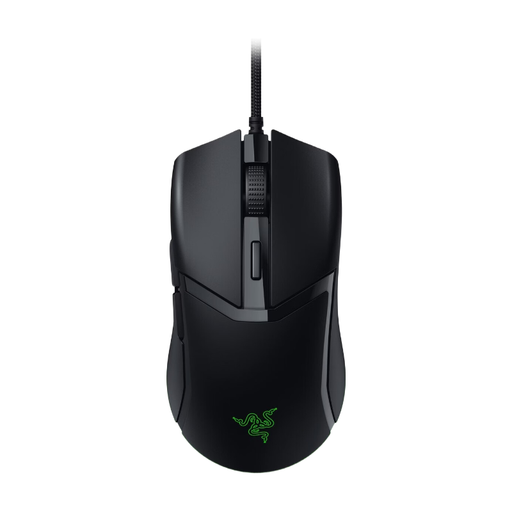
Why it suits this profile: A wired gaming mouse is easy to connect and does not need charging. The six buttons, adjustable DPI and RGB lighting give you room to customise the settings later.
The USB connection eliminates battery concerns. DPI can be adjusted in increments of 50, so you are not reliant on a single high factory setting.
Optical sensor up to 8,500 DPI; six buttons; Speedflex cable and PTFE mouse feet according to the product information.

Why it suits this profile: This compact wireless model is aimed at players who value low weight, a 2.4GHz connection and extensive sensor settings.
The stated battery life of up to 95 hours and USB-C cable make charging straightforward. However, check that the compact shape suits your hand.
53 grams; HERO 2 sensor up to 44,000 DPI; maximum polling rate of 8,000 Hz according to the product specification.

Why it suits this profile: For long gaming sessions or tournaments, low weight, plenty of programmable buttons and long battery life are practical considerations.
The software enables macros and button assignments. According to Rapoo’s own product information, battery life of up to 750 hours is possible at 1,000 Hz; actual battery life depends on usage and settings.
53 grams; maximum polling rate of 8,000 Hz; 10 programmable buttons and optical switches according to the product details.

Why it suits this profile: The vertical shape and HyperSpeed or Bluetooth connectivity suit users who switch between gaming and working across multiple devices.
The long stated battery life reduces how often you need to charge it. However, the shape must suit your grip; a vertical mouse takes some getting used to during fast FPS movements.
Up to 30,000 DPI; six buttons; Bluetooth, USB-C and wireless connectivity; stated battery life of up to six months.
We’ve put together a complete, up-to-date list of products that fully meet these strict selection criteria and the applicable European safety regulations.
Not necessarily. A modern 2.4GHz connection can offer low latency. A wired gaming mouse does have a direct USB connection and does not need charging. Choose wired if simplicity and a constant power supply are your priorities; choose wireless if cable-free movement matters more.
For most gamers, an adjustable range of up to a few thousand DPI is sufficient. FPS players often use lower in-game sensitivity and make larger mouse movements. A high maximum DPI is mainly useful if you want plenty of adjustment range, not because you always need to use that setting.
The lifespan depends on the switches, cable, battery, usage and maintenance. Manufacturers sometimes state a click rating, such as 90 or 120 million clicks. According to the brand’s own information, this is a technical specification under certain conditions and not a guarantee of a fixed number of years of use. Keep the sensor and mouse feet clean, avoid moisture and store a wireless receiver carefully.
