
Vandaag of morgen in huis

Kwaliteit gegarandeerd

Welkomstaanbiedingen ontgrendelen: GRATIS bezorging | Tot 80% korting | Gratis 30 dagen JoyPlus-proefperiode
Download de app
A gaming mouse should suit the games you play, your hand and your desk. Yet people often choose one based on a high DPI figure, eye-catching RGB lighting or promises of extremely low latency. These aren’t automatically good reasons to pay more. A mouse with 35,000 DPI, for example, isn’t necessarily more practical for every player than a model with 6,400 or 12,000 DPI.
Joybuy Product Recommendation Officer helps you cut through the key specifications, so you can avoid buying a mouse that turns out to be uncomfortable or unsuitable after a few weeks.
DPI indicates how sensitive the cursor is to movement. A high DPI figure doesn’t automatically mean the sensor will be more accurate in everyday use. FPS players often use lower in-game sensitivity and move the mouse over a larger area of the mouse mat. A higher setting can be more convenient for office work or a smaller desk.
So, check:
The polling rate, measured in hertz, indicates how often the mouse position is reported per second. A 1,000Hz gaming mouse theoretically reports its position up to 1,000 times per second. A 4K or 8K gaming mouse has a higher polling rate.
A higher polling rate can put more strain on your computer. RAPOO’s product information notes that 4K mode can increase CPU usage. When you see brand claims about speed and latency, treat them as claims rather than universal guarantees. Also check that your PC and games run smoothly at 4K or 8K.
An ultra-light gaming mouse weighing 54 to 70 grams can be quick to move, while a heavier model may feel more stable. The right choice depends on how you hold your mouse:
Also check the length and width. A 128 mm mouse will feel different from a compact 120 mm model. See whether the shape is designed specifically for right-handed use or is symmetrical for left- and right-handed users.
A wired gaming mouse gets a constant supply of power through USB and doesn’t need charging. That’s convenient for a fixed PC setup. Choose a cable that’s flexible enough and long enough to reach without pulling on the connection.
A wireless gaming mouse usually connects via 2.4GHz using a USB receiver. Bluetooth is handy for laptops and everyday use, but 2.4GHz is generally the obvious choice for gaming. Check the battery life, charging port type and whether you can keep playing while it charges.
Optical sensors are common in gaming mice. Don’t just look at the maximum DPI; check the range you’ll actually use. The Trust GXT 109 Felox, for example, ranges from 200 to 6,400 DPI. That may be enough for casual gaming and everyday computer use. Other models offer 26,000, 35,000 or even 42,000 DPI, according to their product specifications.
Such high figures are mainly useful if you want plenty of settings to choose from. They’re no substitute for a comfortable shape, a good mouse mat or the right sensitivity in your game.
A gaming mouse with programmable buttons can be useful for MMO, MOBA and RTS games, as well as for keyboard shortcuts in productivity software. Check:
RGB lighting doesn’t change how the mouse works. An RGB gaming mouse can still complement your desk setup, as long as you can switch the lighting off or adjust it.
A 4K or 8K gaming mouse may appeal to players who’ve tailored their whole system around it. For many users, though, 1,000Hz is simpler and less demanding on the computer. Always check the maximum polling rate in both wireless and wired modes.
For wireless models, the stated battery life is a maximum under specific conditions. RGB lighting, high polling rates and intensive use can affect how long the battery lasts. A model with USB-C that lets you play while charging means you won’t have to stop because the battery has run out.
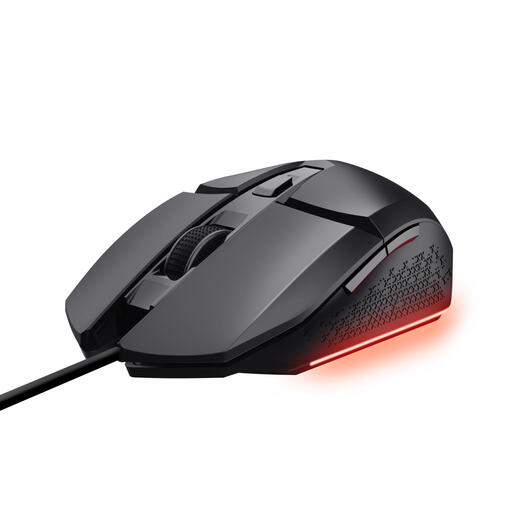
Why it suits this profile: This wired gaming mouse has a straightforward setup and is a good choice if you’re looking for entry-level features such as adjustable DPI, RGB lighting and programmable buttons.
The specifications list an adjustable range of 200 to 6,400 DPI and a 1.5-metre cable. That means you’re not paying for an unnecessarily high maximum DPI.
Optical sensor, six buttons, RGB lighting with three settings, and software for DPI, lighting and macros.

Why it suits this profile: A lightweight wireless gaming mouse for players who place a high value on weight, high DPI and a high polling rate.
The product information lists both wired and wireless use, so you can carry on via USB-C if the battery runs flat.
54 grams, Razer Focus Pro 35K sensor, up to 8,000Hz according to the product specifications, and a stated battery life of up to 95 hours.

Why it suits this profile: Designed for users looking for an ergonomic gaming mouse with plenty of features for gaming and everyday use.
There’s more to this choice than DPI: the product specifications list an ergonomic shape, 11 programmable buttons and both wired and wireless connectivity.
35,000 DPI according to the product information, 11 programmable buttons and Razer Chroma RGB lighting.
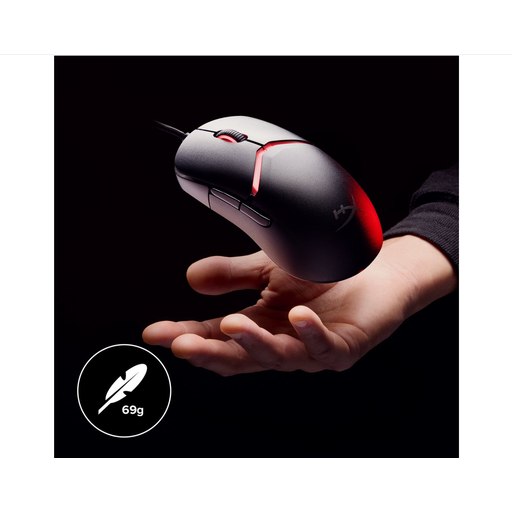
Why it suits this profile: A wired gaming mouse for players who want to combine a light weight, customisable components and a high polling rate.
The mouse has a cable, so you don’t have to plan around battery life. You can adjust the stated 8,000Hz polling rate in the software; just be sure to check the load on your PC.
69 grams, up to 26,000 DPI, an 8,000Hz polling rate and adjustable RGB lighting via HyperX NGENUITY.
We’ve put together a complete, up-to-date list of products that meet these strict selection criteria and the applicable European safety regulations.
Yes, provided it has a stable 2.4GHz connection, a suitable polling rate and enough battery life. For competitive gaming, the supplied wireless receiver is usually a more obvious choice than Bluetooth. A model that also works via USB-C gives you a practical back-up.
There’s no one-size-fits-all setting. Start with a mid-range value and adjust it to suit each game and your screen size. Many FPS players choose lower sensitivity and make larger arm movements. Focus on adjustability rather than just the maximum DPI figure.
Lifespan depends on the switches, cable or battery, cleaning and daily use. Product listings sometimes state a click lifespan, but this is a product specification, not a guarantee for every use case. Don’t leave a wireless mouse completely flat for long periods, keep the sensor dry and use a suitable mouse mat. Consumers in the Netherlands are also covered by the statutory guarantee of conformity; expected lifespan depends on the product and the conditions of use.
