
Vandaag of morgen in huis

Kwaliteit gegarandeerd

Welkomstaanbiedingen ontgrendelen: GRATIS bezorging | Tot 80% korting | Gratis 30 dagen JoyPlus-proefperiode
Download de app
A gaming mouse needs to do more than respond quickly. For everyday use, long gaming sessions and different game genres, the shape, connection, weight and controls are also important. Yet product pages often focus on high DPI values and eye-catching RGB lighting, while other features are not explained as clearly.
With this practical buying guide, you can compare a gaming mouse based on verifiable specifications. That way, you can find a model suited to your PC, laptop, playing style and budget.
A gaming mouse with a high DPI can offer a wide range of adjustable sensitivity, but a higher value does not automatically make you more accurate. For many players, the sensor, connection stability and ability to fine-tune the sensitivity are more important.
So check:
A wireless gaming mouse can work via a 2.4GHz receiver, Bluetooth or both. Bluetooth is convenient for laptops and office work, while a 2.4GHz connection is often preferred for gaming. Also check whether the USB receiver is included and whether your computer has a suitable port.
When choosing a wireless model, look at the difference between:
An RGB gaming mouse can complement a lit-up setup, but lighting has no direct impact on how you control the mouse. With some models, you can adjust or switch off the effects. Also take a critical look at the number of buttons. Extra buttons are particularly useful for MOBA and RTS games and productivity tasks if you can actually programme them.
DPI indicates how far the pointer moves when you move the mouse. An adjustable optical gaming mouse is suitable if you want to switch between, for example, lower sensitivity for precise aiming and higher sensitivity for fast navigation.
A range of 800 to 4,800 DPI can be sufficient for many beginners and casual gamers. Models with 24,000, 30,000 or even 42,000 DPI are mainly interesting if you want plenty of adjustment options. Check that the software, operating system and your game support these options.
A lightweight gaming mouse weighing around 56 to 75 grams moves easily across a large mouse mat. A heavier model may feel more stable instead. There is no universally correct choice.
Consider:
An ergonomic gaming mouse is not automatically suitable for every hand. A vertical shape, as found on some office mice, also takes some getting used to. Always check the dimensions before ordering.
A programmable gaming mouse lets you customise buttons, macros, DPI profiles and lighting. This is practical for MMO, MOBA and RTS games, as well as shortcuts in office programmes. Check that the software is available for your operating system and whether certain functions only work when the mouse is connected by cable.
The polling rate indicates how often the mouse reports its position. A higher value can reduce response times, but it also places greater demands on your computer. For many users, 1,000 Hz is a practical starting point. A higher value is mainly relevant for systems and games that support it properly.
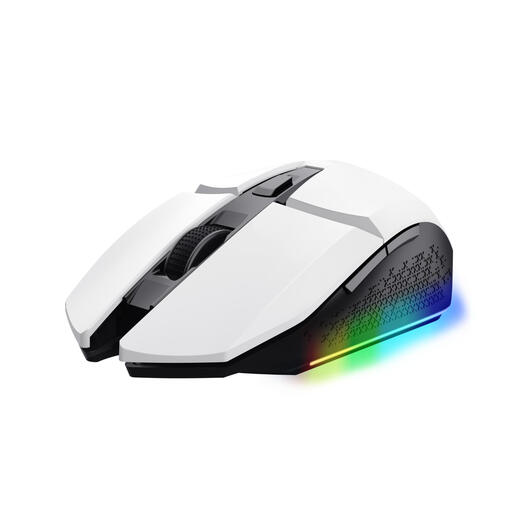
Why it suits this profile: This wireless gaming mouse combines a 2.4GHz receiver, six buttons and adjustable DPI from 800 to 4,800. This makes it suitable for PC and laptop gamers looking for a straightforward introduction to wireless gaming.
The product information states that it has a rechargeable battery with up to 80 hours of use and can be used while charging. You are therefore not dependent on loose batteries.
Optical sensor, six buttons, four RGB options, suitable for right- and left-handed use, and 92 grams according to the product specifications.

Why it suits this profile: This model is aimed at users looking for plenty of adjustment options for competitive gaming and productivity. The mouse supports Bluetooth, 2.4GHz and a wired USB-C mode.
The specified software supports assigning buttons, macros, DPI and polling rate. This means the high technical figures are not the only features you can adjust.
According to the product information: 56 grams, up to 42,000 DPI, a polling rate of up to 8,000 Hz, and a magnetic charging dock with display.

Why it suits this profile: The vertical shape is designed for right-handed users looking for a different hand position for work and gaming. The model offers wireless connections and a USB-C connection.
The product specifications state a battery life of up to six months and support for multiple devices. However, check in advance that the vertical shape suits your grip.
Optical sensor up to 30,000 DPI, programmable buttons, Bluetooth and wireless connection. According to the specifications, the model weighs 150 grams.
We have put together a complete, up-to-date list of products that fully meet these strict selection criteria and the applicable European safety regulations.
It can be. Preferably choose a model with a 2.4GHz receiver and check the stated polling rate and compatibility. Bluetooth is mainly convenient for mobile use and office work. A wired gaming mouse eliminates the need to recharge, but the cable can get in the way during large movements.
Its lifespan depends on usage, switches, cable, battery and maintenance. Product information about, for example, a specific number of clicks is a claim made by the brand, not a guarantee for every user. Keep the sensor and mouse mat clean, avoid liquids, and do not pull on the cable or USB receiver.
A rechargeable model uses power via USB and has no recurring costs for disposable batteries. With a model that uses AA or AAA batteries, you need to allow for replacements unless you use rechargeable batteries. Also check whether a charging cable, receiver and any required software are included.
