
Vandaag of morgen in huis

Kwaliteit gegarandeerd

Welkomstaanbiedingen ontgrendelen: GRATIS bezorging | Tot 80% korting | Gratis 30 dagen JoyPlus-proefperiode
Download de app
Choosing a new gaming mouse can feel like navigating a minefield of marketing terms. Brands throw around sky-high DPI numbers, vague claims about ergonomics, and promises of "wireless freedom." If you're not careful, you'll end up with an expensive mouse that hinders your performance rather than improves it. As a Product Recommendation Officer at Joybuy, I see where gamers go wrong every day. Let's expose the three most common pitfalls so you can make an informed decision.
Pitfall 1: The DPI Myth The marketing focus is often on the highest possible DPI (Dots Per Inch). A mouse with 30,000 DPI sounds impressive, but in practice, most competitive players use a setting between 400 and 1600 DPI. An extremely high DPI makes your cursor uncontrollably fast. The quality of the sensor is far more important than the maximum DPI number.
Pitfall 2: Vague "Wireless Freedom" Not every wireless gaming mouse is created equal. Cheaper models can suffer from noticeable input lag, which is disastrous in competitive games. The promise of freedom then becomes a source of frustration. It's crucial to look for specific, low-latency technologies developed by the brands.
Pitfall 3: The "Ergonomic" Label Without Substance A mouse can be labelled as ergonomic, but if the shape doesn't fit your hand size and grip style (palm, claw, or fingertip), it will lead to cramping and reduced precision. A professional gaming mouse should feel like an extension of your hand, not a clumsy piece of plastic.
To make the right choice, ignore the hype and focus on the specifications that truly matter. These are the three key points to check before you make a purchase.
The sensor is the heart of your mouse. A high-quality optical sensor (like the Razer Focus Pro, Logitech HERO, or PixArt models) ensures a 1-to-1 translation of your hand movement to the screen, without unwanted acceleration or stuttering.
The polling rate, measured in Hertz (Hz), indicates how often the mouse reports its position to the computer. The standard for gaming is 1000Hz, which translates to a 1-millisecond response time. Some advanced models offer 4000Hz or even 8000Hz for even lower latency. While 1000Hz is more than enough for most gamers, a higher polling rate can offer a slight advantage in specific scenarios. Be aware, however, that this can be more demanding on your CPU.
For fast-paced games like FPS, a lightweight gaming mouse (ideally under 70 grams) is a significant advantage. A lower weight allows for faster reactions, less fatigue, and more control during quick "flicks."
However, the shape is just as important. Analyse your own grip:
Modern wireless technologies from top brands, like Logitech LIGHTSPEED and Razer HyperSpeed, are now so advanced that they are on par with a wired connection in terms of speed and reliability. If you opt for a wireless gaming mouse, check that it uses such a 2.4GHz low-latency connection via a USB dongle. Standard Bluetooth is generally slower and less suitable for serious gaming.
Based on these objective criteria, we have selected a few models that suit different types of gamers.

Why This Fits Their Persona: This mouse is designed with one goal in mind: competitive performance. Its extremely low weight and safe, widely-used shape make it ideal for the fast, precise movements required in FPS games.
The focus is on the proven HERO 2 sensor and not on a uselessly high DPI number. The LIGHTSPEED technology tackles the latency pitfall, while the shape has been validated by countless esports professionals.
Extremely lightweight design at 53 grams for maximum speed. Reliable, lag-free wireless connection.

Why This Fits Their Persona: For gamers who value comfort during long sessions as much as performance. The DeathAdder shape is a classic, refined for the modern, lightweight standard.
The "ergonomic" label isn't an empty claim here; it's based on one of the most acclaimed mouse shapes ever. The Razer Focus Pro 30K sensor and HyperSpeed wireless are objectively top-tier specifications.
Proven ergonomic shape for right-handed palm and claw grips. Long battery life of up to 90 hours.
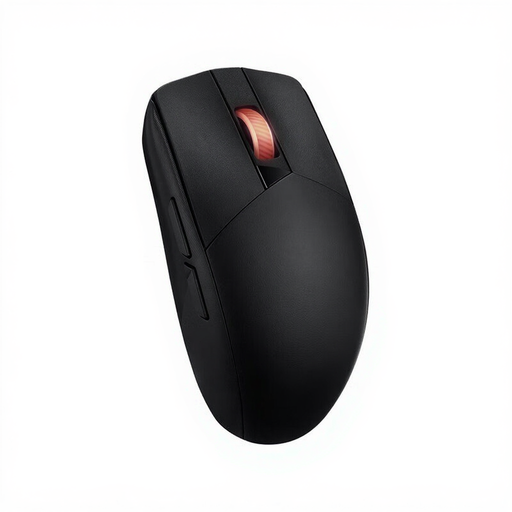
Why This Fits Their Persona: Perfect for left-handed gamers or users who prefer a symmetrical mouse. Its dual connectivity (RF and Bluetooth) makes it versatile for both gaming and productivity.
This mouse offers concrete, functional benefits: a truly ambidextrous design and clear, dual wireless options. No vague promises, just practical versatility.
Symmetrical shape suitable for left- and right-handed users. Connectivity via both RF wireless and Bluetooth.
We have compiled a complete, up-to-date list of products that fully meet these strict selection criteria and local regulations.
Yes, provided you choose the right model. Modern, professional-grade wireless technologies like Razer HyperSpeed and Logitech LIGHTSPEED have virtually no perceptible lag compared to a wired mouse. For competitive gaming, it's crucial to select a model with this type of 2.4GHz technology and not rely on a standard Bluetooth connection.
Most professional FPS players use a DPI setting between 400 and 1600. An extremely high DPI number (like 20,000+) is primarily a marketing figure. What's more important is a high-quality sensor that ensures accurate tracking without acceleration or irregularities at the DPI setting you feel comfortable with.
The lifespan depends on the build quality and the switches used, not the weight. Reputable brands use durable materials and high-quality switches (e.g., rated for 80-90 million clicks), even in their ultralight models. The weight reduction is achieved through smart engineering, such as a perforated shell or thinner yet strong plastics, not by sacrificing durability.
