
Vandaag of morgen in huis

Kwaliteit gegarandeerd

Welkomstaanbiedingen ontgrendelen: GRATIS bezorging | Tot 80% korting | Gratis 30 dagen JoyPlus-proefperiode
Download de app
If you're a competitive gamer, you know that every millisecond counts. Your gear can be the difference between victory and defeat. A good gaming mouse is an essential part of that equation. But the market is flooded with marketing terms and specifications that create more confusion than clarity. How do you avoid buyer's remorse and choose a mouse that will actually improve your performance? As a Joybuy Product Recommendation Officer, I'm here to help you separate fact from fiction.
Before we dive into the specs, it's important to recognise the most common marketing traps. Many gamers unnecessarily spend money on features that add little practical value.
high DPI mouse is no guarantee of better performance; the quality and consistency of the sensor are far more important.lightweight gaming mouse can enable faster movements, but pay attention to how this weight reduction is achieved. Models with a "honeycomb" design may be light, but they quickly accumulate dust and grime and are often less sturdy. A solid, well-engineered lightweight mouse is a better long-term investment.wireless gaming mouse due to the fear of lag (latency). While this can still be an issue with budget models, reputable brands now offer wireless technologies that are on par with a wired connection in terms of speed and stability. Focus on the technology (like 2.4GHz with a dedicated dongle) rather than just the fact that it's wireless.Don't get distracted by marketing jargon. When choosing a new PC gaming mouse, focus on the following three objective specifications.
The sensor is the heart of your mouse. A good optical sensor ensures accurate tracking of your movements without unwanted acceleration or angle snapping. Don't just look at the maximum DPI; focus on the sensor's consistency, such as a PixArt sensor or the proprietary high-end sensors from brands like Logitech (HERO) and Razer (Focus Pro).
The polling rate, measured in Hertz (Hz), indicates how often the mouse reports its position to the computer. The standard is 1000 Hz (1000 times per second). For an esports mouse, you'll increasingly see 4000 Hz or even 8000 Hz. This can provide a more immediate response but also demands more from your CPU. For most competitive gamers, 1000 Hz is more than sufficient, but a higher polling rate can offer a slight edge in specific scenarios.
The weight and shape of the mouse determine how comfortable and controllable it is during long gaming sessions.
lightweight gaming mouse (usually under 70 grams) is ideal for fast-paced FPS games where you frequently lift and reposition the mouse. Heavier mice can offer more stability for other genres.ergonomic gaming mouse is contoured to the hand and provides support, which reduces fatigue. The shape should match your grip style:
A programmable mouse offers the ability to assign macros and functions to extra buttons, which can be a major advantage in MMO or MOBA games. Also, pay attention to the type of switches. Optical switches are becoming increasingly popular because they are faster and eliminate the risk of unwanted double-clicks (a common problem with older mechanical switches). The lifespan, often expressed in millions of clicks, gives an indication of its durability.
Based on objective specifications, we have selected a few models that suit different types of gamers.

Why This Fits Their Persona: For the gamer to whom performance is everything. This model is ultra-lightweight, has a top-tier sensor, and features reliable wireless technology developed in collaboration with esports pros.
Its 53-gram weight is achieved through clever engineering, not a fragile honeycomb structure. The LIGHTSPEED technology is proven to be lag-free, avoiding the pitfall of poor wireless performance.
The HERO 2 sensor offers pixel-perfect precision, and the 8000 Hz polling rate ensures extremely low latency. A proven shape in the esports world.
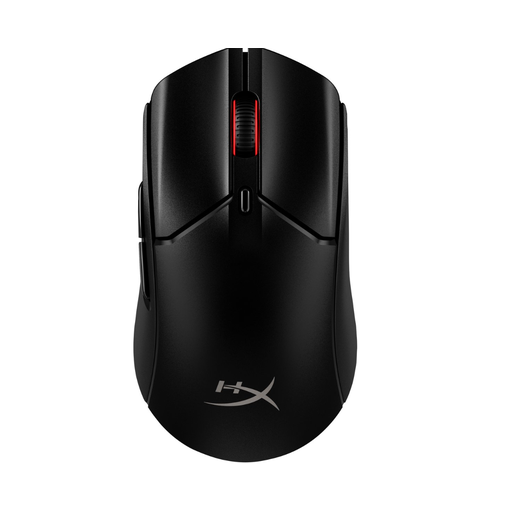
Why This Fits Their Persona: Offers an excellent balance of weight, performance, and features without the premium price tag. Ideal for serious gamers looking for a reliable wireless experience at a reasonable price.
The solid shell is more durable than many perforated competitors. Its 2.4GHz connection is stable for gaming, and the DPI is more than sufficient without falling for marketing hype.
Lightweight (60g) with a solid construction. The dual wireless connectivity (2.4GHz and Bluetooth) makes it versatile for both gaming and on-the-go use.

Why This Fits Their Persona: Perfect for gamers who want maximum control and customisation for MMOs or productivity, with a focus on comfort for long sessions. The `RGB gaming mouse` lighting is fully customisable.
Instead of blindly following the lightweight trend, this mouse focuses on ergonomics and functionality. Its wireless performance is top-tier thanks to Razer HyperSpeed, offering no compromises.
11 programmable buttons and a comfortable, ergonomic shape. The tactile scroll wheel provides extra control, ideal for various games and long gaming sessions.
We have compiled a complete, up-to-date list of products that fully meet these strict selection criteria and quality standards.
Yes, provided you choose a quality model. Modern 2.4GHz wireless technologies, like those from Razer and Logitech, have virtually eliminated latency. They are reliable enough for professional tournaments. Bluetooth connections generally have higher latency and are not recommended for competitive gaming.
Don't be fooled by the marketing. Most professional FPS players use a DPI setting between 400 and 1600. A lower DPI provides more control and precision when aiming. It's more important to find a setting that is comfortable for you and use it consistently than to chase the highest possible DPI number.
Mechanical switches use a physical contact point to register a click. This provides clear, tactile feedback but can wear out over time and lead to unwanted double-clicks. Optical switches use an infrared light beam. This is faster, prevents double-clicks, and, according to manufacturers, often has a longer lifespan. The choice is a matter of personal preference: some gamers prefer the feel of a mechanical click.
