
Builder using a large screen
You want to move quickly across the play area and click on small items accurately. Microsoft Support explains how to adjust pointer speed in Windows; screen size alone doesn’t determine which setting will work for you.


Start with a shape that feels comfortable in your hand and a pointer speed that lets you build accurately while moving quickly across the screen. Extra buttons or a versatile scroll wheel are only worthwhile if you can assign them functions in your game. A wired mouse means no battery to manage, while a wireless one gives you more freedom of movement. A large screen alone doesn’t automatically call for an exceptionally high maximum DPI: try the settings on your own screen and in your game.
You want to move quickly across the play area and click on small items accurately. Microsoft Support explains how to adjust pointer speed in Windows; screen size alone doesn’t determine which setting will work for you.
You’re looking for a shape and button layout that suit your hand and grip. Weight and button layouts vary between models, but specifications can’t tell you how comfortable a mouse will feel to you.
You may want to assign recurring in-game actions to mouse buttons. Check in advance that the game and configuration software support the functions you want, and that the buttons are easy for you to reach.
Start with accurate pointing and comfortable, repeated use. Then consider which extra features you’ll actually use in your own game.
| What to consider | What to look for | Who is this most important for? |
|---|---|---|
| Cursor control | Try the pointer speed, screen settings and available DPI settings in your game. | I want to move across the play area and still click on small building options accurately; around 33% of consumers give cursor control on their own screen top priority. |
| Comfort for long sessions | Check the hand orientation, shape and weight, and whether the buttons are easy to reach. | When using a mouse repeatedly, I want one that suits my hand and grip, not simply one with more features; around 27% of consumers prioritise comfort during extended use. |
| Buttons and scrolling | First make a note of the in-game actions you want to assign, then check that the game and software support them. | I want to perform recurring building actions more quickly without unused buttons; around 20% of consumers put assignable controls first. |
| Wired or wireless | Check the connection type and, for wireless use, the receiver, charging method and stated battery life. | If I want to move without a mouse cable, I bear in mind that charging and possibly a receiver come with the territory; around 20% of consumers choose freedom of movement as their main priority. |
A maximum sensor specification won’t tell you which pointer speed feels comfortable on your screen or works accurately in your game.
Adjust the pointer speed and available mouse settings, then try them out while building.
More buttons aren’t automatically useful: your game must support the actions you want, and the buttons need to be within easy reach.
First decide which actions you use often, then check whether you can set them up with the mouse and its accompanying software.
The wired Razer Basilisk V3 is a different version from the wireless Basilisk V3 Pro 35K; specifications for one don’t automatically apply to the other.
Check the full model name and the details of the exact version you’re considering.
The wired G502 X is worth considering if you’re looking for assignable controls and different scroll modes.
The wired Basilisk V3 may suit you if you’re weighing up multiple assignable controls and different scroll modes.
The Aerox 5 Wireless is worth a look if you want to play wirelessly and are looking for several side controls.
The wireless GXT 923 Ybar is worth considering if a smaller number of configurable buttons is enough for you.
This selection includes wired mice with configurable controls and wireless versions for anyone who prefers to play without a cable.
 No image available
A wired option to consider if custom controls and scrolling matter to you. Check which features your game and software support.
The product name lists up to 26,000 DPI. This maximum figure alone doesn’t determine which pointer speed will feel comfortable on your screen.
 No image available
A wireless version to consider if you want to compare different connection options. Check which connection is compatible with your computer.
The product name lists 2.4G, USB-C and Bluetooth, a 400 mAh battery, a weight of 56 g and 26K DPI. The charging base contains magnets; keep it away from pacemakers, medical implants, and payment or identity cards.
 No image available
A wired mouse to compare if you’re looking for assignable controls. Logitech describes the wired G502 X as having 13 assignable controls; check that the accompanying software and features suit your game.
The product name lists USB Type-A and 25,600 DPI. Set the pointer speed to suit your screen and game.
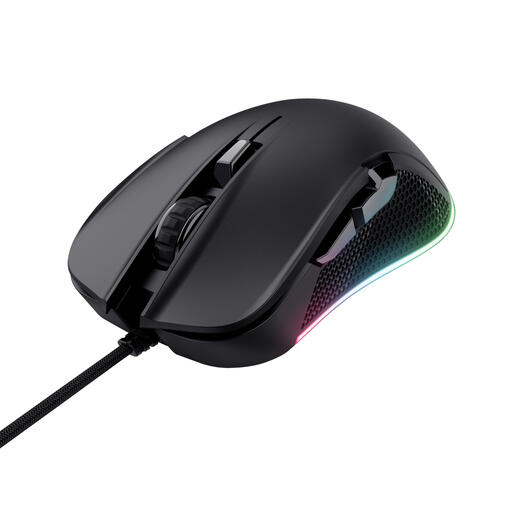 No image available
A wired version to consider if you want to compare a clearly stated DPI figure and don’t need a wireless connection.
The product name lists right-handed use, USB Type-A and 7,200 DPI. Adjust the pointer speed to suit your screen and game.
 No image available
A wireless version to consider if you want to play without a cable. Note that this is the Basilisk V3 Pro 35K, not the wired Basilisk V3.
The product name describes an ergonomic wireless gaming mouse. Check the specifications for this specific version before comparing models.
No. First, find a cursor speed that feels comfortable on your screen and in your game. On a Windows PC, you can adjust the screen settings and pointer speed, then try out the available mouse settings. Screen diagonal alone doesn’t determine a required DPI figure.
First, make a note of which actions the game lets you assign. Then, if the model supports it, assign a few easy-to-reach buttons using the accompanying software and test them in the game. The number of buttons doesn’t guarantee that the functions you want are available.
A wired mouse may suit you if you don’t want to manage a battery or receiver and don’t mind having a cable on your desk. Choose wireless if freedom of movement matters more to you and you’re happy to take charging and, depending on the version, a receiver into account.
For many eligible distance purchases from a business, the Dutch government states that you have a 14-day cooling-off period, with some exceptions. Check who the seller is and which terms apply to your purchase.