Who is this buying guide for?

Sofa players with a PC connected to the TV

If you play from the sofa, you probably don’t want a mouse cable running across the room. Check the connections on your gaming device and where you can place the USB receiver; Bluetooth is only an option if your device supports it.

Players of card and board game interfaces

When playing with cards, pieces and menus, precise cursor control can matter more than a high maximum sensor specification. Adjustable sensitivity or extra buttons are only useful if your game and controls make use of them.

Players who enjoy long sessions

For longer gaming sessions, comfort in your hand and power supply both matter. A replaceable battery, a rechargeable mouse and a cable each call for a different approach to use.

What should you look for when choosing?

Wireless with a USB receiver

Choose this if: your gaming device has a suitable USB port and you want to play from your seat without a mouse cable.

Bear in mind: you need to be able to position the receiver somewhere suitable. If you experience interference, Logitech recommends placing it closer to the mouse and further away from USB 3.0 ports.

Wireless via Bluetooth

Choose this if: your device supports Bluetooth mice and you don’t want to use a USB receiver.

Bear in mind: not every wireless mouse has Bluetooth. Check the exact version and make sure your device supports it.

Wired

Choose this if: you sit close enough to your gaming device and don’t want to use a wireless connection or mouse battery.

Bear in mind: the cable needs to be long enough and safely routed around your seating area.

What to consider What to look for Who should pay extra attention?
Connection and distance Check for USB or Bluetooth support and think about where you can place the receiver. If you experience interference, Logitech recommends placing the receiver closer to the mouse and further away from USB 3.0 devices. If you play from the sofa, you’ll want a connection that suits your device and seating position. Around 36% of consumers say connection is their top priority.
Game controls Check whether the game needs mouse controls and whether adjustable sensitivity or extra buttons offer features you’ll use. Steam notes that not all games support controllers. If you use the cursor to control cards, pieces and menus, you’ll want to tailor the mouse to your game. Around 29% of consumers put game controls first.
Comfort in your hand Compare the shape, dimensions, hand preference and grip. A low weight or low profile doesn’t guarantee that a mouse will feel comfortable in every hand. During longer sessions, the shape may matter more than extra features. Around 21% of consumers put comfort in the hand at the top of their list.
Power supply Check whether the mouse uses a replaceable battery, can be recharged or needs to be plugged in, and whether you can keep playing while it charges. The stated maximum battery life is not a guarantee of how long it will last for you. If you want to reduce interruptions or battery changes, the type of power supply matters. Around 14% of consumers say upkeep and running costs are their top priority.

Common buying mistakes

  • Assuming every wireless mouse has Bluetooth

    Connection options vary by model. Check the exact version and whether your gaming device supports the connection you’ve chosen, especially if you don’t want to use a USB receiver.

    Before choosing, check the model’s connection specifications with the manufacturer.

  • Assuming a high maximum DPI or lots of buttons means better control

    A high maximum sensitivity or extra controls won’t necessarily be useful for cards and menus. The benefits depend on the cursor speed you find comfortable and the features your game supports.

    First check how your game is controlled, then choose the settings and buttons that suit it.

  • Assuming the statutory guarantee always lasts two years

    According to the Dutch government, there is no fixed statutory guarantee period in the Netherlands. A manufacturer’s guarantee is separate from your right to expect a product to meet reasonable standards.

    Keep your proof of purchase and contact the seller if the product is faulty.

Brands to compare

Logitech G

The G305 LIGHTSPEED is an option with a USB receiver and a replaceable AA battery.

  • Logitech specifies a 200–12,000 DPI range and up to 250 hours of use per AA battery for the G305.
  • These figures are provided by the manufacturer, not based on testing during board game adaptations. Check the exact version and connection options.

Razer

According to Razer, the Basilisk V3 X HyperSpeed offers a choice of a 2.4GHz receiver or Bluetooth.

  • Razer lists nine customisable controls and maximum battery life of up to 285 hours via HyperSpeed and 535 hours via Bluetooth.
  • These figures are provided by Razer. Check that the connection and buttons suit your device and game.

SteelSeries

According to SteelSeries, the Aerox 3 Wireless combines a 2.4GHz connection with Bluetooth.

  • For the version reviewed, SteelSeries specifies a weight of 68 grams and battery life of up to 200 hours.
  • A low weight and low profile don’t guarantee that the mouse will feel comfortable in every hand.

Trust

The GXT 923 Ybar is a rechargeable wireless model; check its specifications separately from the GXT 931 Ybar.

  • Trust lists up to 50 hours of use for the GXT 923 and says you can continue playing while it charges.
  • Trust does not confirm Bluetooth support for the GXT 923. The manufacturer describes the GXT 931 as a different model with both a USB receiver and Bluetooth.

Gaming mice at Joybuy

This selection includes wired and wireless gaming mice with different connection options, for anyone who wants to play from their seat on a big screen.

ASUS ROG Keris II Ace Wireless AimPoint Black gaming mouse

ASUS ROG Keris II Ace Wireless AimPoint Black

The product title lists RF Wireless, Bluetooth and USB Type-A, so you can choose the connection option that suits your gaming device.

View at Joybuy

ASUS ROG Strix Impact III Wireless gaming mouse

ASUS ROG Strix Impact III Wireless

The product title lists RF Wireless and Bluetooth; check which connection your gaming device supports.

View at Joybuy

AJAZZ AJ159 PRO wireless gaming mouse, white

AJAZZ AJ159 PRO Wireless Gaming Mouse, White

The product title lists 2.4G, Bluetooth and USB-C, so you can compare the stated connections with your device.

The title lists 26K DPI and a lightweight 56 g design. The product information warns you to keep the magnetic charging base away from pacemakers, medical implants, and payment or identity cards.

View at Joybuy

Razer Basilisk V3 X HyperSpeed gaming mouse

Razer Basilisk V3 X HyperSpeed

The product information lists HyperSpeed Wireless and Bluetooth, an AA battery and programmable controls. Check which features suit your game and device.

View at Joybuy
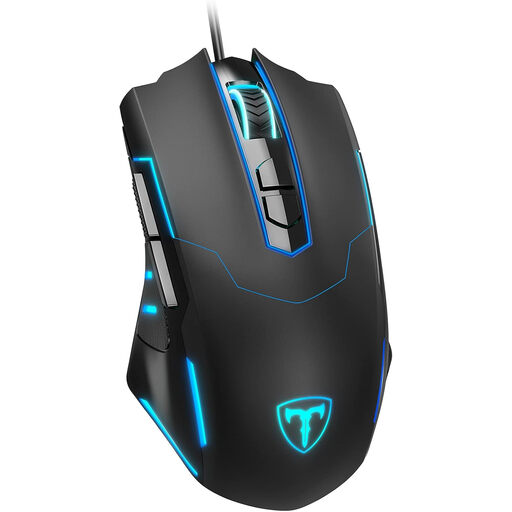
ET Gaming Mouse Wired wired gaming mouse

ET Gaming Mouse Wired

The product title describes a wired gaming mouse for PC and laptop. Choose this connection only if you have a practical way to route the cable to your seat.

View at Joybuy

Frequently asked questions

Can I always play a board game adaptation on the TV using only a controller?

No, it depends on the game. Steam notes that not all games support controllers; with partial support, you may still need a mouse and keyboard for installation, configuration or menus. Check the support available for the game you want to play.

What can I do if my wireless mouse keeps stuttering when I play from the sofa?

First, check where the USB receiver is positioned. Logitech recommends placing it closer to the mouse and further away from USB 3.0 ports; a USB extension cable may also help. This advice doesn’t guarantee that every connection issue will be resolved.

Is a two-year manufacturer’s guarantee the same as the statutory guarantee in the Netherlands?

No. According to the Dutch government, there is no fixed statutory guarantee period in the Netherlands; a product must meet the standards you can reasonably expect. The seller is responsible for faulty products. A manufacturer’s guarantee is an additional benefit.

Can I try out a mouse I’ve bought online and send it back?

For a standard online consumer purchase, ACM ConsuWijzer says you’ll usually have up to 14 days after delivery to change your mind. Check the terms for trying out and returning the product; you may have to pay return postage if this was made clear in advance.

What should I know about the rules for wireless mice in the Netherlands?

Radio equipment placed on the EU market must meet the relevant requirements. The Dutch Authority for Digital Infrastructure states that manufacturers apply the CE marking to compliant products; a product listing alone doesn’t confirm that a specific mouse meets those requirements.
