
Players who use lots of shortcuts
You want to trigger abilities or use items with easily accessible mouse buttons. Check that you can press each button individually with your grip.


For online arena matches, your choice mainly comes down to how you play: programmable buttons are handy if you want to trigger actions with your thumb, while a lightweight mouse may suit you if you make lots of quick movements. A high maximum DPI figure doesn’t prove that a sensor will track reliably on your desk, so test the mouse on your own surface and in the lighting conditions you play in. A wired mouse means you won’t need to charge it, but the cable needs room to move freely. Wireless gives you more freedom of movement, but you’ll need to keep an eye on charging and connectivity.
You want to trigger abilities or use items with easily accessible mouse buttons. Check that you can press each button individually with your grip.
You mainly use the keyboard for actions, and pay attention to the shape, weight and freedom of movement your mouse offers. RTINGS discusses lightweight mice as an option for quick movements.
You play in bright ambient light and want to check whether the mouse tracks reliably on your own desk or mouse mat. Don’t assume that a specification guarantees performance in bright light.
| What to consider | What should you check? | Who is this important for? |
|---|---|---|
| Tracking on your surface | Test it on your desk or mouse mat in the lighting conditions you play in. SteelSeries Support also recommends trying a different surface if you have tracking problems. | I want to know whether the mouse tracks well on my own surface, especially in the lighting conditions I play in. Around 31% of consumers prioritise reliable tracking. |
| Accessible buttons | Count the actions you want to assign and check that you can reach the buttons with your thumb without having to search for them. | If I want to trigger abilities or use items with the mouse, the button layout needs to suit my grip. Around 31% of consumers prioritise button control. |
| Grip and weight | Compare the shape with your current mouse and check that you can still reach the buttons while holding it as you normally would. | I want to move the mouse quickly without its shape feeling uncomfortable. Around 23% of consumers focus mainly on fit. |
| Connectivity and use | Check whether the cable can move freely, or whether you’d rather manage a wireless connection and charging. | I want to choose in advance between having a cable on my desk and playing wirelessly while keeping an eye on charging. Around 15% of consumers prioritise connectivity and ease of use. |
A maximum DPI figure doesn’t tell you how the sensor will track on every desk surface or in every lighting condition.
First compare the shape and controls, then test the mouse on the surface you play on in your usual lighting conditions.
Extra assignable buttons are only useful if you can reliably use the actions you want with your grip.
Make a note of the actions you want to assign beforehand and check that the button placement suits them.
Colour, model variant and included accessories can differ between versions. Check the exact model name and what’s included in the box.
Read the warranty terms separately and distinguish between a commercial warranty and your statutory rights.
The Rival 5 is a wired option for players who want to assign multiple actions to mouse buttons.
The wireless PRO X SUPERLIGHT 2 suits players who value a low stated weight and don’t need an extensive side panel.
The Naga V3 Pro offers a choice of side-panel layouts, while the Viper V3 Pro is a lighter option with simpler controls.
The SCIMITAR ELITE WIRELESS is an option for players who want to assign lots of actions to an adjustable side panel.
This selection includes lightweight mice for quick movements and models with programmable buttons, both wired and wireless.
 No image available
A lightweight wireless option if you often move your mouse quickly.
56 g; PAW3395 sensor; connects via 2.4G, USB-C or Bluetooth.
 No image available
A wired choice if you don’t want to manage a wireless connection and are looking for programmable buttons.
53 g; six programmable buttons; HyperX 26K sensor.
 No image available
A wireless option if you want to assign multiple actions to mouse buttons.
67 g; seven programmable buttons; PixArt PAW3311 sensor; Bluetooth 5.0, 2.4G and USB-C.
 No image available
A wireless option if you want to assign multiple actions and are looking for a low stated weight.
Ten programmable buttons; 68 g; PAW 3398 sensor.
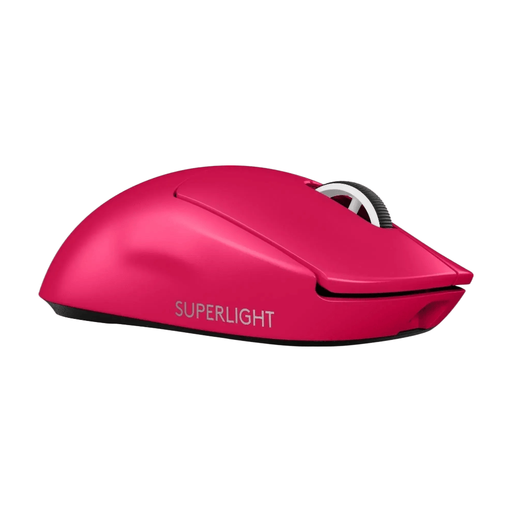 No image available
A lightweight wireless option if quick mouse movements are important to you.
60 g; HERO 2 sensor; LIGHTSPEED connection.
No. A maximum DPI figure doesn’t show how reliably a mouse tracks on your desk or mouse mat. Test the surface in the lighting conditions you play in; SteelSeries Support also recommends trying a different surface if you have sensor problems.
First, check the surface and try a different mouse mat or surface. SteelSeries Support also warns against using liquid cleaner on the sensor.
For an online purchase from a business, you generally have a statutory 14-day cancellation period from delivery, with some exceptions. ACM ConsuWijzer distinguishes between online purchases and purchases in a physical shop; check the returns information for your purchase.
No. According to ACM ConsuWijzer, the statutory guarantee is separate from a commercial manufacturer’s or seller’s warranty. Contact the seller if the product is faulty.
The European Radio Equipment Directive sets requirements for radio equipment placed on the EU market. According to Your Europe, the manufacturer uses the CE marking to indicate that the product meets the applicable EU requirements; it isn’t a gaming performance mark.