First, choose a mouse shape that suits your hand and grip, then test tracking on an even, matt surface. Weight and connection are practical considerations after that. Wireless gives you more freedom of movement, while a wired mouse avoids the need to recharge. However, none of the model specifications listed here proves that a mouse tracks better simply because the room is brightly lit.
Who should consider this choice?
Aim trainer experiencing inconsistent tracking
You practise the same aiming movements repeatedly and want to find out whether your mouse tracks consistently on your current surface. For optical tracking problems, SteelSeries Support recommends testing on an even, matt surface. This is not a proven solution for every combination of sensor and lighting conditions.
Player looking for a comfortable grip
Your hand size and grip can determine whether a compact, symmetrical or ergonomic shape feels comfortable to control. RTINGS.com’s FPS selection also highlights hand size and grip, alongside weight.
Player weighing up freedom of movement
You’re comparing a cable in your movement space with the need to recharge a wireless mouse. Check which connection the specific version uses and whether it suits your desk and computer.
Which factors matter for aim training?
Start with the surface and grip. Then choose between wireless and wired, and only after that consider which settings you actually want to use.
Lightweight and wireless
A good fit if: you want to reposition without a cable and the shape suits your grip.
Consider: checking the connection, receiver and charging method for the version you’re considering.
Ergonomic and wireless
A good fit if: you prefer an asymmetrical shape for your right hand.
Consider: shape and weight vary between models, so try the fit where possible.
Wired
A good fit if: you don’t want to recharge your mouse and a cable won’t get in your way.
Consider: whether the cable and available mouse space suit your desk and movement patterns.
| Factor to consider |
What to look for |
Who should prioritise this? |
| Tracking on your surface |
Test on an even, matt surface and check that the sensor is clean. Don’t assume that bright ambient light alone will cause problems for every optical sensor. |
If my cursor stutters on my current surface, I want to check whether the surface is a factor before choosing another mouse. Around 36% of consumers prioritise tracking and the surface above all else. |
| Shape and grip |
Compare the dimensions and symmetrical or asymmetrical shape with your hand size and grip; consider the weight alongside the shape. |
If I aim repeatedly, I want a shape that feels comfortable in my hand and easy to control. Around 29% of consumers prioritise shape and grip. |
| Wired or wireless |
For wireless, check the connection and whether a receiver is required. For wired, check that the cable and desk provide enough room to move. |
If I want to move without a cable, or would rather not recharge my mouse, the connection matters to me. Around 21% of consumers choose connection as their main consideration. |
| Settings |
Check which DPI and lift-off settings the exact model offers, and whether you want to use software to adjust them. |
If I want to fine-tune my aiming settings, I want to know which options the model actually offers rather than focusing only on the highest figure. Around 14% of consumers prioritise adjustment options. |
Common buying mistakes
-
Assuming a high DPI figure guarantees better aim
DPI alone doesn’t tell you how a mouse will track on your surface or in your lighting conditions. For optical tracking problems, SteelSeries Support recommends testing on an even, matt surface.
Start by comparing your surface and grip. Don’t treat the maximum DPI figure as proof of performance in your room.
-
Choosing based on weight alone
A low weight doesn’t replace the need to consider hand size and grip; compact and ergonomic models can feel different in your hand.
Compare the shape with your hand and try it where possible before letting weight decide.
-
Checking connections using only the product title
Different versions of a model can vary in their connection and design. Check the full model name and the connections available on the version you’ve chosen.
Compare the product details with the manufacturer’s information, and check which items are included with that version.
Brands to consider
Logitech G
The PRO X SUPERLIGHT 2 is a lightweight wireless option, while the separate PRO X2 SUPERSTRIKE offers adjustable click behaviour. These are different models.
- Logitech G lists the PRO X SUPERLIGHT 2 at 60 g.
- Adjustable click actuation is a feature of the PRO X2 SUPERSTRIKE, not the PRO X SUPERLIGHT 2.
ZOWIE
The European EC2-CW specification describes a medium-sized ergonomic wireless mouse for those who prefer this shape.
- ZOWIE says the EC2-CW lets you adjust DPI and report rate on the mouse, without a driver.
- The stated weight of 77 g and maximum report rate of 1000 Hz apply to this model.
Endgame Gear
The OP1 8k v2 is a compact wired option for those who want to avoid recharging.
- Endgame Gear specifies a weight of 49,5 g, USB-A and a 180 cm cable for this model.
- The compact shape and cable need to suit your hand and the space on your desk.
Razer
The Viper V3 Pro is a lightweight wireless mouse designed for FPS gaming.
- Razer lists the black version at 54 g and the white version at 55 g on its UK product page.
- These stated weights don’t prove that the model tracks better on a brightly lit desk.
SteelSeries
According to SteelSeries, the Aerox 3 Wireless offers 2.4 GHz and Bluetooth.
- SteelSeries lists the Aerox 3 Wireless at 68 g.
- Bluetooth and the stated protection apply to this model; they aren’t features of every SteelSeries mouse.
Gaming mice at Joybuy
This selection includes wired and wireless gaming mice for different grip, tracking and connection preferences during aim training. The specifications listed don’t prove that any model tracks better in bright light.
 No image available
AJAZZ AJ159 PRO with magnetic charging dock, white
A wireless option for those looking for an ergonomic shape for small to medium-sized hands.
The product title lists a weight of 56 g and 2.4 GHz, USB-C and Bluetooth. The product information also mentions an optical sensor and adjustable DPI.
The product information advises keeping the magnetic charging dock away from pacemakers, medical implants and items such as payment cards.
Joybuy
 No image available
HyperX Pulsefire Saga, wired, black
A wired option for those who want to avoid recharging and customise their grip with interchangeable parts.
The product information lists a weight of 69 g, 16 grip combinations, an optical sensor and adjustable DPI.
Bear the cable in mind and check that it suits the space available for your mouse.
Joybuy
 No image available
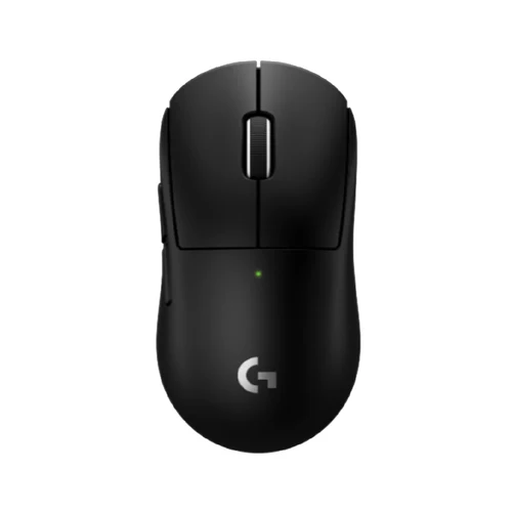
Logitech G PRO X SUPERLIGHT 2c, black
A wireless option for those looking for a compact model that, according to the product information, suits smaller hands or a personal grip preference.
The product information lists a weight of 53 g, a HERO 2 sensor and a LIGHTSPEED wireless connection.
These specifications don’t demonstrate a tracking advantage in bright light.
Joybuy
 No image available
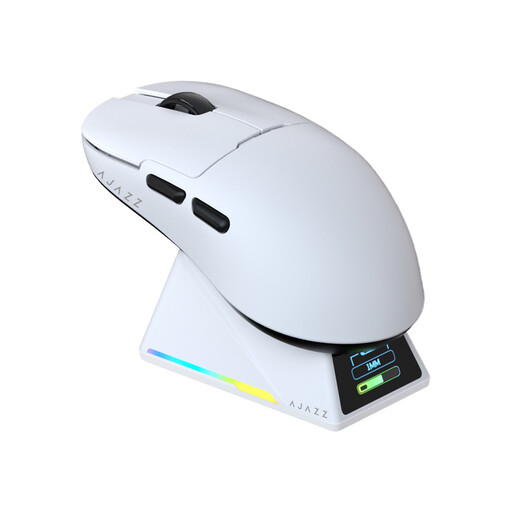
AJAZZ AJ159 APEX with magnetic charging dock
A wireless option with a symmetrical shape for small to medium-sized hands.
The product information lists a weight of 56 g, an optical sensor and DPI and lift-off distance settings. The title mentions a tri-mode connection.
The settings listed don’t, on their own, tell you how well the mouse will work for your aiming movements.
Joybuy
 No image available
Razer Viper V3 Pro, black
A wireless option with a right-handed ergonomic shape, according to the product description.
The product information lists a weight of 54 g, an optical sensor and 8K polling.
These details don’t prove that the mouse tracks better in bright light.
Joybuy
Frequently asked questions
Should you buy a different mouse straight away if your room is brightly lit?
No, not before checking the tracking and surface. For optical mouse problems, SteelSeries Support recommends trying an even, matt surface and checking the sensor. This doesn’t prove that a particular model is unaffected by direct sunlight.
How should you maintain the sensor if the cursor skips?
For sensor problems, SteelSeries Support recommends first checking for firmware updates, then cleaning the sensor with compressed air. Don’t use liquid cleaner on the sensor surface, as this could cause damage.
Can you try out a mouse bought online and return it?
For a standard online purchase from a retailer in the Netherlands, you generally have a statutory 14-day cooling-off period after delivery. ACM ConsuWijzer lists exceptions, so check which rules and returns policy apply to your purchase before buying.
Is the statutory guarantee in the Netherlands always exactly two years?
No. According to the Dutch government, there’s no fixed statutory guarantee period in the Netherlands: a product must meet the standards you could reasonably expect. If a product is faulty, you can contact the retailer for a solution; a manufacturer’s guarantee is additional.


