
Aim trainee with limited desk space
You practise aiming and repositioning repeatedly. Grip, shape and enough room to move your mouse are the key things to consider.


Start with a shape and grip that feel comfortable during repeated aiming, and make sure you have enough room for your mouse movements. Then choose between a wired and wireless power setup. If clicking might disturb your roommate, look for an explicit quiet-button claim for the exact model: Logitech describes the G309 switches as tactile, while CHERRY positions the GENTIX SILENT for quiet working environments, not as a proven competitive gaming mouse. Manufacturer claims alone can’t predict how loud a mouse will sound in your bedroom.
You practise aiming and repositioning repeatedly. Grip, shape and enough room to move your mouse are the key things to consider.
You want to avoid disturbing someone in the same room with your clicks, and may need to weigh quietness against gaming features.
You want to practise without charging or changing batteries, as long as a cable doesn’t get in your way.
First, consider grip and the space you have to move. Then compare the power and connection options, and treat click noise as a separate factor.
| What to consider | What to look for | Who is this important for? |
|---|---|---|
| Control during repeated movements | Compare the shape and grip, and check the weight of the exact version, including the power setup you’ll use. | If I aim, lift and reposition frequently, I want a mouse shape that suits my grip. Around 33% of consumers prioritise control of movement above all else. |
| Audible clicking | Look for an explicit quiet-click claim for the exact model; tactile feedback doesn’t automatically mean quiet clicks. | If clicking bothers my roommate, keeping things quiet matters more to me than a gaming label alone. Around 33% of consumers prioritise quieter clicks. |
| Freedom of movement at your desk | Check that you have room for your full range of mouse movement and that any cable can move freely. | At a crowded desk, I want to move without a cable getting in the way. Around 23% of consumers consider a clear desk setup the most important factor. |
| Connection and power | Check the connection, the power required and which accessories are included with the version you choose. | If I want to avoid any uncertainty about connecting the mouse, batteries or what to do if there’s a problem, I like to keep things simple. Around 11% of consumers prioritise ease of use and aftercare above all else. |
Logitech lists the G309 at 86 g with an AA battery. The stated 68 g weight applies when using the separate POWERPLAY power system.
Compare the weight of the configuration you actually plan to use, and don’t assume the lighter setup is standard.
The stated 68 g weight requires POWERPLAY as a power system. Check which accessories are included with the version you choose.
A description such as “tactile” doesn’t mean the buttons click quietly. Gaming claims don’t automatically tell you how much noise your roommate will hear either.
Treat click noise as a separate factor and look for an explicit claim for the exact version.
CHERRY positions the GENTIX SILENT for quiet working environments and lists three buttons and 1000 dpi. That doesn’t prove the model is suitable for every competitive play style.
Choose this type of mouse only if quiet clicks matter more to you and its stated features suit your games.
The G309 LIGHTSPEED is a wireless gaming option with LIGHTSPEED and Bluetooth. The PRO X SUPERLIGHT 2 is a separate product line.
The Viper V3 Pro is a wireless gaming mouse. The Pro Click Mini is a separate productivity range.
The Aerox 3 Wireless Gen 2 is a wireless gaming mouse with settings for movement control.
CHERRY positions the GENTIX SILENT as a wired alternative for anyone who values quiet clicks.
These product picks are wireless gaming mice for practice sessions where a moving cable could get in the way. For each model, check that its shape, connection and power setup suit your desk and how you plan to use it.
 Image unavailable
The wireless version may suit you if a moving mouse cable gets in the way during practice.
56 g; connects via 2.4G, USB-C or Bluetooth; PAW3395 sensor and 26K DPI. The product name also mentions a magnetic base.
 Image unavailable
The wireless modes give you the option to practise without a moving mouse cable.
63 g; Bluetooth, 2.4G and USB-C; PAW3311 sensor and six buttons. The stated fit is for medium to large hands; up to 1000 Hz in wired and 2.4G modes.
 Image unavailable
A wireless version may be useful if you don’t want a cable running alongside your mouse while you practise.
67 g; Bluetooth, 2.4G and USB-C; PAW3311 sensor, 8KHz and seven programmable buttons.
 Image unavailable
The wireless connection means you won’t have a mouse cable in the way during repeated movements.
60 g; HyperSpeed Wireless and Bluetooth; AA or AAA battery; 18,000 DPI optical sensor and six programmable buttons.
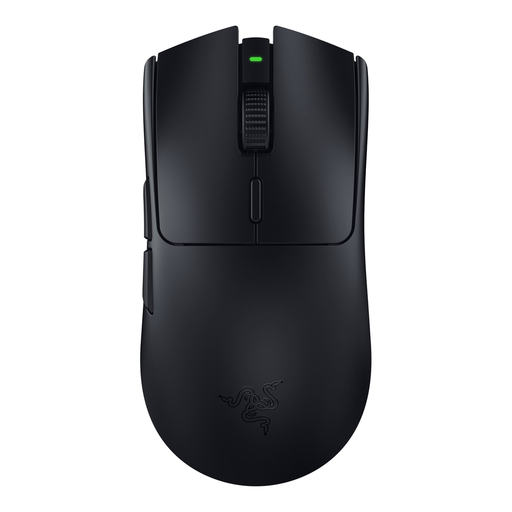 Image unavailable
The wireless connection may be useful if a cable gets in the way of your mouse movements.
82 g; HyperSpeed Wireless; six buttons and an optical sensor up to 30,000 DPI.
No. The type of switch alone doesn’t prove that a mouse clicks quietly. Logitech describes the G309 switches as tactile; if you want quiet clicks, look for an explicit claim about the exact mouse and judge the noise in your own room.
Check that you have room for your full, usual range of mouse movement and that a cable can move freely. If you choose a wireless mouse, check which connection modes and power options the specific model has; Logitech lists LIGHTSPEED and Bluetooth for the G309.
In the configuration with the AA battery described by Logitech, you use a replaceable battery rather than a built-in battery that you charge via a cable. Logitech also lists POWERPLAY as a separate wireless power option; check which configuration you choose.
According to ACM ConsuWijzer, for an applicable online consumer purchase there is usually a statutory cooling-off period, which ends 14 days after the product is delivered. Check the applicable terms and exceptions. If a product breaks too soon during normal use, the seller must, according to ACM ConsuWijzer, resolve the problem free of charge, for example by repairing or replacing it, or issuing a refund.