
Vandaag of morgen in huis

Kwaliteit gegarandeerd

Welkomstaanbiedingen ontgrendelen: GRATIS bezorging | Tot 80% korting | Gratis 30 dagen JoyPlus-proefperiode
Download de app
A gaming PC can have an exceptionally fast processor and graphics card, but without a suitable motherboard, the components may not work together. Upgrades in particular can lead to problems caused by the wrong socket, incompatible memory or too few connections for storage and fans.
When choosing a gaming motherboard, therefore, don’t just focus on terms such as “gaming”, high memory speeds or Wi-Fi. Always check the model’s technical specifications and compare them with your processor, case, RAM and SSDs.
An AM5 motherboard is designed for compatible AMD Ryzen processors. According to the product information, the models in this selection support Ryzen 7000, Ryzen 8000 and Ryzen 9000 processors, but exact support may vary depending on the BIOS version. Before buying, always check the manufacturer’s current processor list.
An Intel LGA1700 motherboard uses a different socket. An Intel processor therefore cannot be fitted to an AMD motherboard, even when both models support DDR5 memory.
A DDR4 motherboard requires DDR4 memory, while a DDR5 motherboard requires DDR5 modules. The modules have a different physical notch and electrical specification. As a result, it is usually not possible to carry existing DDR4 RAM over to a new AM5 system.
Also check:
A micro-ATX motherboard is compact, but always check your PC case’s specifications. A case that supports micro-ATX does not necessarily provide enough room for a long graphics card, large CPU cooler or radiator.
Also consider the number of expansion slots. A compact board may offer less space for additional network cards, sound cards or other PCIe accessories.
An AMD B650 motherboard is a practical choice for an AM5 system with Ryzen 7000, 8000 or 9000 processors. However, the available connections and PCIe versions vary by model. So look beyond the chipset name alone.
An AMD B850 motherboard in micro-ATX format offers, among the supplied models, support for PCIe 5.0, multiple M.2 slots and DDR5. The exact capabilities depend on the motherboard and processor used.
An A620 model is aimed at a simpler AM5 system. It may be suitable for gaming with a single graphics card and one M.2 SSD, but generally offers less room for expansion. For an Intel configuration with DDR4, an Intel LGA1700 motherboard, such as an H610 model, is a separate option.
Check how many M.2 slots are available and which PCIe generation they support. A slot with PCIe 5.0 x4 may be suitable for a compatible NVMe SSD, while other slots use PCIe 4.0. On some models, PCIe 5.0 support depends on the processor used.
If you want to install multiple SSDs or hard drives, you should also check the number of SATA ports. RAID support is available on several models, but a RAID configuration is not a substitute for a separate backup.
A motherboard with Wi-Fi can save you from having to buy a separate network card. Pay attention to the difference between Wi-Fi 6, Wi-Fi 6E and Wi-Fi 7. Real-world speeds also depend on your router, distance, obstacles and operating system. According to the B850M ARK model’s product information, Wi-Fi 7 requires Windows 11 version 24H2 or newer for full functionality, so check the driver requirements.
A 2.5G network port is useful with a suitable network and for fast local data transfers. For a standard internet connection, gigabit Ethernet may be sufficient.
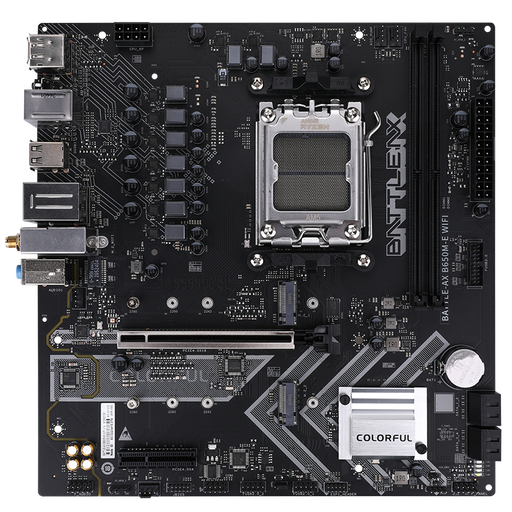
Why it suits this profile: This compact AMD B650 motherboard combines AM5 support with built-in Wi-Fi 6 and two DDR5 slots for a tidy PC build.
The socket, chipset and memory type are clearly specified. However, check the current Ryzen compatibility list before placing your order.
Two M.2 slots, four SATA ports, Wi-Fi 6, Bluetooth 5.2 and one PCIe 4.0 x16 slot.
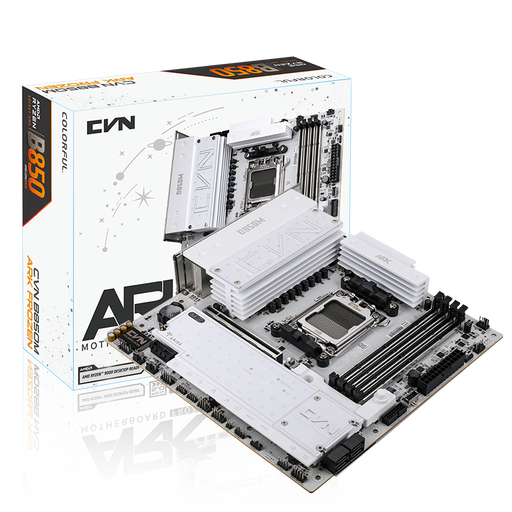
Why it suits this profile: This B850M platform is designed for a feature-rich AM5 build with multiple SSDs, plenty of memory and modern connections.
The storage options are clearly specified: three M.2 slots and four SATA ports. The Wi-Fi 7 requirements for Windows and regions should be checked in advance.
Four DDR5 slots supporting up to 192 GB, PCIe 5.0 x16, 2.5G LAN, Wi-Fi 7 and USB-C up to 20 Gbps.
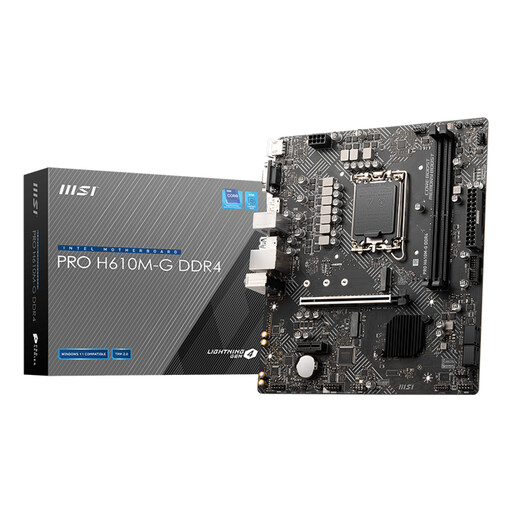
Why it suits this profile: An Intel LGA1700 micro-ATX motherboard for anyone who wants to continue using existing DDR4 modules.
The board explicitly uses DDR4 and socket 1700. This makes the platform choice clearer than with models that only state “Intel-compatible”.
Two DDR4 slots, one M.2 slot, four SATA ports and PCIe 4.0 x16 for a graphics card.
We’ve put together a complete, up-to-date list of products that fully meet these strict selection criteria and the applicable European safety regulations.
You need an AM5 motherboard for these processor families. B650, B850 and A620 models may offer support, but always check the specific CPU list and BIOS version for your chosen model.
No. Ethernet via a network cable generally works directly and reliably. A motherboard with Wi-Fi is particularly useful when running cables is difficult. Pay attention to the Wi-Fi standard, aerials, drivers and compatibility with your router.
Its lifespan depends on workload, temperature, power supply and future upgrades. So choose sufficient M.2 slots, RAM capacity and fan connections in advance. Careful installation, good airflow and a suitable power supply can help prevent unnecessary problems.
