Who is this choice relevant to?

Support player looking for a clear view

You want to keep track of team action and interface elements on a screen that fits your desk. Roles vary from game to game; Blizzard Entertainment describes support roles in Overwatch as including healing, protecting and empowering teammates.

Player in fast-paced team fights

Your priority is smooth motion. Compare the refresh rate modes with what your PC and connection can deliver, without assuming that a higher Hz figure alone means better gaming performance.

Gamer sharing a home-working desk

You use the same desk for gaming and potentially for extended periods of screen-based work. That makes screen positioning, reflections and your workspace setup important too. Arboportaal’s information on employers’ responsibilities applies to employees, not automatically to personal use.

What should you consider when choosing?

Consideration What to look for Who is this important for?
Overview and readability View the game at the resolution and scaling setting you plan to use. Compare screen size and resolution with the space available on your desk and the distance you sit from the screen. PC Monitors’ original review lists the AOC Q24G2A/BK as 23.8 inches, QHD and 165 Hz; MSI lists the MAG 274QRF QD E2 as QHD. I want to keep track of team information and work windows without the screen taking over my desk. Around 36% of consumers put overview and readability first.
Smooth display Check the resolution and Hz combination you want to use with your PC and connection. MSI lists the MAG 274F as Full HD at 200 Hz; GIGABYTE specifies separate modes for the G27U: 4K at 160 Hz and Full HD at 320 Hz. If I play fast-paced team fights, I want to know which display mode my own PC can handle, rather than relying on a high Hz figure alone. Around 29% of consumers put smooth action first.
Setting up a shared desk Measure the available space and check the height adjustment, screen surface and position in relation to windows. If you’re an employee, discuss your workspace setup with your employer if needed; Arboportaal explains employers’ responsibilities when people work from home. I want to use one screen for gaming and work, and position it so my workspace stays practical. Around 21% of consumers put desk setup first.
Connections and service Check that the ports and cables are compatible with your device and read the seller’s terms. Compare any additional cover with your statutory rights; the Dutch Government explains that there is no fixed statutory warranty period in the Netherlands. I want to know in advance whether the monitor will connect to my device and what the purchase terms mean. Around 14% of consumers put compatibility and service first.

What to watch out for when buying

  • Mistaking two display modes for one simultaneous mode

    On the GIGABYTE G27U, 4K at 160 Hz and Full HD at 320 Hz are separate modes. These figures don’t apply at the same time.

    Decide in advance which resolution and refresh rate you want to use, then check that your PC and connection support that combination.

  • Treating a minimum response time as everyday performance

    MSI lists a minimum value of 0.5 ms GtG for the MAG 274F. This is a stated specification, not a measurement covering every setting.

    If motion performance is a key factor in your choice, look for independent tests of the exact model and check which settings were used.

  • Assuming an older model is still readily available

    LG marks the 27GS75Q-B as discontinued on its Dutch product page. Specifications for an older model don’t confirm that it’s currently available to buy.

    Use older model information to compare features, and check the exact variant you’re considering separately.

  • Confusing paid-for cover with your statutory rights

    An additional warranty service doesn’t automatically replace your statutory rights; the Dutch Government states that there is no fixed statutory warranty period in the Netherlands.

    Read the cover and exclusions, and compare them with your existing rights when dealing with the seller.

Brands and model options to use as a guide

AOC

The Q24G2A/BK is a compact QHD option to compare if desk space is limited.

  • PC Monitors’ original review lists this model as 23.8 inches, QHD and 165 Hz.
  • The review dates from 2023 and doesn’t confirm whether this variant is currently available in the Netherlands or whether other AOC models have the same features.

MSI

The MAG 274F and MAG 274QRF QD E2 illustrate different options: Full HD with a higher stated refresh rate, or QHD.

  • MSI lists the MAG 274F as Full HD at 200 Hz and the MAG 274QRF QD E2 as QHD at 180 Hz.
  • The MAG 274F’s minimum GtG figure is a manufacturer specification, not an independent measurement for every setting.

Gigabyte

The G27U is one model to consider when weighing up 4K workspace against a separate fast Full HD mode.

  • GIGABYTE specifies separate modes for this model: 4K at 160 Hz and Full HD at 320 Hz, alongside adjustability and connectivity features.
  • These stated features apply to the G27U and shouldn’t automatically be assumed to apply to other Gigabyte models.

LG

The 27GS75Q-B is a reference point for a 27-inch QHD IPS monitor with a height-adjustable stand.

  • LG lists this model as QHD IPS and 180 Hz.
  • LG marks the 27GS75Q-B as discontinued on its Dutch product page; this doesn’t confirm that it’s currently available to buy.

Joybuy monitors to compare

These monitors are a starting point if you want to practise support games and choose a screen that suits a desk you may also use for work. Compare the listed display modes for each model, and check compatibility with your device and the space you have available.

Samsung Odyssey G5 G50F 32-inch IPS 180Hz LS32FG502EUXEN

Samsung Odyssey G5 G50F 32-inch IPS 180Hz LS32FG502EUXEN

An option to compare if you’re looking for a 32-inch gaming monitor for a desk you may also use for work.

The product name lists a 32-inch IPS screen and 180 Hz.

View at Joybuy

MSI MAG 272QPF E20 27-inch 2K WQHD 200Hz Rapid IPS

MSI MAG 272QPF E20 27-inch 2K WQHD 200Hz Rapid IPS

An option to compare if you’re looking for QHD visuals and a high stated refresh rate for gaming and work windows.

The product name lists 27 inches, 2K WQHD, 200 Hz and Rapid IPS.

View at Joybuy

AOC Gaming Q27G42XNE 27-inch QHD 180 Hz

AOC Gaming Q27G42XNE 27-inch QHD 180 Hz

An option to compare if you want QHD resolution with a stated refresh rate of 180 Hz.

The product name lists 27 inches, 1 ms, FreeSync Premium, HDR10, two HDMI 2.0 ports and one DisplayPort 1.4 port.

View at Joybuy
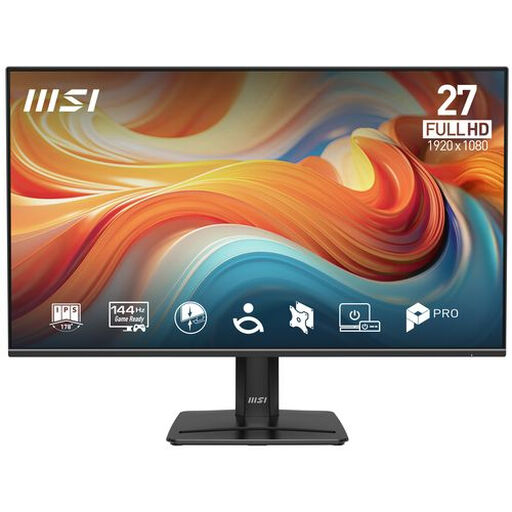
PRO MP271 E14A 27-inch Full HD 144Hz IPS Adaptive-Sync monitor

PRO MP271 E14A 27-inch Full HD 144Hz IPS

An option to compare if you’re looking for a screen for both gaming and work.

The product name lists 27 inches, 1920 × 1080 Full HD, 144 Hz, IPS, HDR Ready and Adaptive-Sync.

View at Joybuy

LG UltraGear 27G810A-B 27-inch 4K UHD 180Hz IPS

LG UltraGear 27G810A-B 27-inch 4K UHD 180Hz IPS

An option to compare if you’re weighing up 4K visuals against a separate, faster Full HD mode for gaming and work.

The listed modes of 4K at 180 Hz and Full HD up to 360 Hz are separate modes.

View at Joybuy

Frequently asked questions

Should I always choose the monitor with the highest Hz figure for support roles?

No. Start with the game and the resolution and frame rate your PC can deliver. Then compare the specific modes: on the GIGABYTE G27U, 4K at 160 Hz and Full HD at 320 Hz are separate modes, not a simultaneous specification.

What should I consider if I also use the monitor at my home-working desk?

Check that you can position the screen at a comfortable height and reduce reflections. For employees who do screen-based work for more than two hours a day, Arboportaal outlines additional workplace requirements; this doesn’t automatically mean the same rules apply to every personal gaming setup.

Does paying for an extra warranty automatically give me more rights?

No. An additional warranty service doesn’t automatically replace your statutory rights. According to the Dutch Government, there is no fixed statutory warranty period in the Netherlands. Compare the specific cover with your existing rights, and contact the seller if a product is faulty.

Can I return a monitor I bought online?

For eligible distance purchases from a business, the Dutch Government says you will generally have a 14-day cooling-off period. Before buying, check who the seller is and which terms apply to your order; this doesn’t necessarily apply to a purchase from a private individual.

Does my employer have to pay for a gaming monitor?

The rules consulted don’t provide for this. If you’re an employee, your employer is responsible for a healthy and safe workspace even when you work from home; discuss what setup you need. This doesn’t give you an entitlement to a gaming monitor for personal use.
