What should you look for when choosing?
Start with how easy the game interface is to read and your PC’s performance. Then check the connections and the trade-offs involved with the panel type.
| What to consider |
What to look for |
Who should consider this? |
| Map overview and interface |
Compare screen size and resolution with your viewing distance, and check whether your PC can reach your desired frame rate. |
If I want to see maps and small interface elements clearly, I weigh the benefit of extra pixels against the load on my PC. Around 36% of consumers say map visibility is their main consideration. |
| Headset and voice chat |
Check separately whether the screen outputs audio and accepts a microphone signal. Also check the connections on your PC or console. |
If I use voice chat while gaming, I want to make sure there’s a working connection for both my headphones and microphone. Around 29% of consumers prioritise their headset and voice chat. |
| Smooth visuals |
Compare your game’s frame rate with the resolution and Hz combination supported by the input you’ve chosen. |
If I want to follow fast movement, I check which refresh rate my PC and the port I’m using actually support. Around 21% of consumers prioritise smooth visuals. |
| Panel choice and static images |
For OLED, read the care instructions and warranty terms for the exact model if interface elements remain on screen for a long time. |
If my game displays high-contrast interface elements for a long time, I want to take the OLED risk and available protection into account. Around 14% of consumers make panel care their main consideration. |
Gaming monitors at Joybuy
The models below are gaming monitors to help you weigh up screen size, resolution, stated refresh rate and connections against your PC and headset.
 No image available
Samsung Odyssey G5 G50F LS32FG502EUXEN
An option to consider if you want to compare a larger QHD screen and a headphone output.
- 32 inches, QHD and 180 Hz according to the product name and description.
- IPS panel and headphone output according to the product description.
View at Joybuy
 No image available
MSI MAG 272QPF E20
A model to compare if you’re considering a 27-inch QHD screen with Rapid IPS.
- 27 inches, 2K WQHD, Rapid IPS and 200 Hz according to the product name.
- Check the model’s exact resolution and refresh rate combination before making your choice.
View at Joybuy
 No image available
AOC Gaming Q27G42XNE
A 27-inch QHD option to compare if you’re considering map detail and the stated refresh rate.
- 27 inches, 2560 × 1440 and 180 Hz according to the product name.
- VA panel and FreeSync support according to the product description.
- The product name lists HDMI 2.0 and DisplayPort 1.4 connections.
View at Joybuy
 No image available
KTC H32S17
A larger curved screen to consider when weighing up map visibility, screen shape and your desired frame rate.
- 32 inches, 2560 × 1440 and 180 Hz according to the product name.
- HVA panel and 1500R curvature according to the product name.
- Adaptive Sync and HDR10 according to the product name.
View at Joybuy
 No image available
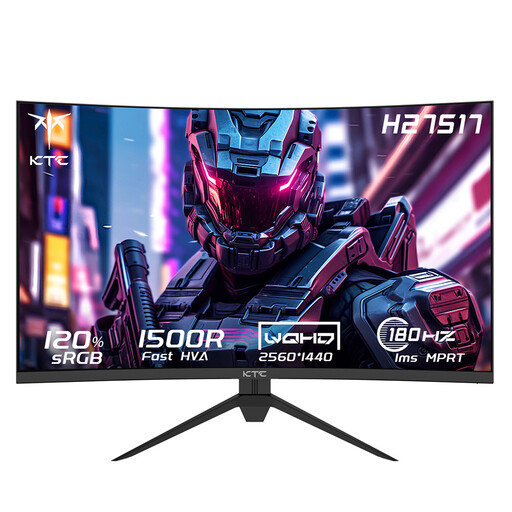
KTC H27S17
A 27-inch curved QHD model to compare if you’re looking for something more compact than a 32-inch screen.
- 27 inches, 2560 × 1440 and 180 Hz according to the product name.
- HVA panel and 1500R curvature according to the product name.
View at Joybuy
Frequently asked questions
Can I connect my entire headset to the monitor for voice chat?
A headphone output alone doesn’t confirm that the microphone will also work through the monitor. LG lists an audio-only output for the 27GS75Q-B; ASUS lists a headphone output for the VG27AQ3A, but this doesn’t confirm microphone support. Check your headset and, if necessary, connect the microphone to your PC or console.
Why can’t I reach my monitor’s maximum refresh rate?
Check the input you’re using, the screen settings and your game’s frame rate. ASUS lists up to 144 Hz via HDMI and 180 Hz via DisplayPort for the VG27AQ3A; Dell also lists 144 Hz via HDMI and 180 Hz via DisplayPort for the G2725D.
What should I bear in mind when using OLED for long strategy sessions?
According to ASUS, a high-contrast static image left on screen for a long time can cause image retention or burn-in. ASUS describes protective features such as Pixel Shift to reduce the risk. Also check the usage instructions and warranty terms for the specific model.
What warranty and cancellation period apply to an online purchase in the Netherlands?
According to the Dutch government, there’s no fixed statutory period for the legal guarantee in the Netherlands. If a product doesn’t meet the requirements, the seller must offer a solution. For applicable online consumer purchases, you usually have 14 days to change your mind. The terms and any exceptions depend on the specific purchase.
Which product regulations are relevant when buying a monitor in the Netherlands?
A monitor covered by the relevant EU rules must carry the required CE marking. The Dutch government explains the CE requirements for relevant products; the European Commission also outlines ecodesign and energy labelling requirements for computer monitors. Check the information for the product that will actually be delivered.


