
Laptop gamer with limited power sockets
You want to play on a larger screen and find out whether the monitor can also charge your compatible laptop, so you may be able to leave its separate charger behind.


If you play on a compatible laptop and want to leave its separate charger behind, choose a QHD monitor with USB-C Power Delivery that provides enough power and supports video over USB-C. LG lists up to 65 W for the 27BA65QB-B, while Dell lists 90 W for the P2725DE. With a desktop PC or console, charging usually won’t free up an extra socket. A high refresh rate matters most if you also play fast-paced games.
You want to play on a larger screen and find out whether the monitor can also charge your compatible laptop, so you may be able to leave its separate charger behind.
You want maps, text and interface elements to be easy to see, and you care about screen positioning during longer strategy sessions.
You also play fast-paced games, so refresh rate is part of your decision. Just remember that a higher refresh rate won’t necessarily make turn-based games more enjoyable in itself.
Start by deciding whether you want to replace your laptop charger. Then compare the screen resolution, connections and refresh rate that suit your devices and games.
| What matters when buying | What to look for | Who is this important for? |
|---|---|---|
| Freeing up a power socket | Check that your laptop supports video over USB-C and that the monitor’s charging power is suitable for your laptop. Also check whether the required cable is included. | If I want to use my laptop with a single connection and avoid its separate charger, I check compatibility first. Around 36% of consumers say replacing that charger is their main concern. |
| Seeing maps, text and menus clearly | Compare screen size and native resolution together. Also check the adjustability and whether the connection is compatible with your PC or console. | During long gaming sessions, I want to be able to read game information clearly from my usual viewing distance. Around 29% of consumers prioritise a clear, readable view. |
| Reducing the amount of equipment | Check whether the exact model has built-in speakers and whether its stand and connections suit your setup. | If I want fewer devices on my desk, I want to know whether the built-in sound will be good enough for me. Around 21% of consumers prioritise a simple setup. |
| Playing fast-paced games too | Check that your source device and chosen input support the refresh rate you want. Compare the panel type and, if relevant, laptop charging power for each model. | If I play fast-paced games as well as strategy games, a higher refresh rate may matter more. Around 14% of consumers say suitability for fast-paced games is their main concern. |
USB-C alone doesn’t tell you whether the port supports video or provides enough power. Gigabyte, for example, lists up to 18 W for the MO27Q2A, while LG lists up to 65 W for the 27BA65QB-B and Dell lists 90 W for the P2725DE.
Compare your laptop’s USB-C video support and charging requirements with the specifications for the exact monitor model.
If the charging power isn’t sufficient, you’ll still need a separate laptop charger and an extra connection.
An extra socket doesn’t automatically make an unsuitable connection safe. Brandweer Nederland recommends plugging high-power devices directly into a wall socket wherever possible.
Follow the load ratings and instructions for your power connections. Plug high-power devices directly into a wall socket wherever possible.
The models listed range from 100 Hz to a maximum of 280 Hz, but a higher figure isn’t essential in itself for a turn-based game. The Gigabyte MO27Q2A’s 18 W USB-C limit also means it won’t automatically replace a laptop charger.
First decide whether you also play fast-paced games and want to replace your laptop charger. Then compare refresh rates and connections.
LG explains that temporary image retention can occur on OLED monitors when static elements remain visible for a long time. This general guidance doesn’t establish what will happen with every model or in every situation.
Compare OLED with IPS for your needs, and check the care and warranty terms for the exact model.
The LG 27BA65QB-B is a QHD IPS monitor for laptop gamers weighing up screen clarity and USB-C charging.
Dell positions the P2725DE as a QHD monitor with USB-C and docking features. The S2725DC combines QHD with 144 Hz and built-in speakers.
The Q27G4ZR is a QHD Fast IPS gaming monitor for anyone who plays fast-paced games as well as strategy games.
The MO27Q2A is a QHD QD-OLED gaming monitor for anyone who values OLED picture quality and a high refresh rate.
These models combine a clear QHD or WQHD view with gaming features and connectivity. Check each model to see which features suit your devices and how you use them.
 No image available
An option if you want to view maps on a QHD screen and also play fast-paced games.
MSI lists a 27-inch screen, 2560 × 1440 resolution, a Rapid IPS panel and 200 Hz.
 No image available
A good fit if you play fast-paced games as well as strategy games and want a 27-inch QHD screen.
AOC lists 2560 × 1440 resolution, a VA panel, 180 Hz and 1 ms GTG.
 No image available
An option if you want a wide screen and to connect and charge a compatible laptop via USB-C.
Dell lists 3440 × 1440 resolution, 100 Hz, an adjustable stand and USB-C with up to 90 W Power Delivery. Check that your laptop supports video over USB-C and can run on this amount of power.
 No image available
Worth considering if you want a clear QHD view alongside a higher refresh rate for fast-paced games.
Philips lists a 27-inch IPS panel with 2560 × 1440 resolution and 144 Hz.
 No image available
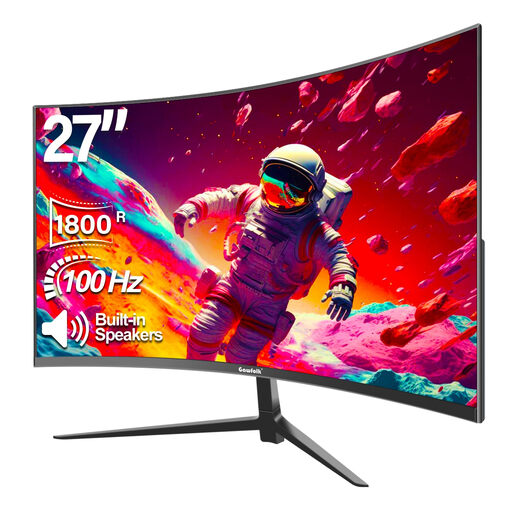
An option if built-in speakers are enough for you and Full HD resolution on a 27-inch screen suits your viewing distance.
Gawfolk lists Full HD 1080p, 100 Hz, 1800R curvature and built-in speakers.
No, the monitor itself needs mains power. You can only leave your separate laptop charger behind if your laptop outputs video through the USB-C port you’re using, can charge via USB-C and can run on the power supplied by the monitor. LG lists up to 65 W for the 27BA65QB-B, while Dell lists 90 W for the P2725DE.
Compare the EU energy label and product information sheet for each model. According to the European Commission, the label for electronic displays includes information such as the energy efficiency class and SDR and HDR performance. A class or wattage figure won’t predict total consumption with your settings unless it’s based on the same measurement method.
Check that your PC or console’s video connection is compatible, and follow the instructions for your power connections. Brandweer Nederland recommends fully unwinding cable reels and plugging high-power devices, such as electric heaters, directly into a wall socket wherever possible. This isn’t a general ban on using a power strip for a monitor.
According to ACM ConsuWijzer, a standard online purchase by a consumer usually comes with a legal cooling-off period of up to 14 days after delivery, subject to exceptions. Products must also meet legal requirements. If a product is faulty and the conditions of the legal guarantee are met, the seller is responsible for providing a solution. In the Netherlands, there isn’t one fixed legal guarantee period of two years for every monitor.
Yes, it’s worth bearing in mind that static elements may remain on screen for a long time when using OLED. LG explains that this can cause temporary image retention, but this general guidance doesn’t predict what will happen with every model or in every situation.