Start with the aspect ratio your game actually supports, how easy the screen is to read from your seat and how much desk space you have. A 21:9 monitor can give you more horizontal space; a 32:9 screen needs more room and graphics processing power, while 16:9 can be a practical choice if ultrawide doesn’t work well with your game or setup. Then check that your PC, connection and refresh rate are compatible. With OLED, you should also consider whether your cockpit HUD stays in the same place for long periods.
Who is this buying guide for?
Cockpit explorer
You want to see more of the cockpit and your surroundings from your seat. So compare 21:9 with 32:9, but first check which aspect ratios your game actually displays. RTINGS and the product specifications from MSI and Samsung provide examples of these screen formats.
Trade route planner
You read maps, route details and trading information during long sessions, so you care about how easy they are to read from your seat. Arboportaal’s guidance on screen-based work highlights, among other things, the importance of legible symbols and avoiding reflections.
Setup-conscious player
You want the resolution, connection and refresh rate to suit your PC and gaming space. MSI’s specifications, for example, show that the achievable refresh rate can vary depending on the input.
What should you look for when choosing?
First check how your own game displays and how much space you have. Then compare readability and the display mode your PC can deliver through your chosen connection.
| What to consider |
What to check before buying |
Who is this most important to? |
| Usable screen width |
Compare 16:9, 21:9 and 32:9 with your game’s display and the space available from your seat. |
I want to see more of the cockpit and surroundings from my seat, but only if my game displays them properly. Around 31% of consumers prioritise usable cockpit width. |
| Readable route information |
Check the text size in your game, viewing distance, reflections and how adjustable the screen or stand is. |
If I read maps and trading data during long sessions, I want to be able to see them clearly from my usual seat. Around 25% of consumers give readability top priority. |
| A suitable display mode |
Check the resolution and refresh rate for each input, and make sure they suit your PC and game. |
I don’t want to choose a resolution or refresh rate that my PC can’t use effectively. This is the top priority for around 19% of consumers. |
| Fixed HUD during long sessions |
Check how long cockpit elements stay in the same place, and read the care and warranty terms for the exact model. |
If my cockpit HUD stays in the same place for a long time, I take that into account when choosing a panel. Around 13% of consumers put this consideration first. |
| Space and peace of mind when buying |
Measure the space available for the screen and stand, and check who the seller is and what returns and warranty terms apply. |
I want to know in advance whether the screen will fit on my desk and who to contact if something goes wrong. Around 12% of consumers start with space and peace of mind when buying. |
Common buying mistakes
-
Assuming every input supports the highest refresh rate
For the MSI MAG 342CQRF E20 at 3440 × 1440, MSI specifies a maximum of 100 Hz via HDMI and 200 Hz via DisplayPort. So your chosen display mode may depend on the connection you use.
Check the specifications for the exact monitor and each input, then make sure your cable, port and PC are compatible.
You may need a different connection or cable to achieve your desired display mode.
-
Choosing a 32:9 monitor without checking your game and setup
A 49-inch screen takes up a different amount of space from a 34-inch model. The extra width only gives you a usable game view if your game supports that aspect ratio.
Measure the space available and check how your game displays and handles the HUD before choosing a size.
A larger setup may require changes to your desk or PC.
-
Assuming panel care prevents burn-in
Samsung warns that game interface elements left in the same place for long periods can cause visible burn-in on OLED monitors. Care features don’t guarantee that this risk will disappear.
Read the instructions and warranty terms for the exact model, and consider how long your cockpit HUD stays in the same place.
-
Confusing the manufacturer’s warranty with all your warranty rights
ACM ConsuWijzer distinguishes between a manufacturer’s warranty and your statutory guarantee rights. Your statutory claim against the seller isn’t simply limited to the stated manufacturer’s warranty period.
Keep your proof of purchase and contact the seller if there’s a fault. Also assess the product based on what you could reasonably expect from it under normal use.
Brands and models to compare
MSI
The MAG 342CQRF E20 is a 34-inch 21:9 model with Rapid VA and a resolution of 3440 × 1440.
- MSI specifies height adjustment and FreeSync Premium for this model.
- At 3440 × 1440, MSI specifies a maximum of 100 Hz via HDMI and 200 Hz via DisplayPort. Check which input you want to use.
Samsung
The Odyssey G9 G91F is a 49-inch 32:9 option with Dual QHD and a stated refresh rate of 144 Hz.
- Samsung specifies a 1000R curvature for this model.
- Check whether your game supports the wide aspect ratio and whether your desk has enough space. Samsung’s OLED warning applies to OLED monitors and doesn’t necessarily apply to a different type of model.
ASUS
The ROG Swift OLED PG34WCDN is a 34-inch 21:9 QD-OLED option.
- ASUS specifies a maximum of 360 Hz for this model and lists OLED Care Pro.
- Check whether your PC and chosen connection can deliver your desired display mode. With OLED, a HUD that stays in the same place for a long time is worth considering; read the care instructions for the exact model.
Dell Alienware
The AW3426DWM is a documented 34-inch ultrawide model with a VA panel.
- Dell specifies 3440 × 1440 at 240 Hz for this model.
- Dell states that 1 ms applies to the Extreme response time mode; this figure doesn’t automatically apply to every mode of use.
Gaming monitors at Joybuy
The models below include 21:9 ultrawides and a 32:9 screen. Check that your game displays the relevant aspect ratio and that your desk has enough space.
 No image available
LG UltraWide 34U601B-B 34-inch curved WQHD VA monitor, 120 Hz
A 21:9 option if your game supports this aspect ratio and you want more horizontal space from your seat.
34 inches, 3440 × 1440, VA panel, 1800R curvature and 120 Hz.
View at Joybuy
 No image available
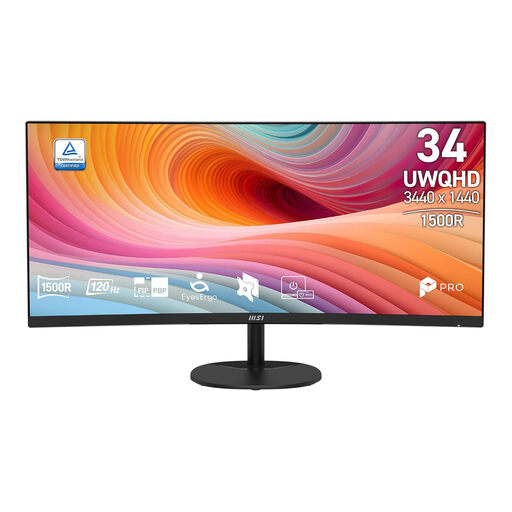
MSI PRO MP341CQ E12 34-inch curved UWQHD VA monitor, 120 Hz
A 21:9 model to consider if your game supports this aspect ratio and you’re looking for extra horizontal space.
34 inches, 3440 × 1440, VA panel and 120 Hz. The product information also lists a response time of 4 ms.
View at Joybuy
 No image available
Gawfolk 34-inch curved UWQHD gaming monitor, 144 Hz
A 21:9 option if your game supports ultrawide and you want a wider view from your seat.
3440 × 1440, 1500R curvature and VA panel. The product information lists a VESA 75 × 75 mm mount.
View at Joybuy
 No image available
Gawfolk GF340C-H 34-inch curved UWQHD gaming monitor, 165 Hz
A 21:9 model to compare if your game displays this aspect ratio and you’re looking for a wider cockpit view.
3440 × 1440, 1500R curvature, VA panel and 165 Hz. The product information lists AMD FreeSync and VESA 75 × 75 mm support.
View at Joybuy
 No image available
CRUA 49-inch curved 32:9 gaming monitor, DQHD 165 Hz
A super-wide option if your game supports 32:9 and your desk has room for a large screen.
DQHD 5120 × 1440, 1500R curvature, VA panel and 165 Hz. The product information lists HDMI 2.1, DisplayPort 1.4 and FreeSync.
The product description recommends a load capacity of at least 15 kg for a desk or VESA mount, and installation by two people.
View at Joybuy
Frequently asked questions
Will an ultrawide always show more of the cockpit in my space game?
No, you can’t tell that from the monitor specifications alone. Check which aspect ratios and interface views your game supports. If it supports the format, ultrawide can give you more horizontal space.
How do I get the specified refresh rate after installation?
Check the resolution and the limits of the input, cable and PC you’re using. For the MAG 342CQRF E20 at 3440 × 1440, MSI specifies a maximum of 100 Hz via HDMI and 200 Hz via DisplayPort. Then set your desired display mode on your PC.
What should I consider during long gaming sessions with a fixed cockpit HUD?
For OLED monitors, Samsung warns about images that stay in the same place for long periods and refers to the available panel care features. Check the instructions for the exact model, and also consider readability and screen placement.
What are my rights in the Netherlands regarding cooling-off periods and manufacturer’s warranties for online purchases?
According to ACM ConsuWijzer, a standard online purchase usually comes with a statutory cooling-off period of up to 14 days after delivery. Check whether an exception applies. You also have statutory guarantee rights against the seller if a product doesn’t perform as you could reasonably expect under normal use. A manufacturer’s warranty period doesn’t replace those rights.


