Three monitors are a good choice for practising on a street circuit if you value peripheral vision and your simulator, PC and available space can accommodate the setup. For NVIDIA Surround, identical screens using the same connection type offer the greatest certainty about the available resolutions and refresh rates, according to NVIDIA. iRacing also describes a windowed mode across three screens. A single monitor is a simpler alternative if setting up or positioning three screens isn’t practical.
Who is this guide for?
Circuit explorer who wants peripheral vision
You want to see the sides of the cockpit as well as the virtual windscreen, and have room to position and set up three screens. iRacing Support explains how to configure three monitors, while NVIDIA outlines the requirements for Surround.
Sim racer mindful of their PC’s capabilities
You want to use multiple screens, but need to match the total resolution to your PC’s connections and capabilities. NVIDIA explains how differences between screens can limit the resolutions and refresh rates available in Surround.
Builder of a compact sim rig
You need to weigh up screen width, viewing distance and mounting options to work out whether a setup with side screens will fit in your available space. ASUS and AOC specifications offer examples of features to check for each model.
What should you look for when buying?
Three monitors
Choose this option if: peripheral vision matters when practising, and your simulator, PC and available space can support a three-screen setup.
Bear in mind: you’ll need extra space, mounting hardware and time to configure it. Check that the combined resolution is suitable for your PC, too.
One gaming monitor
Choose this option if: your PC, available space or time for installation makes a three-screen setup impractical.
Bear in mind: one screen won’t give you the same distinct peripheral vision as a well-configured three-screen setup.
| What to consider |
What should you check? |
Who should prioritise this? |
| Peripheral vision and image geometry |
Check whether your simulator supports three screens. Measure your viewing distance and available space, and plan where the side screens will go. |
If I want to see the sides of the cockpit as well as the virtual windscreen, I need to be able to position and align the screens appropriately. Around 33% of consumers put peripheral vision first. |
| PC load and connections |
Check which GPU outputs are available, along with the connections and intended total resolution. Three 2560 × 1440 screens add up to 11.059.200 pixels; three 1920 × 1080 screens add up to 6.220.800 pixels. This compares pixel counts; it doesn’t predict fps. |
If you want to use three screens without losing sight of your PC’s capabilities, you’ll need to consider resolution and connections. Around 27% of consumers put PC load first. |
| Positioning and mounting |
Check the width, adjustability and VESA mount, as well as the load capacity of any monitor arm, for the exact model. |
If I’m building a compact sim rig, the setup needs to fit in the available space and be angled towards my seating position. Around 20% of consumers put positioning and mounting first. |
| Sharpness and motion handling |
Compare the resolution of each screen and the refresh rate available through the input you plan to use. Treat quoted response times as manufacturer specifications. |
If sharpness and motion handling are your main priorities, check which settings your PC and connection actually support. Around 20% of consumers put these features first. |
Common buying mistakes
-
Combining different screens without checking the shared display mode
NVIDIA says that differences between screens in Surround can limit the resolutions and refresh rates available.
Before using existing and new screens together, compare their size, resolution, refresh rate and connection type.
You may need extra time to configure the screens, or have to replace one that isn’t compatible.
-
Assuming the maximum refresh rate is available on every input
For the ASUS TUF Gaming VG27AQ3A, ASUS lists different digital frequency ranges for HDMI and DisplayPort.
Check the specifications for the input you’ll actually use, and compare them with the outputs on your PC.
-
Focusing only on the screen and forgetting about mounting
According to ASUS, the stand supplied with the ASUS TUF Gaming VG27AQ3A isn’t height-adjustable, although the model does have a VESA mount.
Decide on your preferred height and screen positions in advance, then check the mount and load capacity for the exact model.
You may need a suitable monitor arm to get the alignment you want.
Brands to consider
Samsung
According to Samsung Netherlands, the Odyssey G5 G50F LS32FG502EUXEN is a flat 32-inch QHD model with Fast IPS and a refresh rate of up to 180 Hz.
- The stated screen size and resolution give you specific details to compare with your available space and PC.
- These are Samsung’s model specifications, not the results of an independent performance test. They don’t prove that 180 Hz is achievable in every three-screen setup.
ASUS
According to ASUS’s specifications, the TUF Gaming VG27AQ3A is a 27-inch QHD monitor with Fast IPS and a 100 × 100 mm VESA mount.
- ASUS specifies a maximum refresh rate of 180 Hz via DisplayPort and a digital range of up to 144 Hz via HDMI.
- The supplied stand isn’t height-adjustable. Check that the mounting options and input suit your setup.
AOC
AOC describes the AGON by AOC Q27G42XE as a 27-inch QHD Fast IPS monitor with a refresh rate of up to 180 Hz.
- You can compare its stated resolution and maximum refresh rate with your PC’s capabilities and connections.
- The stated 1 ms GtG response time and motion handling claims come from AOC, not an independent test. Check the mounting options and what’s included with the exact version.
LG
According to the Dutch model specifications, the LG UltraGear 27GS75Q-B has a flat 27-inch QHD screen, an adjustable stand and a VESA mount.
- The adjustable stand and VESA mount are useful features to compare with your planned setup.
- LG marks this model as discontinued. Use its specifications for comparison, not as an indication that it’s currently available.
Dell
According to the product specifications, the Dell G2722HS is a 27-inch Full HD gaming monitor with a 165 Hz refresh rate, DisplayPort and a VESA mount.
- Full HD per screen is an option to consider if the total pixel load matters to you.
- Dell lists this specific model as unavailable on its product page, so the specifications don’t indicate that it’s currently available to buy.
Gaming monitors at Joybuy
These Joybuy products are individual gaming monitors you can compare for a racing simulator. Check whether each model’s resolution, connections and mounting options suit your planned setup.
 Image unavailable
Samsung Odyssey G5 G50F LS32FG502EUXEN, 32-inch
A standalone 32-inch monitor to consider if you’re looking for a larger screen and have the space for it.
QHD 2560 × 1440, up to 180 Hz and IPS. Listed connections: DisplayPort 1.2 and HDMI 2.0; VESA 100 × 100 mm. The description lists height, swivel and tilt adjustment.
Joybuy
 Image unavailable
Samsung LS27FG500SUXEN, 27-inch OLED
A standalone 27-inch monitor to consider if Quad HD and its stated refresh rate suit your PC and how you plan to use it.
OLED, Quad HD 2560 × 1440 and 180 Hz. The description lists HDMI 2.0, DisplayPort 1.2, tilt adjustment and VESA 100 × 100 mm.
Joybuy
 Image unavailable
AOC Q27G42XNE, 27-inch Quad HD
A standalone 27-inch monitor to consider if Quad HD and the listed video inputs suit your planned PC setup.
Quad HD 2560 × 1440 and 180 Hz. The product name lists FreeSync Premium, HDR10, two HDMI 2.0 inputs and one DisplayPort 1.4 input.
Joybuy
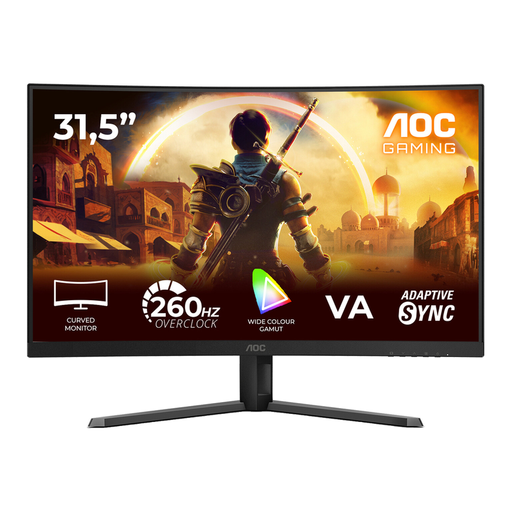 Image unavailable
AOC C32G42ZE, 31.5-inch curved Full HD
A standalone curved monitor to consider if Full HD suits your chosen screen size and PC setup.
31.5 inches, Full HD 1920 × 1080, VA panel and 1500R curvature. The product name lists 240 Hz native and 260 Hz overclocked.
Joybuy
 Image unavailable
MSI MAG 272F X24, 27-inch Full HD
A standalone 27-inch Full HD monitor to consider if its resolution and mounting options suit your PC and sim rig.
1920 × 1080 and 240 Hz. The product name lists AMD Adaptive Sync, HDMI, VGA, VESA mounting and tilt adjustment.
Joybuy
Frequently asked questions
Do all three monitors need to be exactly the same?
Not necessarily, but for NVIDIA Surround, identical screens using the same connection type offer the greatest certainty about the available resolutions and refresh rates. Differences between screens can limit the settings available across the setup.
Do I need to use NVIDIA Surround to play iRacing across three screens?
No. iRacing Support describes both a window that spans three monitors and a combined full-screen display using, for example, NVIDIA Surround or AMD Eyefinity. Follow iRacing’s instructions for connecting to the graphics card and entering your monitor details in the simulator.
What are my rights to returns and guarantees when buying online in the Netherlands?
According to ACM ConsuWijzer, ordinary online product purchases generally come with a statutory 14-day cooling-off period after delivery, although there are exceptions. The statutory guarantee is separate from any manufacturer’s guarantee: what you can expect in terms of a product’s lifespan depends on the product and the circumstances. A fixed statutory period of exactly two years is not the general rule in the Netherlands.
How can I compare the energy consumption of three monitors?
Compare the EU energy label and product information for the exact models. The European Commission says that computer monitors are covered by the labelling rules for electronic displays. To compare the whole setup, use the information for each screen and the same usage period.


