For rhythm games, don’t choose based on the advertised response time alone. Refresh rate, motion clarity and input lag are separate considerations, and the source device and game determine which display mode you can actually use. Then consider how the monitor will fit on a shared desk and whether it has a suitable headphone socket. A larger OLED screen also calls for extra care with reflections and long periods of static images.
Who is this relevant to?
The rhythm gamer focused on timing
Wants to follow notes clearly and see inputs reflected quickly. BenQ Europe explains that pixel response time is different from input lag; RTINGS.com notes that low input lag matters for games that demand quick reactions.
The player with a sleeping room-mate
Wants to listen without audible sound from the monitor, so checks whether the audio output and the rest of the audio setup are suitable. Dell Netherlands lists an audio output on the G2422HS.
The player with a small shared desk
Considers screen size, space for the stand and adjustability to make sure the monitor fits in a shared workspace. Dell Netherlands describes height adjustment on the G2422HS; AOC specifies a 23.8-inch screen for the 24G4X.
What should you look for when buying?
First, check which display modes your PC or console and game actually support. Then compare how the monitor will fit on your desk and how you want to listen in a shared room.
| What to consider |
What should you check? |
Who is this important to? |
| Timing and motion clarity |
Compare input lag and motion handling for the exact model. Also check the supported refresh rate at your resolution and with your connection. BenQ Europe distinguishes pixel response time from input lag; RTINGS.com notes that low input lag matters for reaction-based games. |
If I want to follow fast-moving notes, I look at both how the image is displayed and the delay between my input and what I see. Around 31% of consumers prioritise timing and motion clarity. |
| Quiet listening |
Check whether the monitor has an audio output and whether your source device sends sound to the monitor. Dell Netherlands lists an audio output for the G2422HS. |
When someone is sleeping in the same bedroom, I want to listen through headphones without sound from the monitor disturbing the room. Around 25% of consumers prioritise quiet audio. |
| Space and adjustability |
Measure the available width and depth, and check the dimensions with the stand fitted. Also see what adjustments the model offers; AOC and Dell Netherlands list a 23.8-inch screen for the 24G4X and height adjustment for the G2422HS, respectively. |
At a shared desk, I want the monitor to fit and the viewing height to be adjustable. Around 25% of consumers prioritise available desk space. |
| Connection and display mode |
Check the ports on your source device and monitor, the cable you’ll use, and the resolution and refresh rate supported by each input. Microsoft Support explains how to check the active refresh rate in Windows; MSI lists HDMI 2.1 with 4K at 120 Hz for consoles on the MPG 272URX. |
Before paying for a particular display mode, I want to know whether my PC or console can run it with the connection I’ve chosen. Around 19% of consumers prioritise compatibility with their existing source device. |
Common buying mistakes
-
Assuming an advertised millisecond figure is the total response time
Pixel response time doesn’t automatically describe the lag across the entire input chain. BenQ Europe distinguishes response time from input lag.
Compare these figures separately and look for measurements of the exact monitor model.
-
Choosing the highest Hz figure without checking your own display mode
The available refresh rate depends on factors including the screen, resolution and connection. So the highest stated figure doesn’t necessarily mean your source device can use that setting.
Before buying, check the supported modes for each input. Once connected, check which resolution and refresh rate are active.
-
Looking only at screen size in a shared room
The stand footprint, adjustability and audio connection also determine whether a monitor is practical on a shared desk and when someone else is sleeping nearby.
Measure your space and check the dimensions, adjustment options and audio setup of the model you’re considering.
-
Choosing an OLED monitor without considering long periods of static images
ASUS warns that static images displayed for long periods can contribute to burn-in. Protective features don’t make this risk impossible.
Check the protective features and usage instructions for the exact model, and review the applicable warranty terms.
Brands to consider
AOC
The 24G4X is a compact Full HD option to compare if desk space is a consideration.
- AOC specifies a 23.8-inch IPS screen and a refresh rate of up to 180 Hz for this model.
- These model specifications are not a measurement of input lag.
Dell
The G2422HS is an example of a compact monitor with height adjustment and an audio output.
- Dell Netherlands lists a 23.8-inch screen, Full HD at 165 Hz, height adjustment and an audio output for this model.
- Dell Netherlands currently lists this model as unavailable.
Pixio
The PX248 Wave is a 24-inch Full HD model to compare if you’re looking for a compact screen setup.
- Pixio specifies a Fast IPS panel and a 200 Hz refresh rate for this model.
ASUS
The ROG Strix OLED XG27AQDMG is a larger QHD OLED option for anyone who prioritises picture quality over compactness.
- ASUS specifies a glossy 26.5-inch visible WOLED screen and 240 Hz.
- A glossy screen calls for care with reflections. ASUS describes burn-in protection features, but these don’t eliminate the risk from static images displayed for long periods.
MSI
The MPG 272URX QD-OLED is a 27-inch UHD option to consider if your source device and available space suit that display mode.
- MSI specifies UHD and 240 Hz. For consoles, MSI lists HDMI 2.1 with 4K at 120 Hz; the model also has DisplayPort 2.1a.
- Check that your source device, connection and game support the display mode you want.
Gaming monitors at Joybuy
This selection includes Full HD gaming monitors: compact models from 23.8 to 24.5 inches and one 27-inch option.
 No image available
LG UltraGear 24G414B-B
A compact Full HD option if you’re looking for a gaming monitor for a shared desk.
23.8 inches; Full HD.
View at Joybuy
 No image available
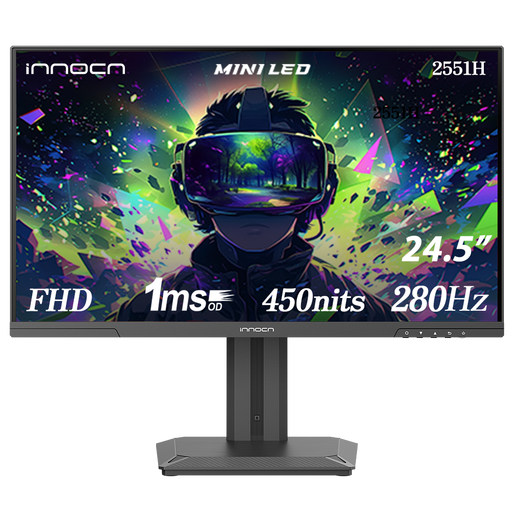
INNOCN 2551H 24.5-inch Mini LED
Suited to anyone looking for a compact Full HD screen with a high stated refresh rate.
24.5 inches; Mini LED; Full HD 1080P; IPS; 280 Hz.
View at Joybuy
 No image available
KTC H24B9S
A 24-inch option if you’re looking for a Full HD gaming monitor for a compact workspace.
24 inches; Full HD 1080P; IPS; 144 Hz.
View at Joybuy
 No image available
Thunderobot CF25F300L
Suited to anyone considering a compact Full HD screen with height and swivel adjustment.
24.5 inches; Full HD; 320 Hz; height and swivel adjustment.
View at Joybuy
No image available
LG UltraGear 27G414B-B
A 27-inch option if you’d like more screen space and have enough room on your desk.
27 inches; Full HD.
View at Joybuy
Frequently asked questions
Is a 1 ms response time the same as 1 ms input lag?
No. Pixel response time and input lag describe different parts of how the display responds. So a stated response time of 1 ms doesn’t prove that the entire chain from pressing a button to seeing the result takes 1 ms.
How do I set the refresh rate in Windows?
Go to Settings, System, Display and Advanced display to choose a supported refresh rate. Check the active resolution there too; as Microsoft Support explains, the available settings depend on the screen and connection.
What should I look out for with an OLED monitor?
Follow the care instructions and protection settings for the exact model. ASUS warns that static images displayed for long periods can contribute to burn-in, so check the terms for the model you’re considering as well.
Am I always entitled to exactly two years’ legal guarantee in the Netherlands?
No. According to the Government of the Netherlands, there is no fixed legal guarantee period in the Netherlands: it depends on what you could reasonably expect from the product. If something is wrong, contact the seller.
Can I return a monitor ordered online if it doesn’t fit on my desk?
For many distance purchases from a business, the Government of the Netherlands says you have a 14-day cooling-off period. Check the terms of your specific purchase; the cooling-off period is separate from your rights if a product is faulty.


