
PC rally driver who wants a wider view
You want a wider horizontal view while driving and can check whether your game and PC support your chosen ultrawide resolution. Samsung and AOC provide specifications for the ultrawide models mentioned here.


Start with your gaming platform and the space around your steering wheel. A single 16:9 monitor is usually easier to fit in, while an ultrawide can offer more horizontal screen space in a supported PC game. Three screens need extra room, connections and adjustment. Also check which resolution and refresh rate your connection can handle, and whether to plug your headphones into your PC, console or a suitable audio output.
You want a wider horizontal view while driving and can check whether your game and PC support your chosen ultrawide resolution. Samsung and AOC provide specifications for the ultrawide models mentioned here.
You want a screen that fits alongside your steering wheel and other equipment, with a connection and refresh rate suited to your gaming system. ASUS lists different maximum refresh rates for the VG27AQ3A depending on the input used.
You’re considering side screens, so you’ll need to factor in available space, mounting and graphics card outputs. SimXPro highlights these points when advising on a triple-screen sim racing setup.
Best for: a tidy setup, limited space or a console whose video output you want to check first.
Bear in mind: one screen offers less horizontal screen space than an ultrawide or three screens. ASUS lists a maximum of 144 Hz via HDMI and 180 Hz via DisplayPort for the VG27AQ3A.
Best for: PC players whose rally game supports the aspect ratio and field-of-view settings they want. A 34-inch 21:9 model offers a different screen format from a 49-inch 32:9 model.
Bear in mind: measure the overall dimensions and check that your PC and game support your preferred resolution and input settings. A wide panel alone doesn’t guarantee a wider view in the game.
Best for: a permanent PC cockpit where side screens can be positioned and aligned.
Bear in mind: check the space, mounting, monitor weight and available GPU outputs before expanding your setup. SimXPro highlights these points in its advice on triple monitors.
| What to consider | What to look for | Who is this most relevant to? |
|---|---|---|
| Field of view | Check the aspect ratio, native resolution, overall dimensions, and your game’s ultrawide and field-of-view settings. | I want more horizontal screen space during rally stages, but only if my game and PC support the settings I choose. Around 33% of consumers put field of view first. |
| Smooth visuals | Compare your preferred resolution and Hz with the specifications for the exact HDMI or DisplayPort input you’ll be using. | I want my monitor, connection and PC or console to work well together for the action in my game. Around 25% of consumers prioritise this practical combination of refresh rate and connection. |
| Space and positioning | Measure the available width and depth. Check the dimensions with the stand, weight, VESA mount and, for three screens, the available GPU outputs. | I want my screen or screens to fit around my steering wheel and cockpit, or to be able to expand my setup later without running out of room. Around 25% of consumers start by checking what will physically fit. |
| Headphone audio | Decide where you’ll plug in your headphones and whether you also need a microphone. Then check which audio output the model has. | I want to hear game audio through my headphones and need to know whether the microphone will also work through the connection I choose. Around 17% of consumers make the audio and any microphone connection their first priority. |
The maximum refresh rate can vary depending on the input. ASUS lists a maximum of 180 Hz via DisplayPort and 144 Hz via HDMI for the VG27AQ3A. A PS5’s video output also depends on the screen and game.
Check the resolution and refresh rate for the input and source you’ll actually be using.
The aspect ratio describes the panel, not the support or display settings for every individual game.
Before you buy, check whether your game and PC support your preferred ultrawide resolution and field-of-view settings.
LG describes the 3-pole output on the 27GS75Q-B as audio-only; this doesn’t confirm that it has a microphone input.
Check the microphone connection separately, or plug a compatible headset directly into your gaming system.
The examples below relate to specific product ranges and models; they are not general recommendations for the brands as a whole.
The Odyssey G9 G95C is an example of a 49-inch 32:9 monitor for a spacious PC setup.
The CU34G2XP/BK is an example of a curved 34-inch 21:9 monitor.
The UltraGear 27GS75Q-B is an example of a 27-inch QHD monitor for a single-screen setup or as a reference for a multi-screen setup.
The TUF Gaming VG27AQ3A is an example of a 27-inch QHD option where input and mounting matter.
The AW3426DWM is an example of a 34-inch ultrawide with a resolution of 3440 × 1440.
This selection includes 27-inch QHD gaming monitors and 34-inch curved ultrawide monitors. For an ultrawide, check whether your game and PC support the resolution and aspect ratio you want.
 No image available
A 27-inch QHD screen to consider if you’re looking for a conventional screen size.
2560 × 1440; 180 Hz; FreeSync Premium; HDR10; 2 × HDMI 2.0 and 1 × DisplayPort 1.4.
 No image available
A curved 34-inch ultrawide to consider if your PC game supports the wide aspect ratio you want.
WQHD 3440 × 1440; 21:9; VA panel; 1800R curvature; 120 Hz.
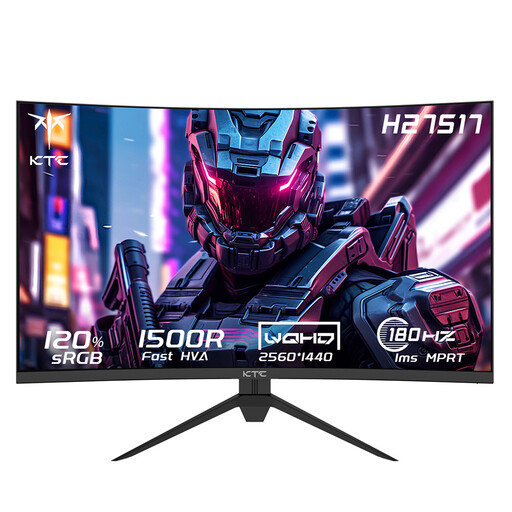 No image available
A curved 27-inch QHD monitor to consider if this size suits your desk or cockpit.
2560 × 1440; 180 Hz; HVA panel; 1500R curvature; HDMI 2.0 and DisplayPort 1.4.
 No image available
A 34-inch ultrawide to consider if your PC and rally game support the resolution and aspect ratio you want.
UWQHD 3440 × 1440; 144 Hz; VA panel; 1500R curvature; FreeSync.
 No image available
A curved 34-inch ultrawide to consider if you can fit its size and mounting requirements into your setup.
UWQHD 3440 × 1440; 165 Hz; VA panel; DisplayPort; VESA 75 × 75 mm.
No, you can plug your headphones into your gaming system instead. PlayStation explains how to set the output device and send audio to a compatible headset on the PS5. If you connect to a monitor, check separately whether its output also supports a microphone.
Use the 1440p output test in the PS5 video output settings. PlayStation lists options for 60 Hz, 120 Hz and VRR; 120 Hz also depends on the game supporting that output. A monitor’s higher Hz rating doesn’t mean the PS5 will deliver that refresh rate.
Measure the available width and depth, and allow for the space around the wheelbase. Then check the weight and mounting pattern of each screen, the stand’s load capacity and the available display outputs before aligning the screens.
According to ACM ConsuWijzer, online consumer purchases generally come with a cooling-off period of up to 14 days after delivery, subject to applicable exceptions. If a product breaks too soon under normal use, the seller is responsible for the statutory guarantee; this isn’t automatically limited to a fixed manufacturer’s warranty period.